Website SEO Checker
Enter a URL
About Website SEO Checker
ToolsPivot's Website SEO Checker is a free, no-signup online tool that audits any single URL against roughly 50 checks across 18 categories, then returns a scored, A-to-F report with a prioritized fix list. It covers on-page, technical, performance, content, and E-E-A-T signals, plus something most free auditors still skip: AI-search readiness for engines like ChatGPT, Perplexity, and Google AI Overviews. Run unlimited checks instantly, with no daily cap and no account.
What the Website SEO Checker Does
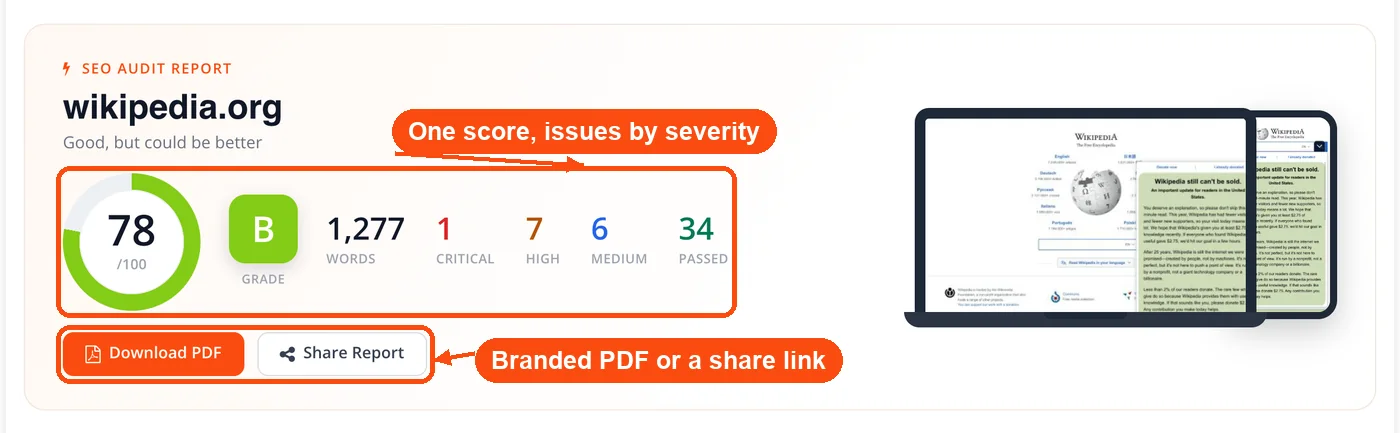
This SEO checker scans a URL and grades how well that page is set up to rank in both classic search and AI answer engines. You paste a web address, and ToolsPivot fetches the page once, caches it, then runs five independent analysis engines against that single copy so your server isn't hit repeatedly. The result is one reconciled report: an overall score, four category scores, a count of passed checks, and every issue sorted by impact.
Who it's for: SEO specialists, freelancers, agency teams, web developers, and content creators who need a fast, honest read on a page without buying a subscription or learning a crawler. It works on your own pages, a client's site, or a competitor's URL.
The problem it solves: Most free checkers either cap you at a few scans a day, hide the useful parts behind a login, or only look at Google-era signals while ignoring whether AI crawlers can even read your page. This free website SEO checker removes the cap, skips the login, and adds the AI layer, so a single scan tells you where you stand across every channel that sends traffic today.
Key Benefits of the Website SEO Checker
- Unlimited and free: No daily scan cap and no account. Audit as many URLs as you want, as often as you want.
- One scan, both search worlds: Classic SEO and AI-search readiness sit in a single report, so you don't run three separate tools to see the full picture.
- Real Core Web Vitals: It pulls genuine lab and field data from Google PageSpeed Insights instead of faking or skipping the speed score. For a deeper speed breakdown, pair it with the Page Speed Checker.
- Fixes ranked by impact: Every issue lands in an action plan ordered by priority, impact, and effort, so you know exactly what to do first.
- Per-image alt suggestions: The report names each image missing alt text and suggests a replacement, rather than only counting how many are wrong.
- Branded PDF and share link: Export a clean, branded PDF for clients, or copy a shareable report URL in one click.
- Reads well on mobile: The report is built for small screens, so you can audit a page from your phone.
What the SEO Audit Checks
The audit runs roughly 50 checks across 18 categories, grouped under the four scoring pillars plus a dedicated AI layer. Here is what each area covers.
- Indexability and crawlability: Index status, meta robots, canonical tags, HTTPS with a valid certificate, and domain canonicalization (whether http, www, and non-www all redirect to one host). It runs a soft-404 test and checks your robots.txt (build or fix one with the Robots.txt Generator), XML sitemap (create one with the Sitemap Generator), and llms.txt, showing the live URL for each.
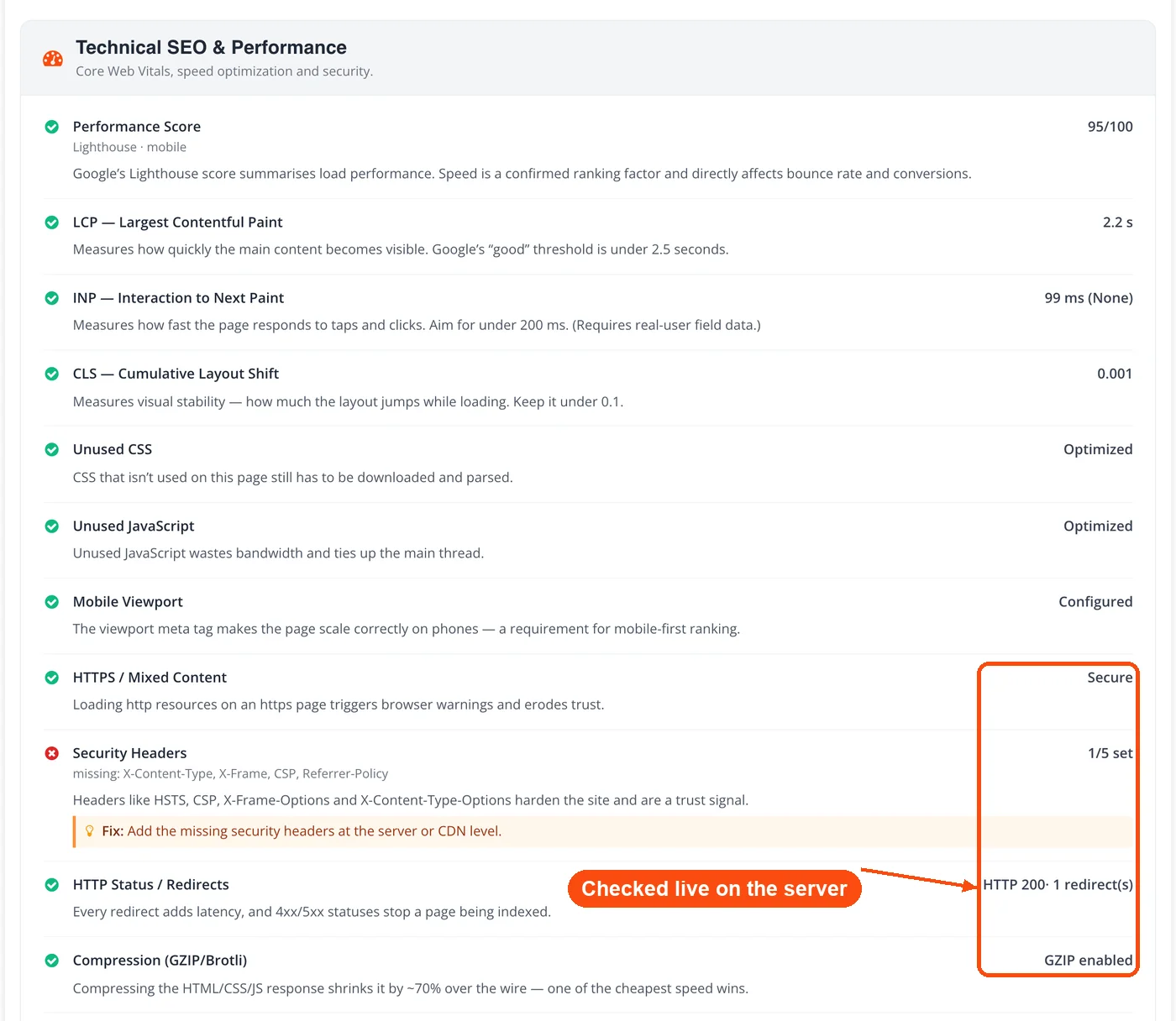
- Technical and performance: Mobile viewport, mixed content, security headers (HSTS, CSP, X-Frame-Options, and more), redirect chains, and GZIP or Brotli compression. Core Web Vitals (LCP, INP, CLS) and the Lighthouse score arrive with named opportunities like render-blocking resources, unused CSS or JS, and caching.
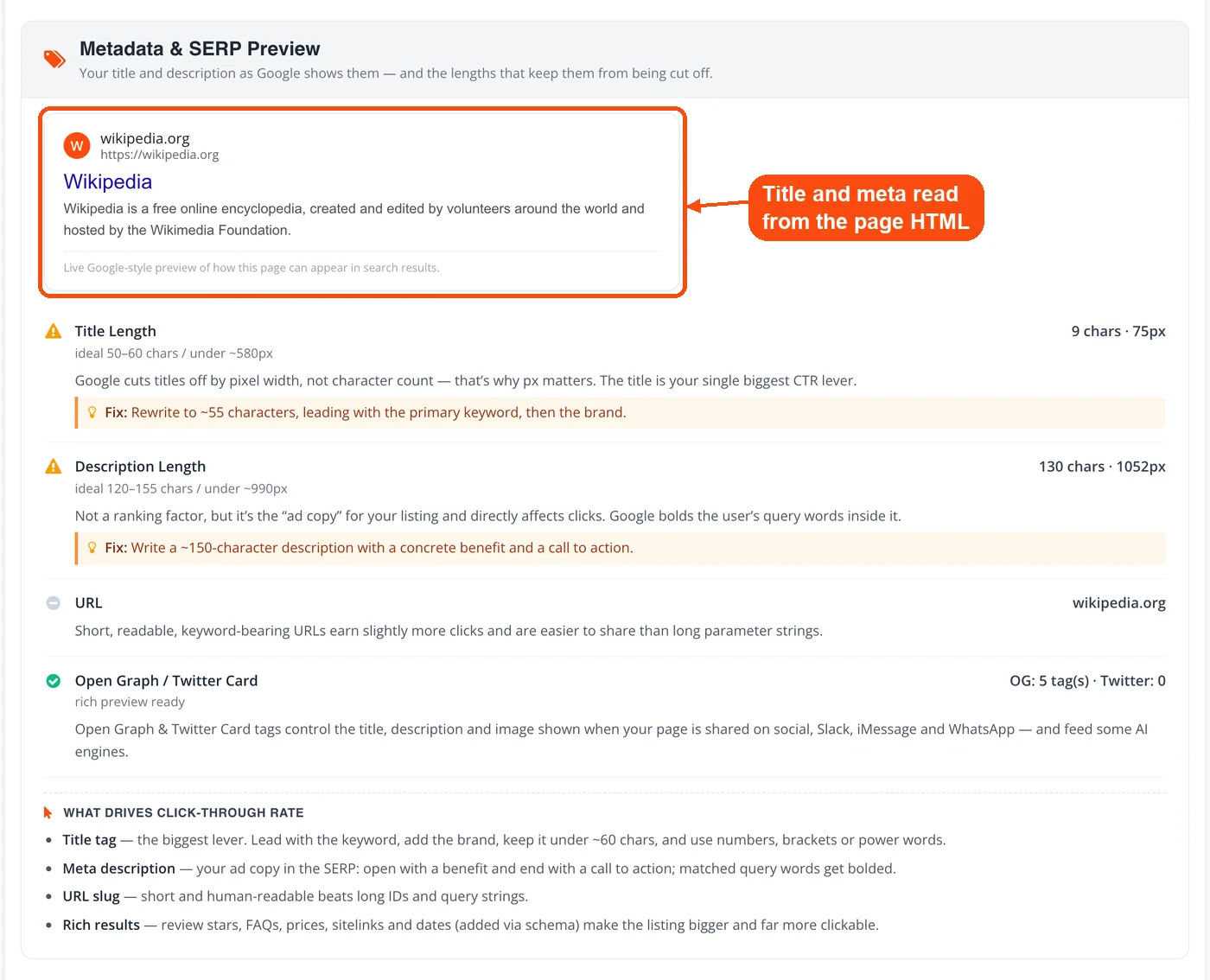
- Metadata and SERP preview: Title and description measured by both character count and pixel width, a live Google-style SERP preview, and Open Graph and Twitter Card tags. You get a clear read on what drives click-through, and you can inspect any page's tags in more detail with the Meta Tags Analyzer.
- Headings, keywords, and links: The full H1 to H6 outline (flagging multiple H1s, skipped levels, and empty headings), the auto-detected primary keyword with a density and stuffing flag (cross-check it in the Keyword Density Checker), and internal link volume with anchor-text quality. Failing links surface in a list you can pass straight to the Broken Link Checker.
- Content and E-E-A-T: Word count and depth, Flesch readability (test any text in the Readability Checker), content freshness from publish and updated dates, author bylines, trust pages like About and Contact, and authority citations to .gov, .edu, or Wikipedia sources.
- Images and accessibility: A per-image table listing each image's current alt text and a suggested fix, plus filename quality, next-gen format use, lazy loading, ARIA roles, and form labels.
- Structured data: Detected JSON-LD types with context-aware suggestions and a one-click option to generate the schema you're missing.
- AI SEO: An AI-readiness score covering crawler access, answer formatting, entity schema, and llms.txt, alongside international signals like the lang declaration and hreflang.
How the Website SEO Checker Works
When you submit a URL, ToolsPivot fetches the page HTML once and caches it, then runs five engines against that single copy. Here is the pipeline behind your report.
- Fetch and cache: The tool pulls the page HTML one time and stores it server-side, so every check reads the same copy and your site isn't hammered.
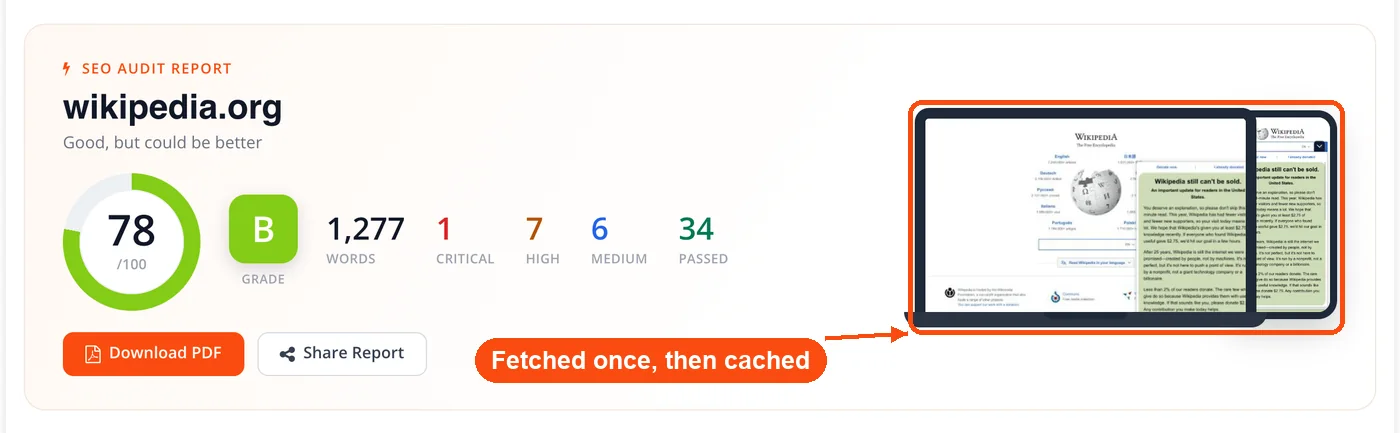
- Parse the page: A DOM parser extracts titles, meta tags, headings, content, links, images, schema, and language declarations.
- Probe the live server: Server-side requests verify the HTTPS certificate, security headers, redirect chain, compression, robots.txt, sitemap.xml, llms.txt, and domain canonicalization, then run the soft-404 test.
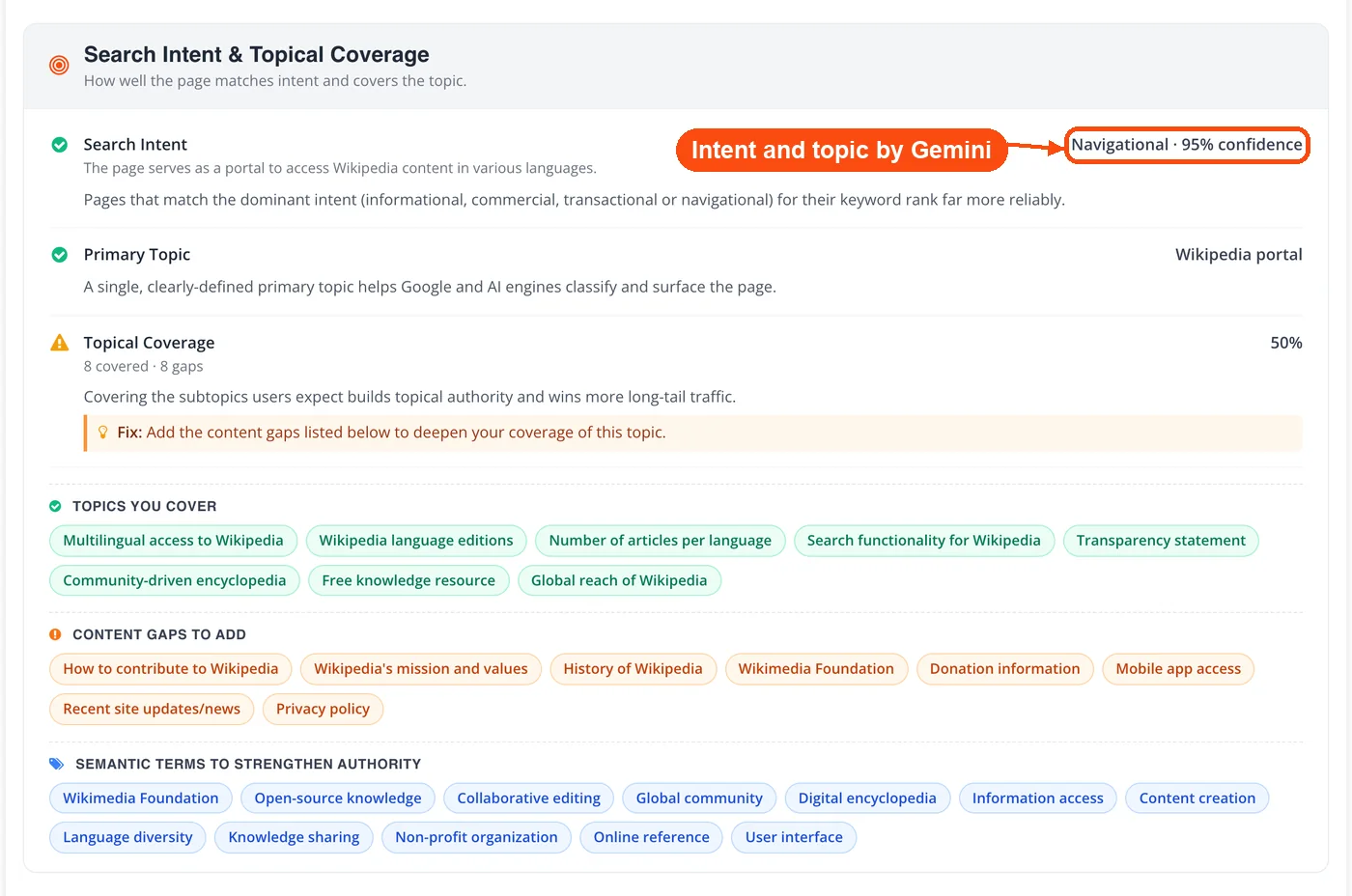
- Measure speed and meaning: Google PageSpeed Insights returns real Core Web Vitals (lab and field), Google Gemini classifies search intent, primary topic, topical coverage, and missing subtopics, and Open PageRank supplies a Domain Authority estimate.
- Score and render: Every signal feeds one reconciled checklist, scored pass, medium, high, or critical, and the report renders progressively as each engine returns. Download a branded PDF or copy a share link when you're done.
How Your SEO Score Is Calculated
Your overall score is a weighted average of four pillars, mapped to a letter grade from A to F. Each check is marked pass, medium, high, or critical, and those statuses roll up so the numbers always reconcile: passed plus critical plus high plus medium equals the total checks run.
The four pillars and their weights:
- Technical (30%): crawlability, indexing, HTTPS, redirects, compression, security headers.
- Content (28%): depth, readability, freshness, keyword use, topical coverage.
- UX (27%): Core Web Vitals, mobile readiness, layout stability.
- AI SEO (15%): crawler access, answer formatting, entity schema, llms.txt.
How to read the number: A score of 90 to 100 (grade A) means the page is in strong shape. 70 to 89 is a solid foundation with room to improve. 50 to 69 signals real gaps worth fixing soon. Below 50 usually points to blocking issues, like a missing title or a robots.txt error, that stop search engines and AI crawlers from reading the page at all.
A high score isn't a ranking guarantee, and we are upfront about that. It tells you the page is technically and editorially sound. Where it lands in results still depends on content quality, the strength of your link profile (gauge it with the Domain Authority Checker and Page Authority Checker), and how tough the competition is for your terms.
AI Search Readiness: AEO, GEO, and LLMO
The Website SEO Checker scores how likely your page is to be read and cited by AI answer engines, not just ranked by Google. This is the part most free auditors still don't check. AI search readiness covers Answer Engine Optimization (AEO), Generative Engine Optimization (GEO), and large language model optimization (LLMO), three overlapping disciplines that decide whether ChatGPT, Perplexity, Claude, and Google AI Overviews can find and quote you.
The audit checks four things that gate AI visibility:
- Crawler access: Whether your robots.txt allows AI bots like GPTBot, ClaudeBot, PerplexityBot, OAI-SearchBot, and Google-Extended. If these are blocked, your content can't appear in those tools' answers no matter how good it is.
- An llms.txt file: Whether you publish an llms.txt index that points AI systems to your priority pages. If it's missing, build one with the llms.txt Generator.
- Answer-shaped content: Whether the page uses the formats AI engines extract from, such as FAQ blocks, lists, tables, and question-style headings.
- Entity and schema clarity: Whether structured data and clear entity terms make the page easy to parse and attribute.
For a deeper, query-level look at how AI engines see your whole site, run it through the GEO Audit, our free AI SEO audit tool, which goes past on-page signals into prompt-level visibility.
When to Check Website SEO
Run a website SEO audit whenever something on the page or site changes, and on a regular cadence even when nothing does. A scan takes under a minute, so it's cheap insurance against silent ranking losses.
Specific moments worth a check:
- Before publishing: Catch missing meta tags, thin content, or a stray second H1 before Google indexes the page.
- After a redesign or migration: These quietly introduce redirect chains, broken canonicals, and robots.txt mistakes. Audit right after launch.
- When rankings slip: A sudden drop often traces back to a technical break the audit surfaces fast.
- During competitor research: Scan a rival's URL to see where they are stronger and where you can close the gap.
- On a monthly schedule: Monthly checks catch most issues before they compound; weekly spot checks suit sites publishing daily.
- Before pitching a client: A baseline audit shows prospects exactly what needs work.
The one case where a single-page scan won't be enough is diagnosing site-wide patterns across hundreds of URLs. For that you would want a full crawler, though the audit is still the fastest way to read any one page.
Who Uses the Website SEO Checker
The Website SEO Checker fits four groups especially well, each with a different workflow.
Freelancers and small business owners usually build on WordPress, Shopify, or Wix without ever opening the SEO settings. A first audit commonly surfaces 10 to 15 fixable issues: product pages with no meta description, images bloating load time, a missing alt attribute here and there. Compressing those images with the Image Compressor and writing real meta tags often moves a page up a full results page on its own.
Marketing agencies run the checker during onboarding to build a baseline. Audit the homepage, the top three service pages, and the blog index, then present a prioritized fix list in the first meeting. To prove the work later, track positions with the Keyword Rank Checker before and after each fix.
Web developers should audit after every major change: a CMS migration, a redesign, or a new feature. Redirect chains, dropped canonicals, and broken robots.txt rules are easy to ship and hard to catch by eye. The checker flags them in seconds, and its external-links view pairs well with the Backlink Checker when you are auditing link equity after a move.
Content creators and bloggers check posts before and after publishing. The audit catches duplicate titles across articles, keyword stuffing, weak readability, and the AI-readiness gaps that keep a post out of AI answers. Fixing the metadata before indexing, with help from the Meta Tag Generator, gives the post a head start.
What the SEO Checker Can't Do
No single-page auditor can predict your rankings, and this one doesn't pretend to. Being clear about the edges of the tool is part of using it well.
- It scores one URL at a time. This is a page-level audit, not a full-site crawler, so it won't map site-wide duplicate content or orphan pages across hundreds of URLs.
- It reads the HTML the server returns. Content injected by client-side JavaScript after load may be under-counted, which is, usefully, close to how many AI crawlers read a page too.
- Domain Authority is a third-party estimate. The authority figure comes from an external API and approximates off-page strength; it isn't a Google metric.
- AI topical analysis is directional. The intent and content-gap read is generated by an AI model to guide editing, not to hand you guaranteed keywords.
- A perfect score won't out-rank better content. The audit removes technical and on-page barriers. Winning the SERP still takes strong content, real authority, and time.
Frequently Asked Questions
A website SEO checker scans a single URL and grades the on-page, technical, content, and AI-search signals that affect where the page ranks. It returns an overall score, category scores, and a list of issues sorted by impact, each with a recommended fix.
Yes. ToolsPivot's Website SEO Checker is free with no daily scan limit and no signup or credit card. There are no paywalled checks or hidden upgrade prompts.
A score of 90 to 100 is strong, 70 to 89 is a solid base with room to improve, and 50 to 69 means real gaps to fix. Anything below 50 usually points to blocking issues that stop search engines or AI crawlers from reading the page.
It audits AI-search readiness alongside classic SEO, which most free tools skip. The same scan tells you whether AI crawlers can reach your page, whether you have an llms.txt file, and whether your content is formatted for AI answers.
Yes. The audit reads your robots.txt to see whether AI crawlers like GPTBot, ClaudeBot, and PerplexityBot are allowed or blocked. Blocked bots mean your content can't appear in those tools' answers.
Monthly audits catch most issues before they compound. Check individual pages after content edits or design changes, and run weekly spot checks if you publish daily.
Yes. Enter any public URL to see its score and issue breakdown. Comparing a rival's report against yours shows exactly where they have an edge.
Each tool checks a different number of signals and weights them differently. A page scoring 72 in one tool can score 85 in another, so focus on fixing the issues each one flags rather than chasing a single number.
Yes. It pulls real Largest Contentful Paint, Interaction to Next Paint, and Cumulative Layout Shift data from Google PageSpeed Insights, including both lab and real-user field measurements.
Yes. The checker analyzes the rendered HTML of any public page, so it works on WordPress, Shopify, Wix, Squarespace, and custom-built sites alike.
Google Search Console reports performance data only for sites you own and verify. This online website SEO checker scans any public URL instantly without verification, which makes it faster for one-off audits and competitor analysis.
No tool can guarantee rankings. Fixing audit issues removes the technical and on-page barriers that hold a page back, but final position still depends on content quality, backlink strength, and competition.


