Credit Card Generator
This credit card generator creates Luhn-valid test card numbers for checking payment forms and checkout flows. Fake numbers for developers and QA, with no account behind them, so they cannot be charged.
Official sandbox test cards
Generic generated numbers are rejected by real payment sandboxes. To test Stripe, PayPal and others, use their own published test cards below.
Is this legal? Will these work?
Yes, it is legal: generating test card numbers is standard practice, and processors like Stripe and PayPal publish their own. No, you cannot buy anything: these numbers pass the Luhn checksum but have no real account behind them, so any real charge is declined. Everything runs in your browser; nothing is sent to us or stored.
About Credit Card Generator
A credit card generator produces Luhn-valid test card numbers that pass a payment form's checksum but cannot be charged, because no bank account sits behind them. Developers and QA engineers use it to test checkout flows, decline logic, and error handling without touching real card data, which keeps sensitive information out of staging environments entirely. The ToolsPivot generator builds full test records across every major scheme, in bulk, with framework-ready exports and a built-in reference of the official processor sandbox cards.
What the Credit Card Generator Does
This fake credit card generator creates synthetic card records for software testing, each with a valid scheme prefix, a correct Mod-10 check digit, a brand-appropriate CVV, and a future expiry date. Every number follows the same structural rules a real card uses under the ISO/IEC 7812 standard, so payment forms accept it during validation, yet the output carries no balance and will be declined by any live processor. Use it as a credit card generator with address details: attach a cardholder name and billing address to build a complete test row, or keep the output to bare numbers for quick checks.
As a test credit card generator, the tool exists to solve one specific problem: testing payment code safely. Using real card numbers in a non-production environment is one of the fastest ways to create a compliance and privacy exposure, and it is prohibited under most processor agreements. Replacing that data with generated numbers removes the risk while giving QA teams enough variety to build a realistic test matrix. When a form needs matching supporting data, pairing this tool with the fake address generator produces coherent billing details for the same test record.
Primary users are payment-gateway developers wiring up Stripe, PayPal, Braintree, or Razorpay integrations; QA engineers validating transaction flows and receipt formatting; and product teams building demos where a real card number on screen would be a liability. Anyone testing an e-commerce checkout, a subscription billing flow, or a mobile payment sheet needs card data that behaves correctly without being real.
Benefits of a Fake Credit Card Generator for Testing
No real card data in testing. Generated numbers keep genuine payment information out of your staging, development, and demo environments, which shrinks your PCI DSS exposure to almost nothing.
Correct scheme behavior. Each number carries the right prefix, length, and check digit for its brand, so your form's brand detection and validation logic behave exactly as they would in production.
Bulk test matrices in seconds. Generate up to 100 de-duplicated records at once instead of hand-typing test data, which turns a tedious setup step into a single click.
Error-path coverage. A dedicated invalid-card mode produces deliberately broken records so you can test how your form handles expired dates, failing checksums, and malformed input.
Framework-ready output. Export batches as ready-to-paste fixtures for Playwright, Cypress, or Selenium, so test data drops straight into your automated suite.
Honest, chargeable-free by design. Every number is Luhn-valid but non-functional, and the entire process runs in your browser, so nothing is generated on or sent to a server. It is also a free credit card generator, with no account or sign-up needed.
Core Features
Full scheme coverage. Generate cards for Visa, Mastercard including the 2-series range, American Express, Discover, JCB, Diners, UnionPay, RuPay, Maestro, and Verve, or use it as a random credit card generator that mixes brands in one batch.
Complete test records. Attach a brand-correct CVV, which is four digits for Amex and three for everything else, plus a future expiry, cardholder name, and billing address.
Bulk generation with de-duplication. Use it as a bulk credit card generator: produce 1 to 100 numbers in a single batch, automatically de-duplicated so no value repeats within the set.
Custom BIN prefixes. Use it as a BIN credit card generator: enter any issuer prefix and the tool auto-completes the remaining digits, then detects the scheme back from the finished number.
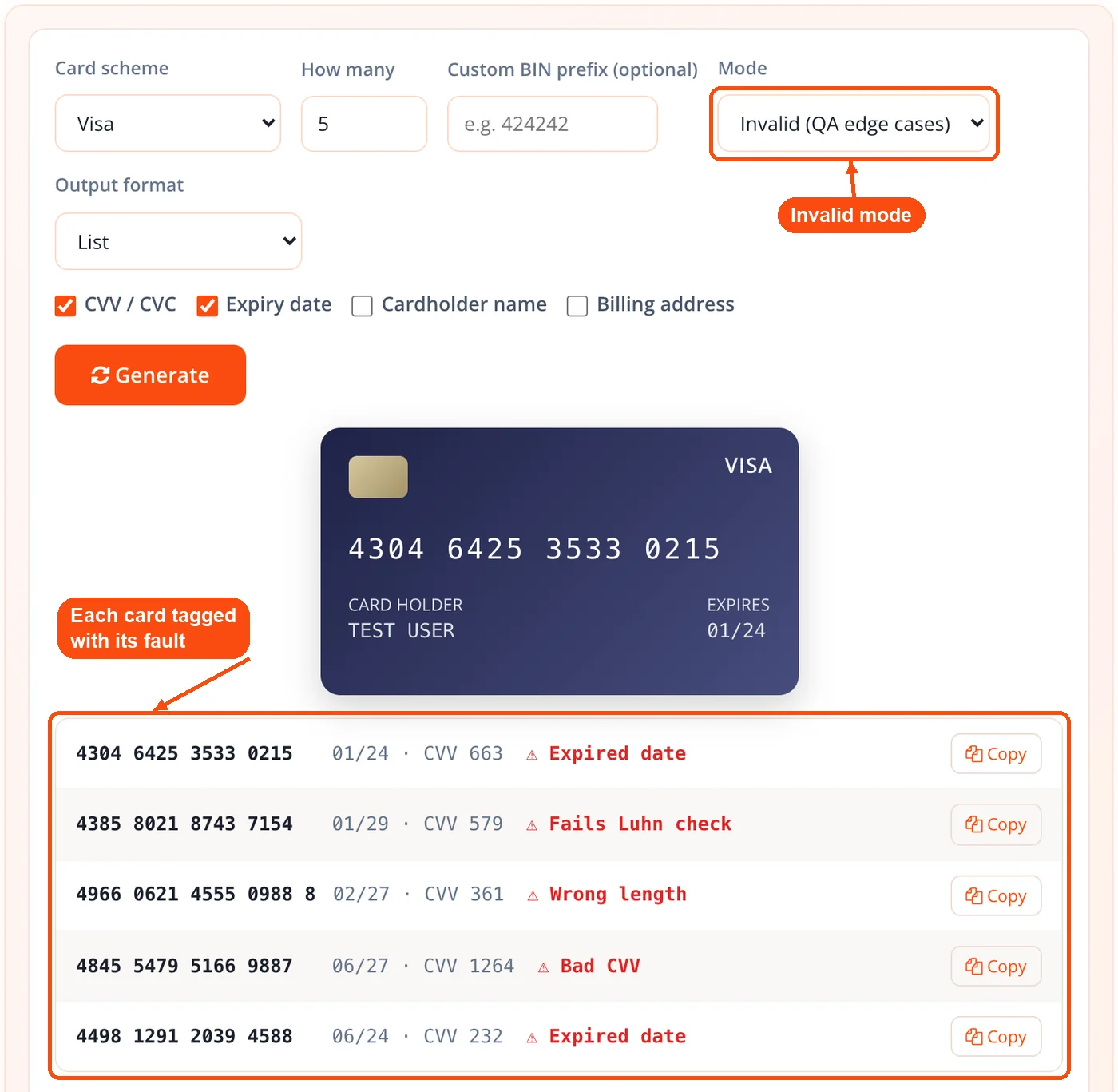
QA invalid-card mode. Instead of valid cards, produce ones that are deliberately broken by expired date, failing Luhn, wrong length, or bad CVV, each tagged with its specific issue.
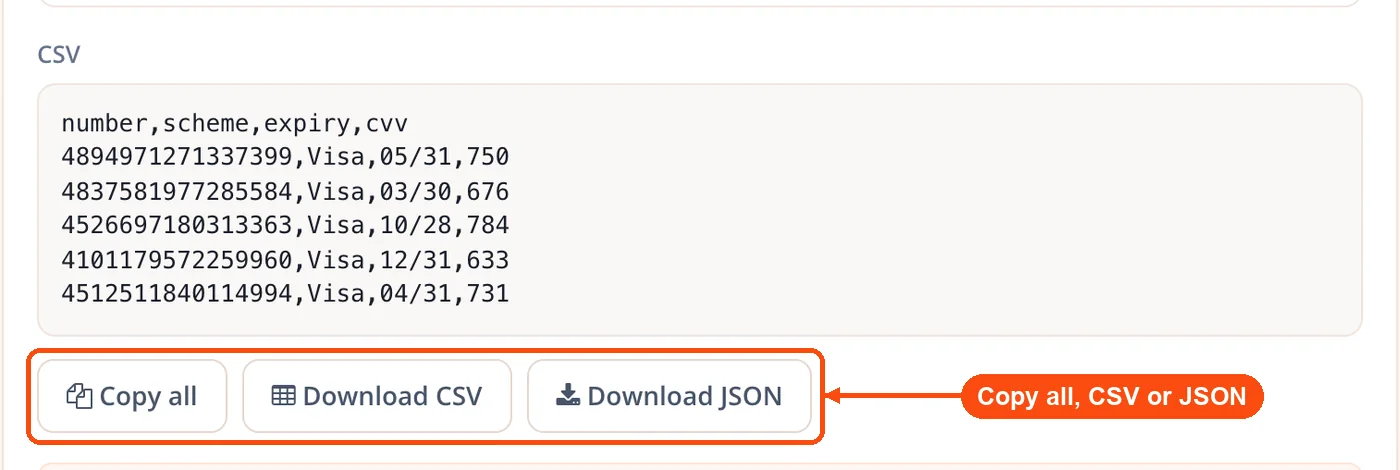
Six export formats. Copy or download results as List, CSV, JSON, Pipe, Playwright or Cypress fixtures, or Selenium Python, adapting to your data pipeline. Exported CSV batches feed cleanly into the CSV to JSON converter when your test harness expects structured objects.
Official sandbox reference. A separate panel lists the published test cards for Stripe, PayPal, Adyen, and Square with copy buttons, because generic generated numbers are rejected by those sandboxes.
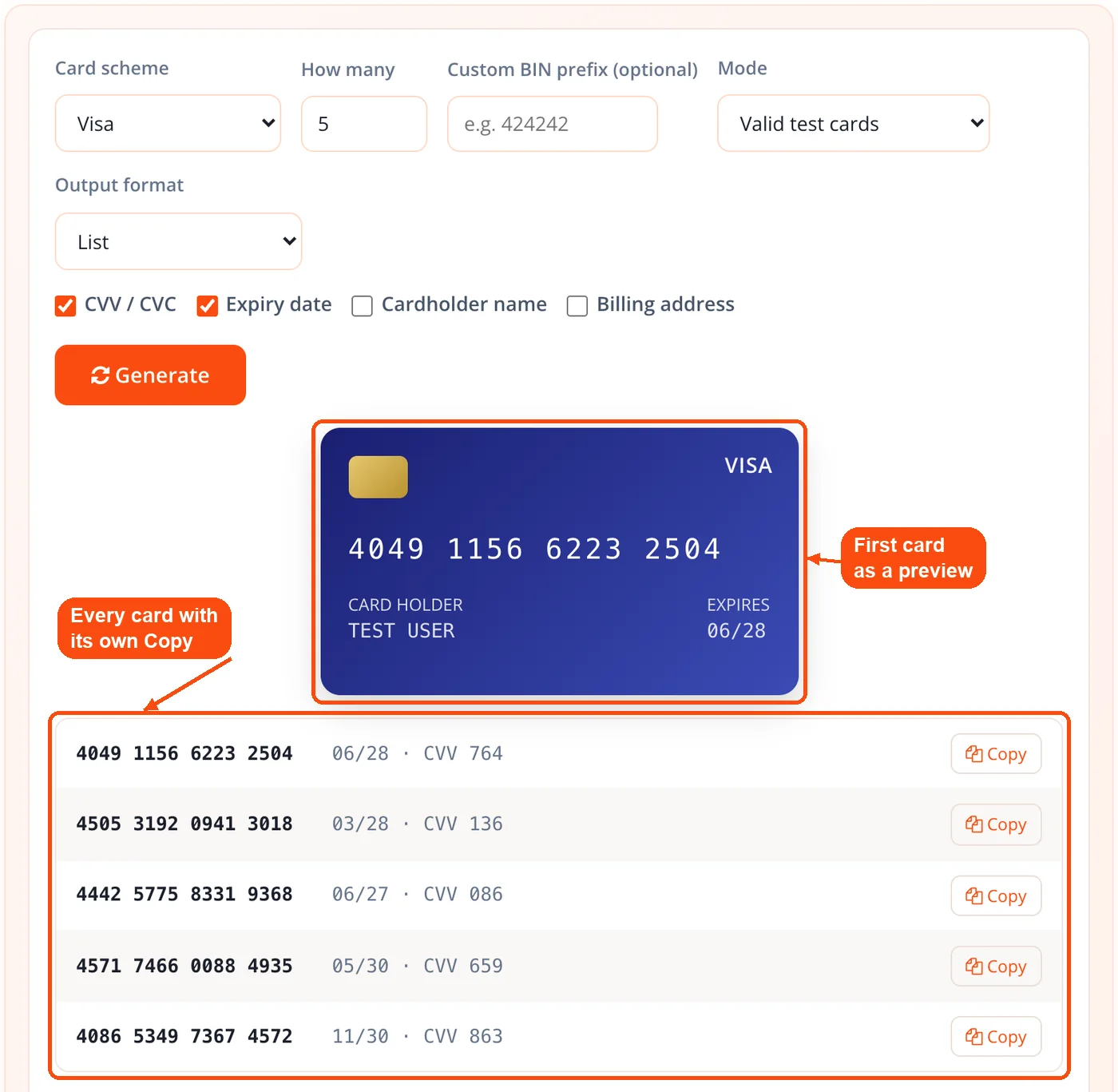
Brand-colored card preview. The first result renders as a visual card so you can confirm the scheme and formatting at a glance before exporting the batch.
Per-card and batch copy. Copy any single record from the results list, or copy the whole formatted set at once, with a download option for larger batches.
How ToolsPivot Credit Card Generator Works
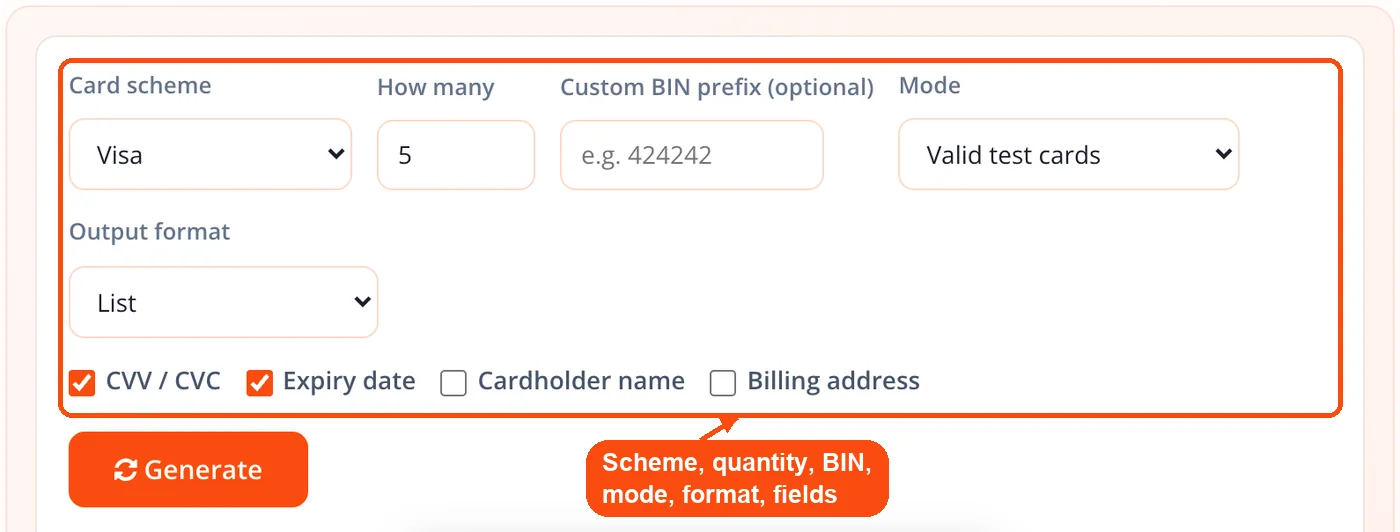
- Choose your scheme or a random mix, set a quantity from 1 to 100, pick which fields to include, add an optional custom BIN prefix, and select an output format.
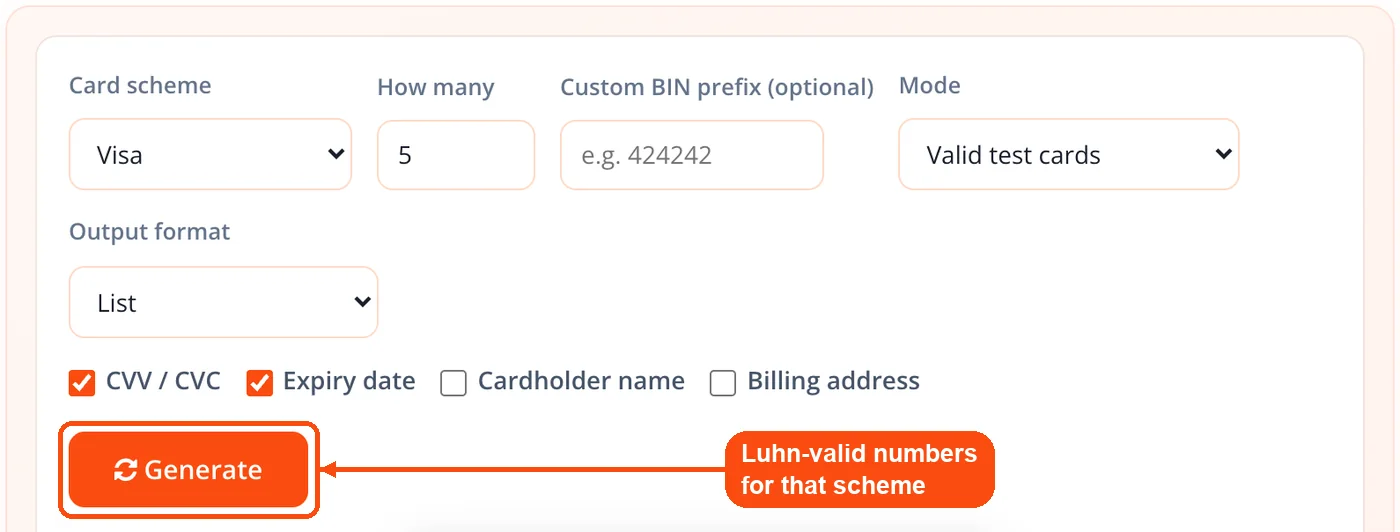
- Click generate. For each card, the tool fills a valid scheme prefix with random digits and computes the final Luhn check digit, regenerating until the number detects back to the requested scheme.
- Review the results. The first card appears as a brand-colored preview, and the full batch shows in a results list with per-card copy buttons.
- Switch to invalid-card mode if you need broken records, and the tool produces tagged failures for error-handling tests instead of valid numbers.
- Export the set in your chosen format, copy everything at once, or download the file for your test suite.
When to Use the Credit Card Generator
Reach for a credit card generator whenever your code needs to touch card data but must never touch a real card. It fits any point in the development cycle where a checkout, billing flow, or card-input field has to be exercised repeatedly and safely.
Building a payment integration. Wiring up a new gateway means running dozens of test transactions before going live, and generated numbers give you that volume instantly.
Validating form logic. Test that brand detection, field masking, and length rules fire correctly for Visa, Amex, and every other scheme your form claims to support.
Testing decline and error paths. Use the invalid-card mode to confirm your form shows the right message for an expired date or a failing checksum, not a generic crash.
Seeding automated test suites. Drop framework-ready exports into Playwright, Cypress, or Selenium runs so your regression tests always have fresh, valid card data.
Preparing client demos. Populate a checkout screen with realistic data for a sales call without ever displaying a genuine card number.
Testing Indian payment rails. Generate RuPay records when your gateway serves Indian customers, and pair the flow with the UPI QR code generator when you are also testing UPI acceptance or the IFSC code finder for bank-detail fields.
One caveat worth stating up front: these numbers work for form and format validation, not for end-to-end processing. If you need a full transaction to clear a sandbox, you must use the processor's own test cards, which is exactly why that reference is built into the tool.
How Teams Use It
QA Regression Suite
Context: A QA engineer maintains an automated checkout test that runs on every deploy. Process:
- Generate 50 mixed-scheme records and export them as a Selenium Python fixture.
- Drop the fixture into the regression suite as reusable test data.
- Pair the cards with throwaway logins from the password generator to cover the full account-creation flow. Result: Every deploy now tests both the happy path and the failure paths with fresh, valid data and zero real card exposure.
Payment Gateway Integration
Context: A developer is integrating a new processor into an existing store. Process:
- Generate Visa, Mastercard, and Amex records to test each brand's field rules.
- Confirm the form's brand detection and CVV length logic with each scheme.
- Copy the official Stripe sandbox cards from the reference panel for the live end-to-end test. Result: Form-level validation is verified with generated numbers, then processing is confirmed with the processor's real test cards.
Frontend Form Development
Context: A frontend developer is building a card-input component from scratch. Process:
- Generate a small batch and watch the brand-colored preview to confirm formatting.
- Test the component against multiple schemes and a custom BIN prefix.
- Fill supporting fields on the checkout page with the Lorem Ipsum generator and placeholder art from the dummy image generator. Result: The component ships with confirmed formatting and validation behavior across every scheme it supports.
Bulk Test-Data Preparation
Context: A team needs a large, clean dataset for load-testing a billing pipeline. Process:
- Generate 100 records, automatically de-duplicated, and export as CSV.
- Clean any leftover list with the remove duplicate lines utility.
- Validate the finished set by running numbers through the credit card validator. Result: A verified, duplicate-free test dataset feeds the load test without a single real account involved.
Official Sandbox Cards vs Generated Numbers
Generated numbers and official sandbox cards solve two different problems, and confusing them is the most common testing mistake. A generated number passes the client-side checks a browser form runs, so it is right for testing field validation, brand detection, and error display. It will not clear a processor's sandbox, because Stripe, PayPal, Adyen, and Square only accept their own designated test numbers for simulated transactions.
That is why the ToolsPivot generator embeds the official sandbox reference alongside the generator itself. When you need a form to accept input, you generate; when you need a transaction to actually complete in a test environment, you copy the processor's published card. Most free generators leave you to hunt through separate documentation pages for those numbers, which is where the built-in panel saves real time.
Key points:
- Generated numbers: Pass Luhn and format checks; use for form and field validation.
- Sandbox cards: Provided by each processor; use for end-to-end transaction tests.
- The rule of thumb: If money would move in production, you need a sandbox card, not a generated one.
Valid and Invalid Test Cards Explained
Most generators only produce valid cards, but thorough testing also needs cards that fail on purpose. A valid test card lets you confirm the happy path works; an invalid one confirms your error handling works, which is where production bugs usually hide. The invalid-card mode produces four distinct failure types so you can test each branch of your validation logic.
An expired card checks that your date validation rejects past expiries with a clear message. A failing-Luhn number checks that your checksum validation catches typos before they reach the processor. A wrong-length number checks that your field-length rules hold, and a bad CVV checks that security-code validation fires correctly. Each broken record is tagged with its specific issue, so you always know which failure you are testing.
Building both sets of data by hand is slow and error-prone. Generating them means your test matrix covers the full range your production system actually sees, from a clean Visa to a mistyped Amex, without you constructing a single broken number manually. For the same checkout, you can also validate the test email addresses your form collects with the bulk email validator.
Honest Limitations
Generated numbers are for testing only, and there are real constraints worth stating plainly rather than glossing over.
They cannot be charged. No account, balance, or credit line sits behind any number, so no transaction will ever process. This is by design, not a shortcoming, and any tool promising otherwise is describing fraud.
They will not clear a real sandbox. Payment processors reject generic generated numbers in their test environments. For end-to-end sandbox testing you must use the official test cards, which is why that reference is included.
BIN metadata describes ranges, not accounts. A custom BIN completes to a structurally valid number and detects to a scheme, but the prefix only identifies an issuer range. It does not connect to a specific real card.
Format validity is not fraud protection. A number passing the Luhn check confirms structural correctness only. It says nothing about whether a real card is active, funded, or authorized, so this tool is not a verification service.
Using generated card numbers to attempt real purchases, bypass paid trials, or deceive a merchant is fraud and often a crime. This tool is built for legitimate software testing, and its output is deliberately non-functional for anything else. Before deploying payment code, you can also confirm the wider page setup is sound by encoding test payloads through the URL encoder and decoder and hashing any test tokens with the MD5 hash generator.
Frequently Asked Questions
No, they are synthetic test numbers not connected to any bank or account. Each one is Luhn-valid so it passes format checks, but no balance sits behind it and no transaction can be charged.
No, generated numbers will be declined by every live payment processor. They exist only to test payment forms and checkout code, and using one to attempt a purchase is fraud.
Processor sandboxes only accept their own designated test cards, not generic generated numbers. For end-to-end sandbox testing, copy the official Stripe, PayPal, Adyen, or Square cards from the built-in reference panel.
The Luhn algorithm, also called Mod 10, is a checksum formula that validates card number structure. It is the same check real payment forms run, which is why Luhn-valid test numbers pass client-side validation.
You can generate 1 to 100 cards per batch, automatically de-duplicated so no number repeats within the set. Export the full batch as a file or copy it all at once.
Yes, the invalid-card mode produces deliberately broken records for error-handling tests. Each one fails through an expired date, failing Luhn, wrong length, or bad CVV, and is tagged with its specific issue.
The generator covers Visa, Mastercard including the 2-series, American Express, Discover, JCB, Diners, UnionPay, RuPay, Maestro, and Verve. You can pick one scheme, for example to use it as a Visa credit card generator, or request a random mix across brands.
Yes, enter any issuer prefix and the tool auto-completes the remaining digits and detects the scheme. This is useful when you need numbers that match a specific issuer range for testing.
Results export as List, CSV, JSON, Pipe, Playwright or Cypress fixtures, or Selenium Python. The framework formats drop straight into an automated test suite without reformatting.
No, the entire process runs in your browser and nothing is generated on or transmitted to a server. Your test data stays on your device for the duration of the session.
Yes, generating Luhn-valid numbers for software testing, QA, and education is legitimate and standard practice. The numbers are non-functional, so they carry no financial value and cannot be used for real transactions. Generated numbers only work where a format check is the test, such as form validation and Luhn checks; Stripe, PayPal and every live processor decline them.
Yes, each record can include a brand-correct CVV, four digits for Amex and three otherwise, plus a future expiry date. You can also add a cardholder name and billing address to build a complete test row.


