AI Meta Description Generator
5 SEO-optimized descriptions with character count, keyword analysis, CTA detection, and a Google SERP preview combined with your title.
Your 5 Description Variants
Page title will appear here
Click any description above to preview it here
About AI Meta Description Generator
An AI meta description generator is an online tool that uses artificial intelligence to write search-engine-ready meta descriptions based on your page topic, target keywords, and preferred tone. ToolsPivot's version is a free SEO meta description generator that writes 5 variants at once and lets you pick the target length, one of five tones, one of six audiences and a call-to-action verb, all without creating an account.
Meta descriptions sit below your page title in Google's search results. They don't directly affect rankings, but they shape whether someone clicks your link or scrolls past it. A well-written description can lift click-through rates by 5-10%, which adds up fast across hundreds of pages. The problem? Writing unique, compelling descriptions for every page on a site is tedious. That's exactly the kind of repetitive task AI handles well.
How to Use ToolsPivot's AI Meta Description Generator
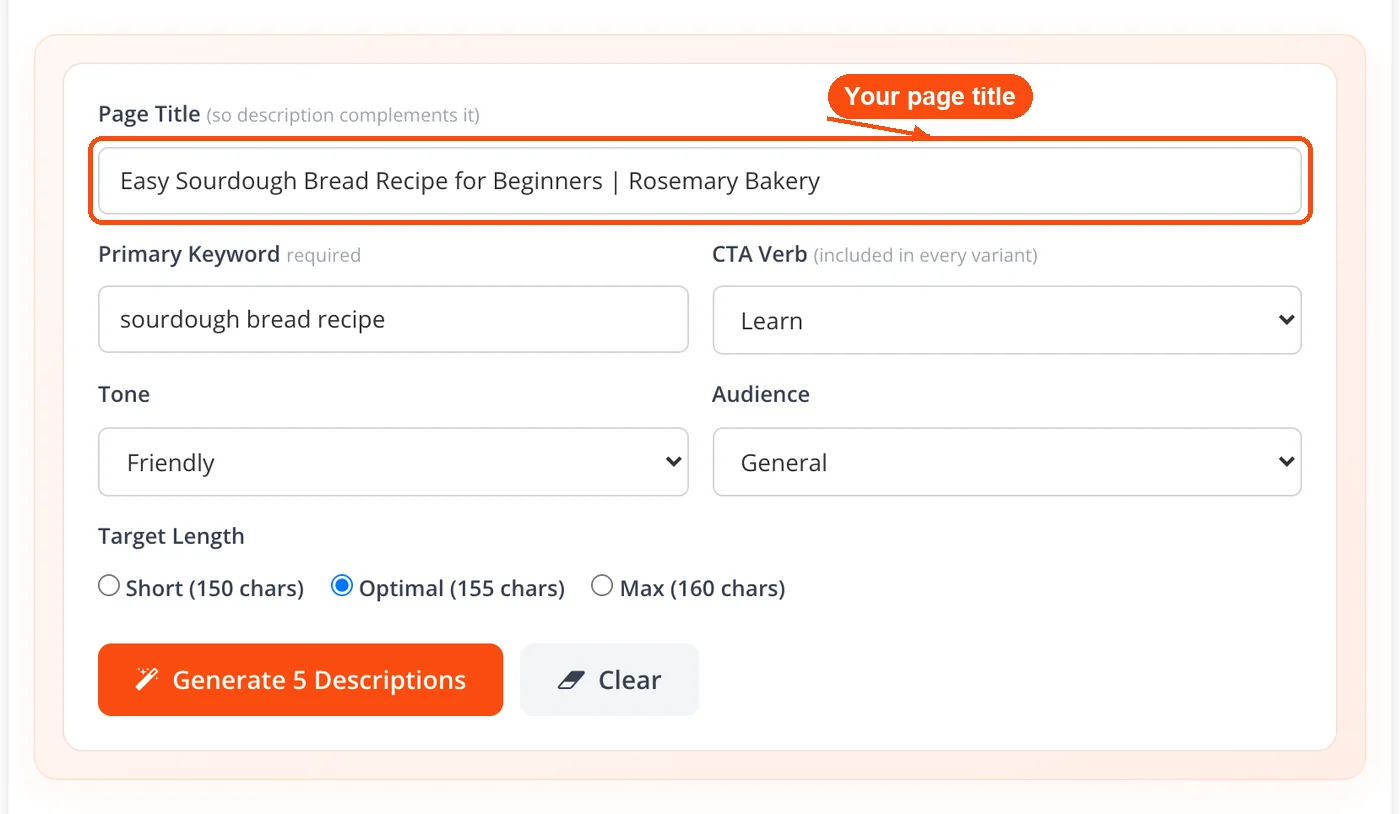
Enter your page title: Type your blog post title, product name, or page headline into the "Page Title" field so the description complements it. The more specific you are, the better the output.
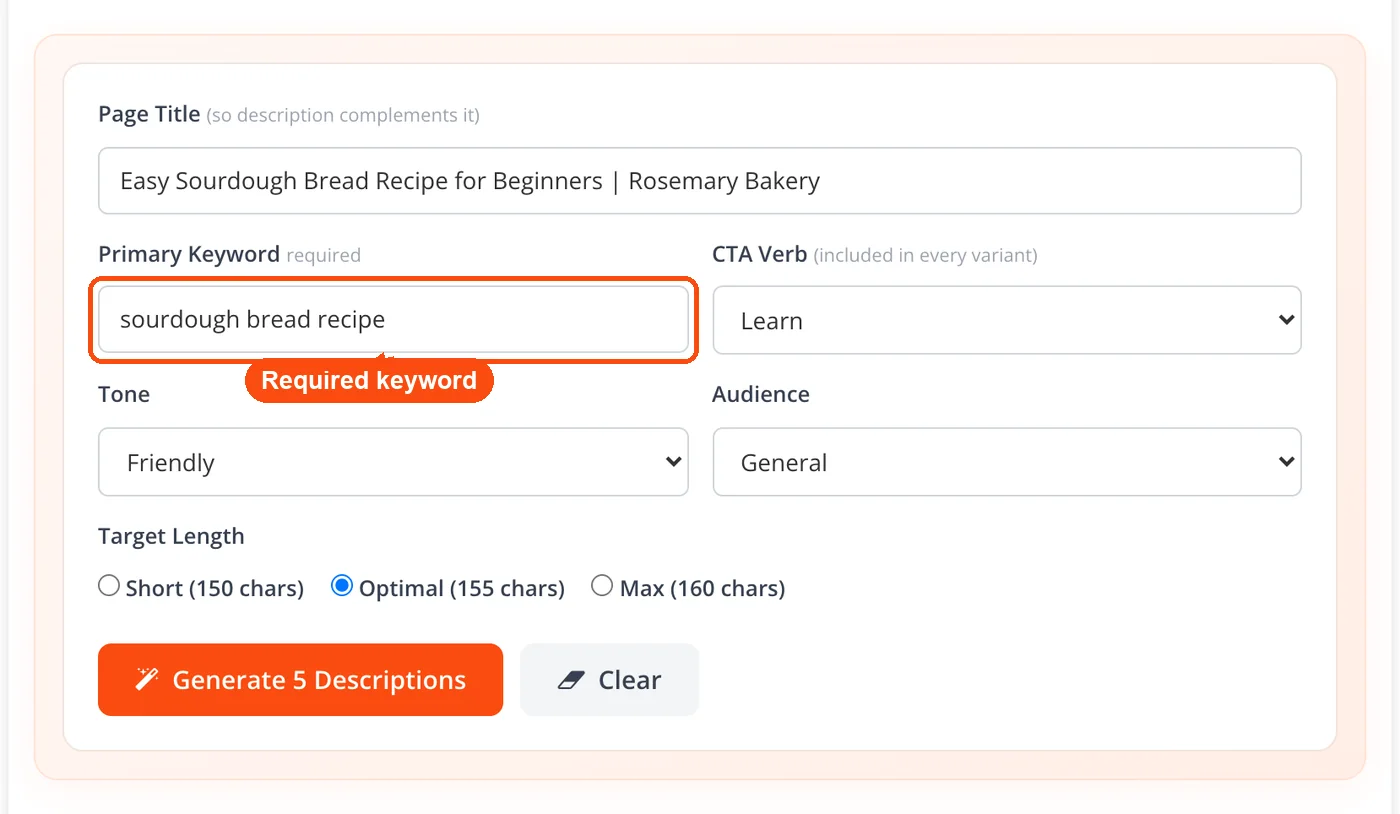
Add your primary keyword: Type the keyword you want the page to rank for into the "Primary Keyword" field. It is required, and every description is built around it.
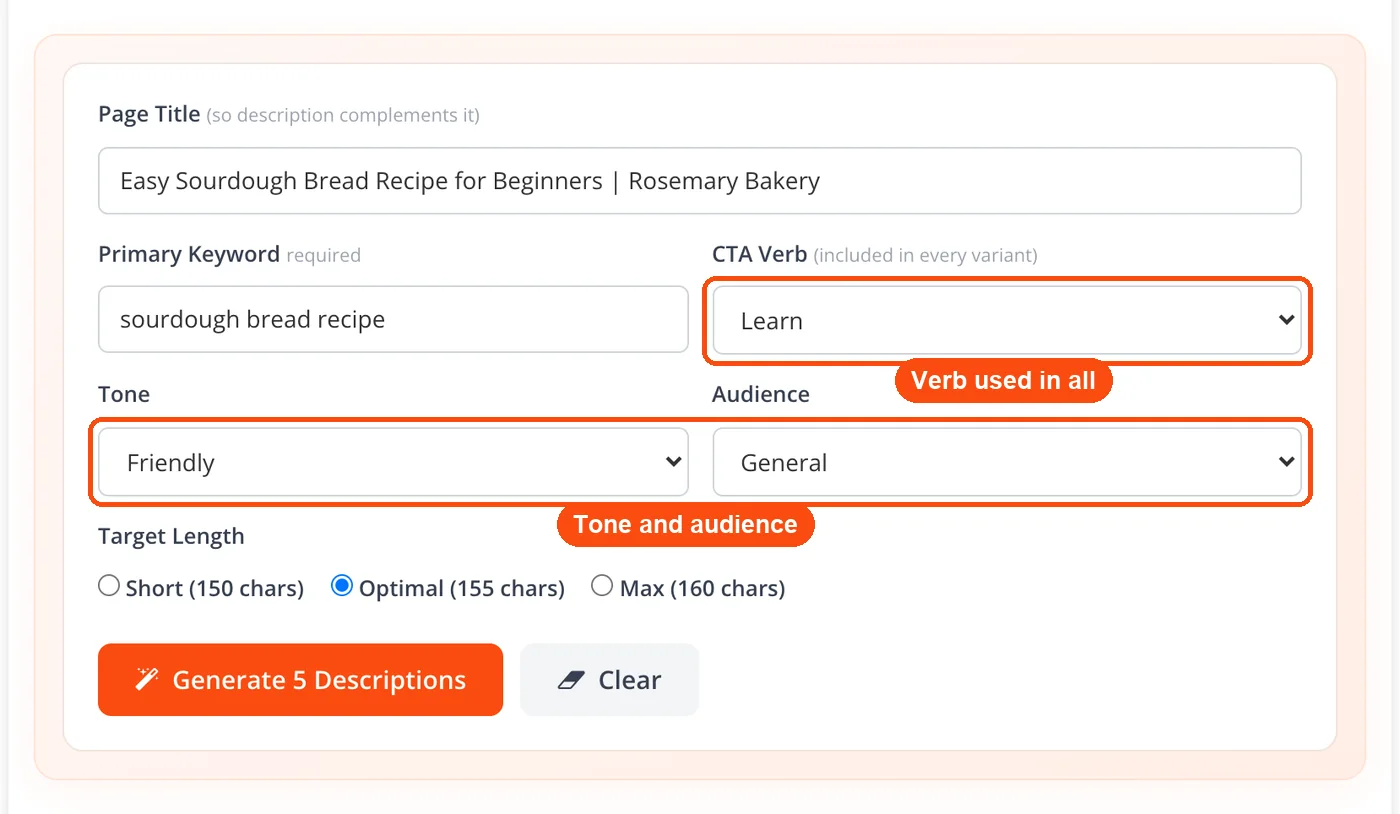
Pick your CTA, tone and audience: Choose a call-to-action verb that goes into every variant (Learn, Get, Try, Download, Discover, Read, Save, Compare, or Start), one of five tones (Authoritative, Friendly, Urgent, Casual, Professional), and an audience (General, Business owners, Marketers, Developers, Students, Writers). These settings shape the vocabulary and style of the output.
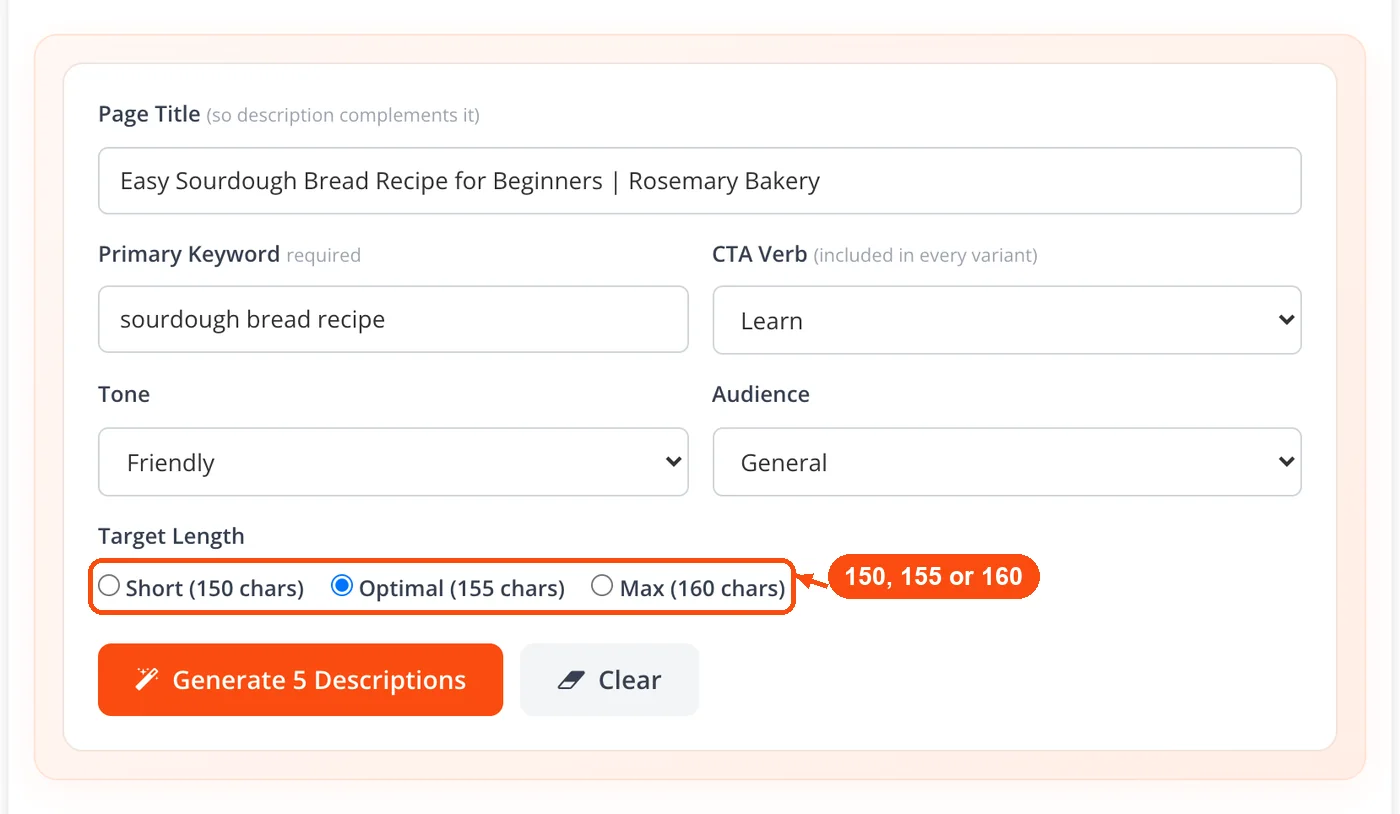
Set the target length: Choose Short (150 characters), Optimal (155), or Max (160). For Google snippets, 150 to 160 characters is the sweet spot.
Click Generate and review: Hit "Generate 5 Descriptions." Each variant shows its length, keyword use, CTA, and a CTR score, and the strongest one is marked. Click "Preview in SERP" to see it under your title in a Google preview, or Copy to grab it.
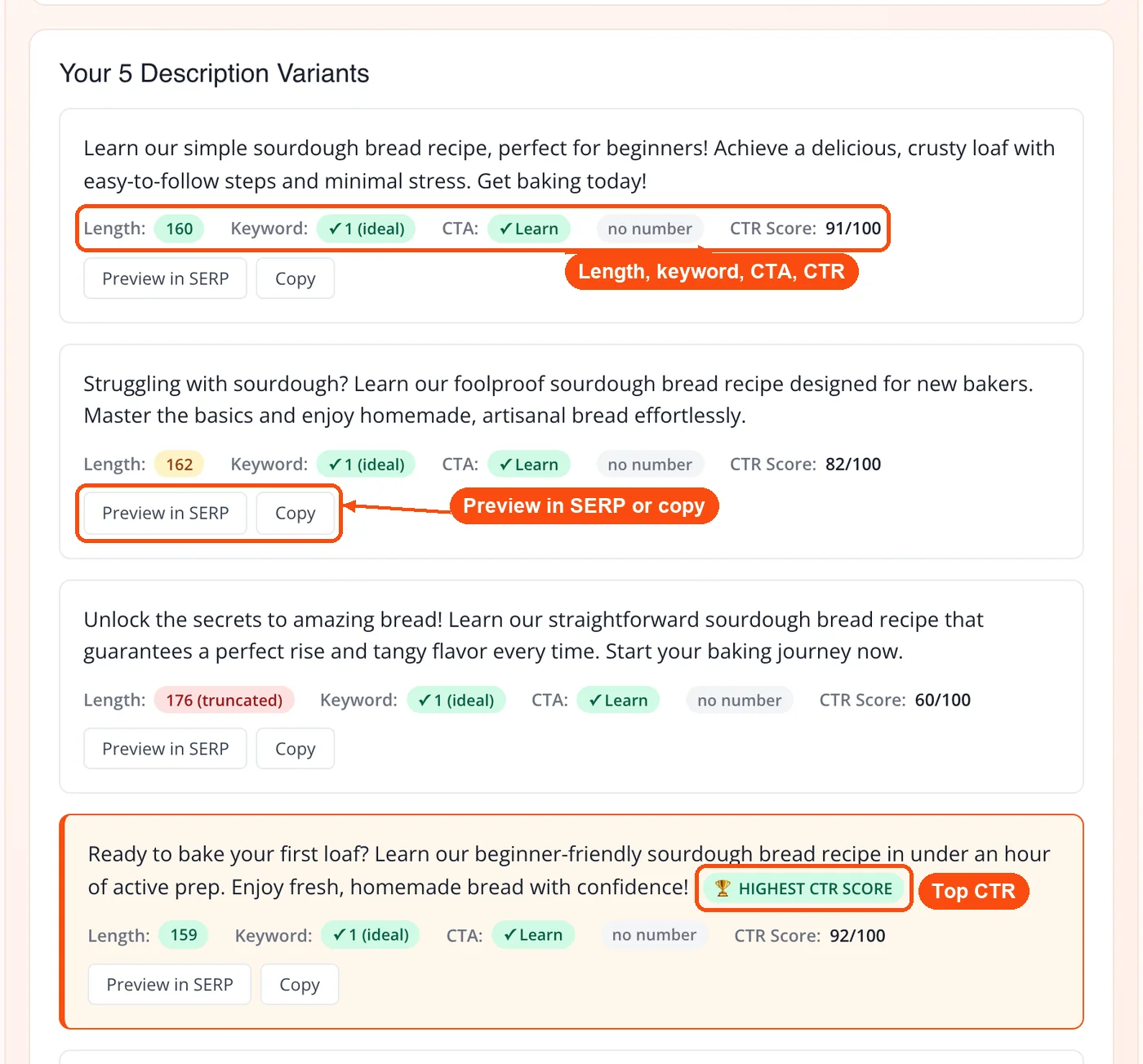
The whole process takes under 30 seconds. If the first output doesn't feel right, tweak the tone or adjust your keyword and regenerate. You can run up to 30 AI generations a day.
What ToolsPivot's AI Meta Description Generator Does
AI-powered description writing: The tool reads your page title, keyword, tone, and audience, then produces 5 meta descriptions that match your inputs. It doesn't just rearrange your words; it creates original phrasing built for search results.
Five tone presets: Choose Authoritative, Friendly, Urgent, Casual, or Professional. A product page selling running shoes needs a different voice than a legal services landing page. This setting handles that.
Six audience targets: Select General, Business owners, Marketers, Developers, Students, or Writers. The AI adjusts its vocabulary and framing based on who you're trying to reach.
Target length control: Choose Short (150 characters), Optimal (155), or Max (160), so every description fits Google's desktop display, and each variant shows its exact character count.
CTA in every variant: Pick a call-to-action verb (Learn, Get, Try, Download, Discover, Read, Save, Compare, or Start) and each description includes it. The results also check keyword use and show a CTR score, so action-oriented copy is easy to spot.
Instant copy and SERP preview: Grab any description with one click, or use "Preview in SERP" to see it under your page title in a Google preview. No formatting hassle, no extra steps.
Free daily usage: No credit system, no sign-up wall. You get 30 free AI generations per day (shared with the AI meta title and keyword cluster tools), and each run gives you 5 descriptions.
If you're also working on page titles, the AI meta title generator uses the same input structure, so you can create matching title-description pairs in minutes.
Why Use This Free SEO Meta Description Generator
No registration barrier: Ahrefs, Quattr, and SE Ranking all offer meta description generators, but several lock features behind accounts. ToolsPivot gives you full functionality the moment you open the page.
More control than most alternatives: Grammarly and Dashword accept a topic and spit out a description. ToolsPivot adds tone, audience, CTA verb, and target length inputs, which means the output is closer to what you'd actually publish without heavy editing.
Speed at scale: Writing meta descriptions manually takes 3-5 minutes per page if you're being careful. For a 200-page e-commerce site, that's over 10 hours of work. An AI generator cuts that to under an hour, even with review and editing time included.
Consistent quality across pages: Human writers get tired. By page 50, descriptions start sounding repetitive or lazy. AI maintains the same level of effort on description number 200 as it does on number 1.
Pairs with other SEO tools: After generating descriptions, run your pages through the meta tags analyzer to check how they'll appear in search results. Use the keyword density checker on your page content to make sure description keywords match what's on the page itself.
Works for any content type: Blog posts, product pages, service pages, landing pages, YouTube video descriptions, app store listings. The tone and audience controls make the tool flexible enough for all of these.
When Google Rewrites Your Meta Description (And What to Do About It)
Google rewrites meta descriptions roughly 60-70% of the time, according to multiple industry studies. That sounds discouraging, but it doesn't mean writing good descriptions is pointless.
Google typically replaces your description when it doesn't match the searcher's query well enough. If someone searches "best running shoes for flat feet" and your meta description says "Shop our collection of athletic footwear," Google will pull a more relevant sentence from your page content instead. But when your description directly addresses the search intent, Google is far more likely to keep it.
So how do you increase the odds of Google using your generated description?
First, include your primary keyword naturally. ToolsPivot's AI handles this when you enter it in the Primary Keyword field. Second, make sure the description accurately reflects what's on the page. Don't describe features your page doesn't cover. Third, keep it within 120-160 characters. Descriptions that run longer get truncated, which often triggers a rewrite.
Run your page through the website SEO checker after publishing to verify that your meta description is properly indexed. If Google is consistently rewriting your descriptions, it's a signal that your page content and description aren't aligned well enough.
Editing AI Descriptions Before You Publish
AI-generated descriptions are a starting point, not a finished product. Even a strong output benefits from 30 seconds of human review. Here's what to look for.
Check the character count. Google shows approximately 155-160 characters on desktop and around 120 on mobile. The word counter tool can help you verify exact character counts if you want precision beyond ToolsPivot's built-in length setting.
Verify keyword placement. Your primary keyword should appear naturally, ideally within the first 80 characters. Google bolds matching search terms in the SERP, which increases visual prominence and draws the eye. Use the keyword research tool if you're unsure which keyword to prioritize.
Add a call to action. Phrases like "Learn how," "Compare prices," "Get started," or "Find out why" give the reader a reason to click. If the AI output doesn't include one, tack a short CTA onto the end.
Make it unique. Every page on your site needs a different meta description. Duplicate descriptions confuse search engines and dilute your click-through potential. For large sites, you can batch-generate descriptions by running the tool once per page with different titles and keywords.
Once your descriptions are ready, don't forget the rest of your page metadata. The meta tag generator helps you build complete meta tag sets, and the schema markup generator adds structured data that search engines use to create rich results.
Who Gets the Most Out of This Tool
Freelance writers and content agencies juggling 10-20 client sites can't spend an hour per site hand-writing meta descriptions. Used as a website meta description generator, it handles the bulk work, leaving time for strategic review.
E-commerce store owners on Shopify or WooCommerce often have hundreds (sometimes thousands) of product pages, each needing a unique description. Generating a base description per product category, then tweaking per item, cuts the workload dramatically.
SEO specialists running site audits frequently find pages with missing or duplicate meta descriptions. Instead of writing each one from scratch, they can feed page titles into the generator and produce a first draft for every flagged page in a single session. Pair this with the page speed checker and readability checker for a more complete audit workflow.
Bloggers publishing 3-4 posts per week know that writing the post itself is the hard part. The meta description shouldn't be an afterthought, but it also shouldn't take 15 minutes. With the right tone and keyword inputs, the generator produces publish-ready descriptions in seconds.
Common Questions About AI Meta Description Generators
Yes, it is a 100% free meta description generator. You get 30 free AI generations per day (shared with the AI meta title and keyword cluster tools), each giving 5 descriptions, without creating an account or entering payment information. Every feature on the page is fully accessible from the start.
Google displays roughly 155-160 characters on desktop and about 120 characters on mobile before truncating. Pick Short, Optimal, or Max (150 to 160 characters) in ToolsPivot's generator and put the key point first, so it survives mobile truncation. Descriptions shorter than 70 characters waste SERP space, while anything over 160 risks getting cut off mid-sentence.
No. Google has confirmed that meta descriptions are not a direct ranking factor. But they strongly influence click-through rates, and higher CTR can indirectly improve your position over time. A well-crafted description acts like ad copy for your organic listing.
Absolutely. Set the tone to "Urgent" or "Friendly" and the audience to "General" or "Business owners" depending on your market. Put the product name in the Page Title field, the product keyword in the Primary Keyword field, and pick a CTA such as Get or Compare. The AI will produce descriptions focused on conversion language. For product-heavy sites, the keyword cluster ideas tool can help you organize product keywords before generating descriptions.
ToolsPivot offers more input controls. Ahrefs and Grammarly accept a topic and optional keywords, then generate output with limited customization. ToolsPivot adds tone selection (five options), audience targeting (six types), a CTA verb, and a target length, plus a CTR score and SERP preview for each of the 5 variants. These extra controls produce descriptions that need less manual editing before publishing.
No. Google's guidelines focus on whether content is helpful to users, not how it was created. An AI-generated description that accurately summarizes your page and encourages clicks is perfectly fine. What Google does penalize is misleading descriptions that don't match page content.
Google rewrites meta descriptions when it finds a better match for the specific search query within your page content. This happens more often with vague or overly broad descriptions. Writing specific, keyword-aligned descriptions reduces the chance of rewrites. The open graph generator can help you control how your page appears on social platforms, where your written description is always shown.
Each generation gives you 5 descriptions, and you can run up to 30 generations a day. You can generate, review, adjust your inputs, and regenerate within that allowance. For sites with hundreds of pages, many SEO professionals run through all their titles in one sitting.
Only if your brand is well-known enough to increase clicks. For most small businesses and blogs, the limited character space is better spent describing the page's value. Major brands like Nike or Apple can benefit from brand recognition in the snippet, but that space costs you 10-15 characters.
Yes. While the tool is built for web page meta descriptions, the tone and audience controls work well for short-form copy of any kind. The target length tops out at 160 characters, so use the output for the opening lines of a YouTube description or a short listing summary, and adjust the tone to match your platform. The article rewriter tool is also useful if you want to rephrase an existing description for a different platform.
For most blogs, "Friendly" or "Casual" works best. If you're writing opinion pieces or hot takes, try "Urgent" sparingly. For how-to guides and tutorials, "Authoritative" or "Professional" keeps the description focused on what the reader will learn. Match the tone to whatever voice your blog already uses.


