A Twitter video downloader is a free online tool that saves videos and GIFs from public X (formerly Twitter) posts to your device as MP4 or MP3 files. Paste a tweet link and the ToolsPivot Twitter Video Downloader pulls every clip the post contains, including the multi-video threads that most downloaders quietly skip. It accepts twitter.com, x.com, and shortened t.co links, asks for no account, and keeps none of your files once the download finishes.
What the Twitter Video Downloader Does
The tool fetches any public X post and pulls out the media inside it: standard videos, animated GIFs, and posts that bundle several clips together. It runs on the yt-dlp engine paired with ffmpeg, processed on the server, so it reads the post's media list directly instead of screen-recording or re-encoding from a preview. You get the real source files X serves, in the qualities X actually hosts. This is one of several social downloaders in the ToolsPivot video downloader collection, which covers most major platforms from a single workflow.
Social media managers, journalists, marketers, and everyday users reach for it most. A marketer archives a brand's video before a scheduled post gets deleted. A reporter saves footage from a breaking-news thread for verification. A creator grabs a clip to react to or repost with credit. The common thread is wanting the original file, not a lossy copy of what played on screen.
Saving an X video used to mean a choice between two bad options: a screen recording with watermarks and lost quality, or an ad-heavy site that grabbed only the first clip in a post and ignored the rest. This downloader returns each clip separately at full quality, treats GIFs as proper files, and offers MP3 audio for the times you only need the sound.
What Makes It Different
Most Twitter video downloaders earn their keep through ads and cut corners on the content itself. Run a tweet that holds three videos through twdown or ssstwitter and you often get back only the first clip, with GIFs either skipped or flagged as undownloadable. This downloader works the other way around. It lists every video and GIF in a post as a separate download, so a four-clip thread hands you four files, not one.
Four design choices separate it from the usual results on page one:
- Every clip, not just the first. Multi-video posts are detected and split out, with each video and GIF offered on its own.
- GIFs handled as real files. X stores GIFs as silent MP4s internally, and the tool fetches that original rather than skipping it.
- MP3 extraction built in. Pull just the audio from a video when the visuals do not matter, with no second tool needed.
- Nothing kept. No login, no signup, and no stored copies of what you download. Public posts only.
Key Benefits of the Twitter Video Downloader
Captures every clip in a post. Multi-video threads are returned as separate files, so you never have to wonder whether a downloader missed the second or third video.
Real GIF support. Animated GIFs save as video files you can actually use, instead of being treated as un-saveable like they are on many competing pages.
Audio-only MP3 option. Extract the sound from any video post as an MP3, which is handy for music clips, interviews, and voice notes you want to keep without the picture.
Original quality, not a re-encode. The tool fetches the source files X serves rather than re-recording playback, so you keep the resolution and clarity of the upload.
No account and no caps. Downloads are free and unlimited, with no email, no signup, and no daily quota standing between you and the file.
Files are never stored. Your links and downloads are not saved on the server, which matters when the post is sensitive or time-bound.
Works on any device. It runs in the browser on iPhone, Android, Windows, and Mac, with nothing to install.
Free and multilingual. The tool is free to use and available in 18 languages, so the same workflow serves a global audience.
Core Features of the Twitter Video Downloader
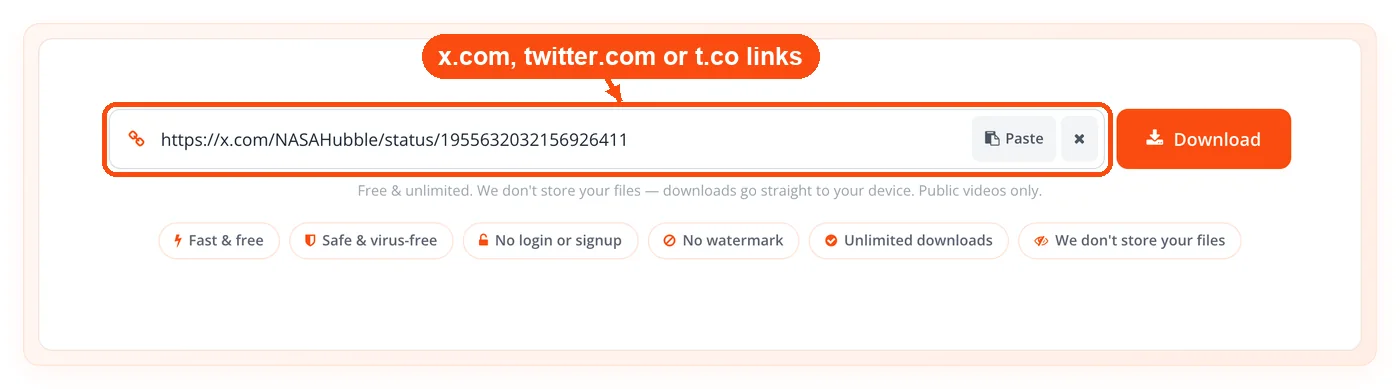
Broad link support. Paste twitter.com, x.com, or t.co links and the tool reads them all, including links copied from the mobile app's share menu.
Multi-video detection. Posts with several clips are pulled apart automatically, with support for up to 20 separate clips from a single post.
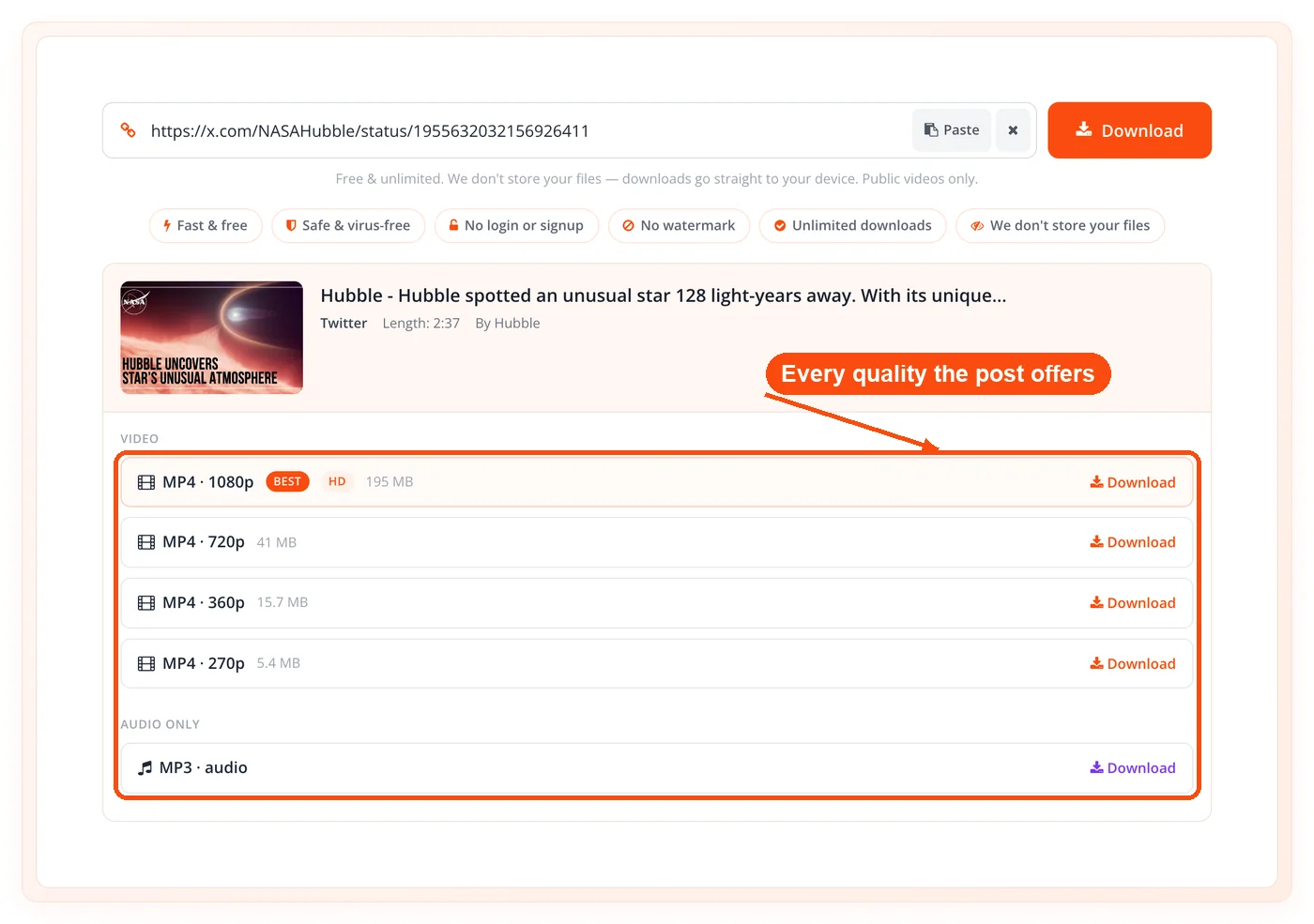
Full quality ladder. Each video is offered across the resolutions X hosts, with up to 12 download options listed per post.
Progressive MP4 downloads. Lower and mid-tier qualities stream straight to your device as ready-to-play MP4 files.
Audio-merged high quality. Higher resolutions are stitched back together with their audio track using ffmpeg, so the top-quality file is not silent.
GIF-to-video saving. Animated GIFs are saved in the MP4 form X stores them as, ready to repost or convert.
MP3 audio extraction. Any video post can be saved as an audio-only MP3, which pairs well with the ToolsPivot text-to-speech converter when you are producing voice content.
Per-clip preview. You see each clip and its options before downloading, so you pick the right video in a crowded thread.
Server-side engine. The yt-dlp and ffmpeg pipeline does the heavy lifting, which is why it handles formats that browser-only tools cannot.
Download protection. A guard against automated abuse keeps the service fast and available for normal use.
How the Twitter Video Downloader Works
The Twitter Video Downloader turns a tweet link into a downloadable file in four steps.
- Copy the post link. On X, tap Share on the tweet and choose Copy Link, or copy the URL from your browser's address bar.
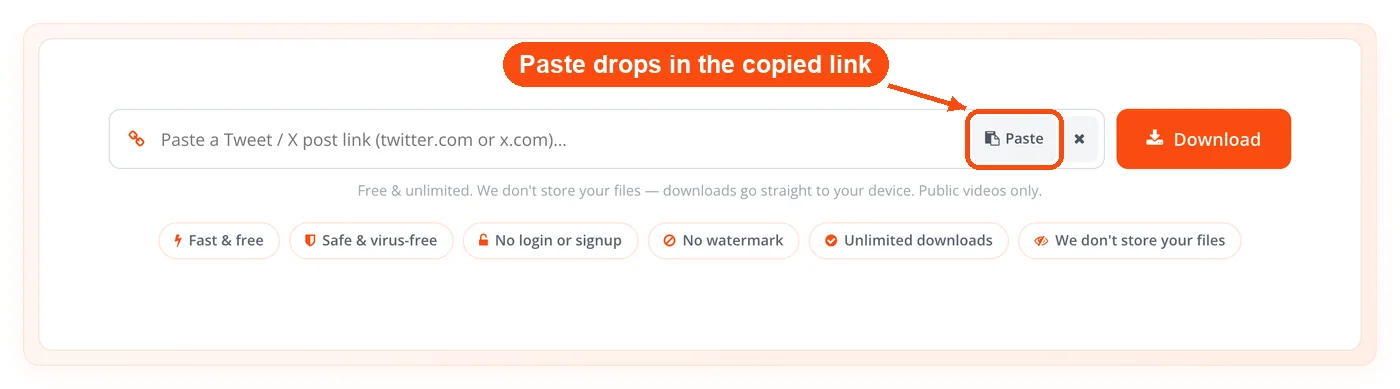
- Paste it into the tool. Drop the link into the input field. Any twitter.com, x.com, or t.co address works.
- Let the server read the post. The tool validates the host, fetches the post, and lists every video or GIF it finds, each with its quality options.
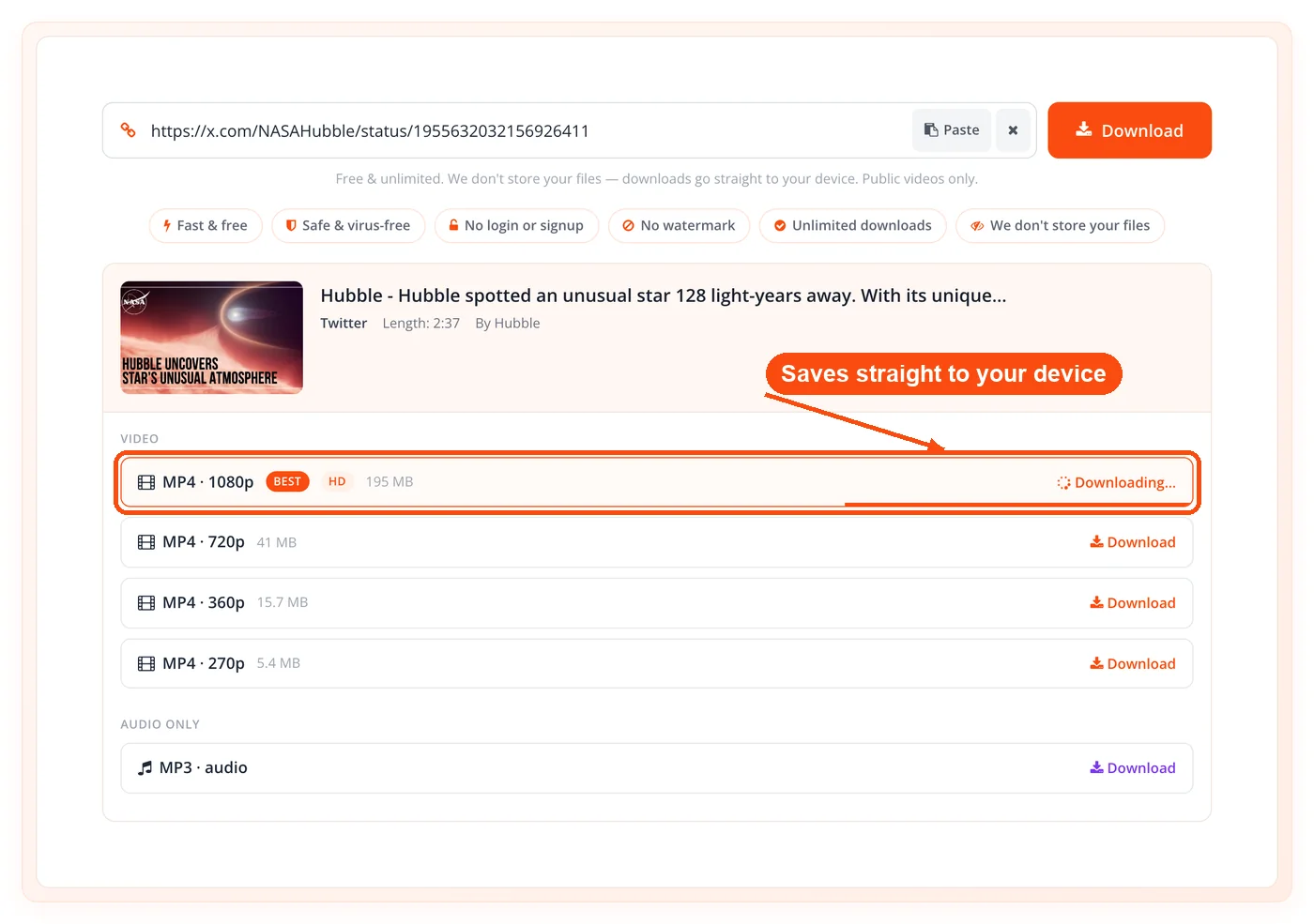
- Pick and download. Choose a clip, select MP4 at the quality you want or MP3 for audio only, and save it to your device.
When to Use the Twitter Video Downloader
Reach for this tool whenever you need the actual file behind an X post rather than a recording of it. That covers archiving, verification, repurposing, and offline viewing, and it matters most when the post might disappear or when quality counts.
- Archiving brand content. Save a campaign video before the post is edited or deleted, so you keep a clean master copy.
- News and verification. Pull footage from a breaking-news thread to check it, slow it down, or store it as a record.
- Repurposing for other platforms. Grab a clip to edit and repost, then resize it for a new aspect ratio with the image resizer if you are pulling a still or GIF frame.
- Offline viewing. Keep tutorials, talks, or highlights you want to watch without a connection.
- Saving GIFs you actually want. Download a reaction GIF as a real file instead of losing it in an endless feed.
- Building a clip library. Collect reference videos across platforms, since the same workflow extends to the Instagram video downloader, TikTok video downloader, Reddit video downloader, and Facebook video downloader.
If the video lives on another network entirely, ToolsPivot also runs dedicated tools for Pinterest, Vimeo, and Dailymotion, so you are not stuck switching sites for every source.
Common Use Cases
Social Media Manager Archive
Context: A brand manager needs to keep every video a campaign posts before anything gets pulled.
Process:
- Copy each post link as it goes live on X.
- Run multi-video posts through once to get all clips.
- Save the highest-quality MP4 for the archive.
Result: A clean library of source videos, ready for reports, ads, or reposts.
Journalist Verification
Context: A reporter covering a fast-moving story has to confirm footage from a tweet thread.
Process:
- Download each clip in the thread as a separate file.
- Review frame by frame for edits or context.
- Cross-check the visuals with a reverse lookup.
Result: Verified source video stored independently of the post, which may be deleted later.
Creator Repurposing
Context: A creator wants to react to a viral X clip in their own video.
Process:
- Grab the original MP4 at full quality.
- Edit it into the reaction piece.
- Compress the export before uploading.
Result: A polished response video built on the real clip, not a blurry screen recording.
To keep file sizes manageable after editing, run the export through the image compressor for any thumbnails or still frames you publish alongside it.
Understanding Twitter Video Quality and Formats
The quality you can download depends entirely on how the video was uploaded to X. X re-encodes every upload into a set of fixed resolutions, usually topping out at 1280x720 for most videos and 1920x1080 for the rest, and the tool offers whichever of those exist. Lower qualities download as progressive MP4 files that play instantly, while the highest quality is rebuilt with its audio track using ffmpeg before it reaches you. GIFs are a special case: X converts them to silent MP4, so they save as short, soundless video clips rather than the looping image format you might expect.
Honest Limitations
No downloader is unlimited, and being upfront about what this one will not do saves you time.
Public posts only. Videos from private or protected accounts need login access that the tool does not have, so they cannot be downloaded. This is a firm boundary, not a bug.
Quality is capped by the upload. The tool fetches what X hosts. It cannot create a 4K version of a video that was uploaded at 720p, so the resolutions you see are the ones that actually exist.
Long or large videos can time out. Fetching is bounded to 45 seconds and downloading to 180 seconds. Most clips finish well inside that, but an unusually long or heavy video may not complete.
GIFs have no audio. X strips sound from GIFs, so the MP3 option only appears for real video posts, not animated GIFs.
It is a downloader, not an editor. There is no trimming, cropping, or format conversion beyond MP4 and MP3. For resizing or compressing the result, pair it with the dedicated image tools.
Processing happens on the server. Unlike browser-only tools, this one fetches and assembles files server-side because that is what handles the merged high-quality output. Files are not retained afterward, but the request does reach the server.
Frequently Asked Questions
Yes, the tool is completely free with no limits. There is no account, no subscription, and no cap on how many videos you download.
No login or signup is required. You paste a link and download, and the tool never asks for an email or password.
Yes, the tool accepts twitter.com, x.com, and t.co links interchangeably. The platform's rename to X did not change how the underlying post links work.
No, only public posts are supported. Private and protected accounts require authentication that the tool does not have access to.
Paste the post link once and every clip is listed separately. A post with four videos gives you four downloads, each with its own quality options.
Yes, animated GIFs are saved as MP4 video files. X stores GIFs as silent MP4s internally, and the tool fetches that original file directly.
Yes, video posts offer an MP3 download for audio only. The option does not appear for GIFs, since X removes the audio track from them.
You get every resolution X hosts for that video, up to the original upload quality. The tool lists the available options so you can pick the best one, but it cannot upscale beyond what exists.
Yes, it runs in any mobile or desktop browser with nothing to install. The same paste-and-download flow works across phones, tablets, and computers.
Files save to your device's default download location, the same as any other browser download. On mobile, that is usually your Downloads folder or Photos, depending on your settings.
No, the tool keeps no copies of your files and does not log the posts you fetch. Once your download finishes, nothing about it remains on the server.
Many ad-heavy downloaders read only the first video in a post and ignore the rest. This tool detects multi-video posts and returns each clip on its own, which is the main reason people switch to it.
This tool saves videos from existing posts, while the ToolsPivot Twitter Card Generator builds the meta tags that control how your own links preview on X. One pulls media out, the other shapes how your content appears.
Downloading public videos for personal use is generally accepted, but reposting or distributing someone else's content without permission can infringe copyright. Credit creators, respect their rights, and use a reverse image search to confirm a source when you need to attribute it. This is general guidance, not legal advice.
