Bulk Email Validator
This free email validator tool checks whether an email address is properly formatted and whether its domain accepts email, and flags disposable, role and free-provider addresses, with a deliverability score and a typo catcher. Check one or paste a list. No sign-up.
About Bulk Email Validator
An email validator checks whether an email address is properly formatted and whether its domain can receive messages. ToolsPivot's free email validator tool checks one address or up to 50 at once with no account and no sign-up. Paste your list, click Validate, and export the results as CSV in seconds. Most free validators cap you at one address per check or force registration before showing results.
How to Use This Free Email Validator
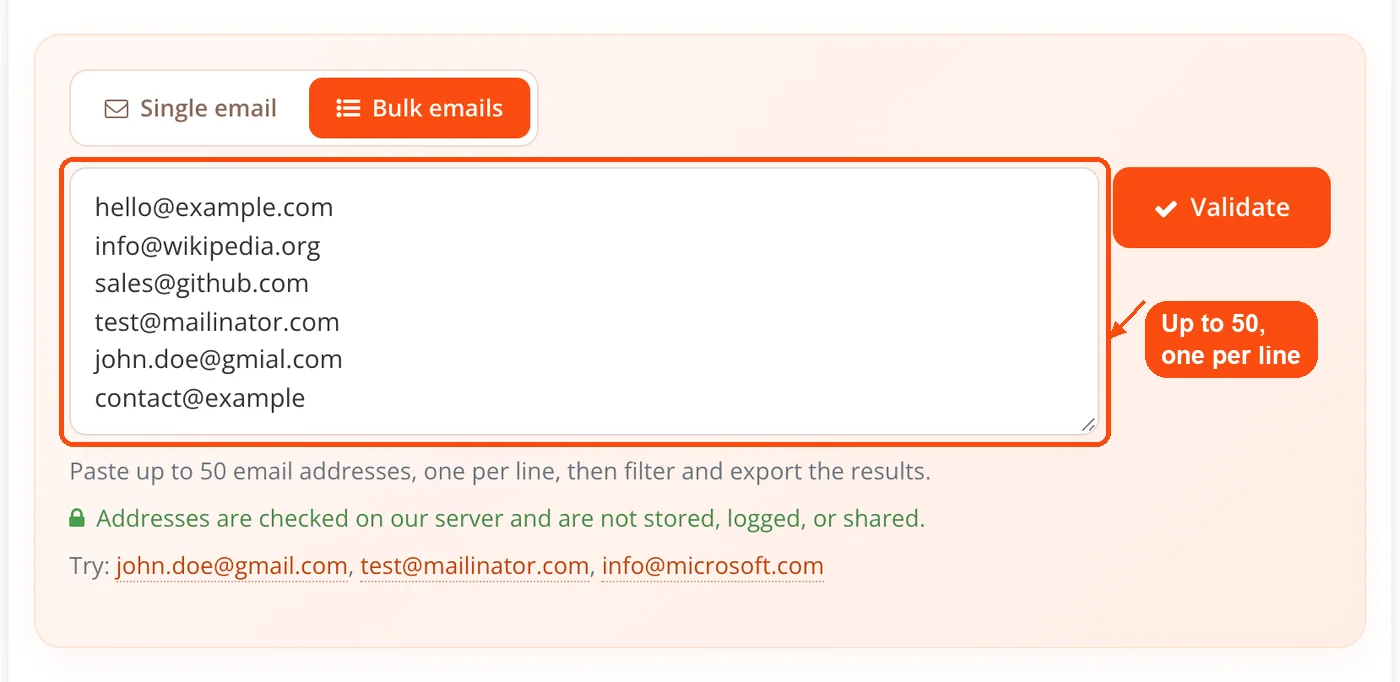
Enter your email addresses: Open the Bulk emails tab and paste up to 50 email addresses into the text box, one per line. Copy-pasting from a spreadsheet column works perfectly. To check one address, use the Single email tab.
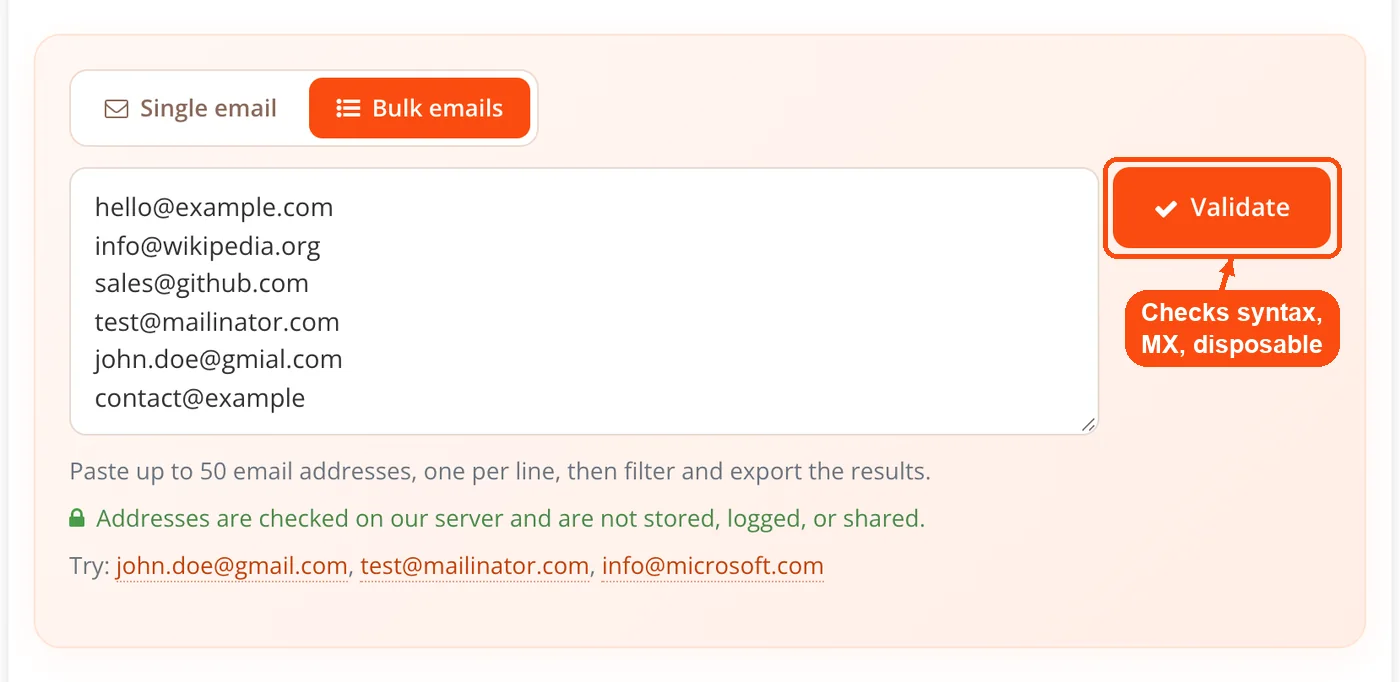
Click Validate: ToolsPivot runs each address through syntax checks, domain and MX record verification, and disposable, role and free-provider checks. Results appear directly on the page within seconds.
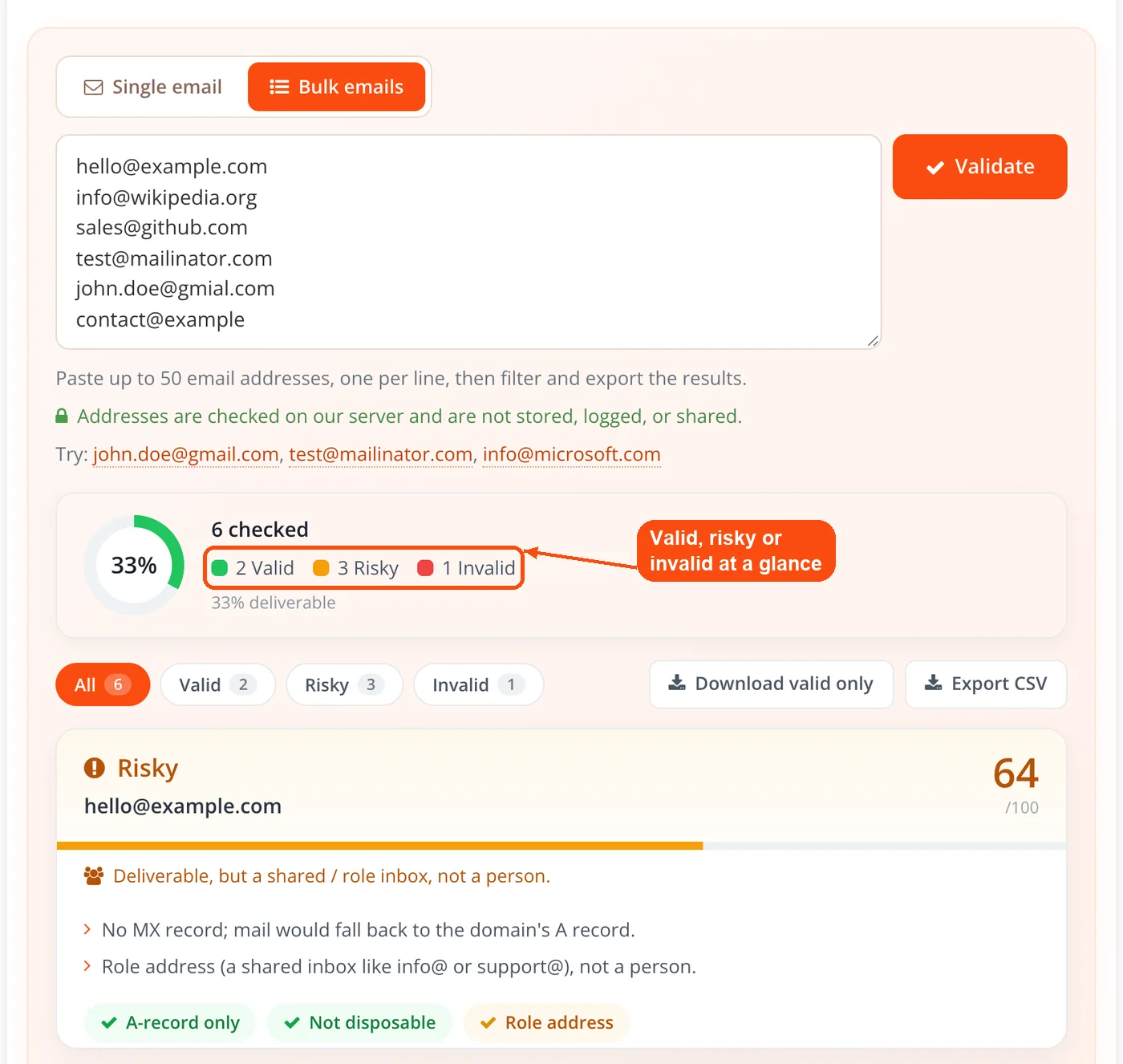
Review the results: Each email is marked valid, risky or invalid, with a score out of 100 and a suggested action. Use the All, Valid, Risky and Invalid filters to find the addresses that need attention.
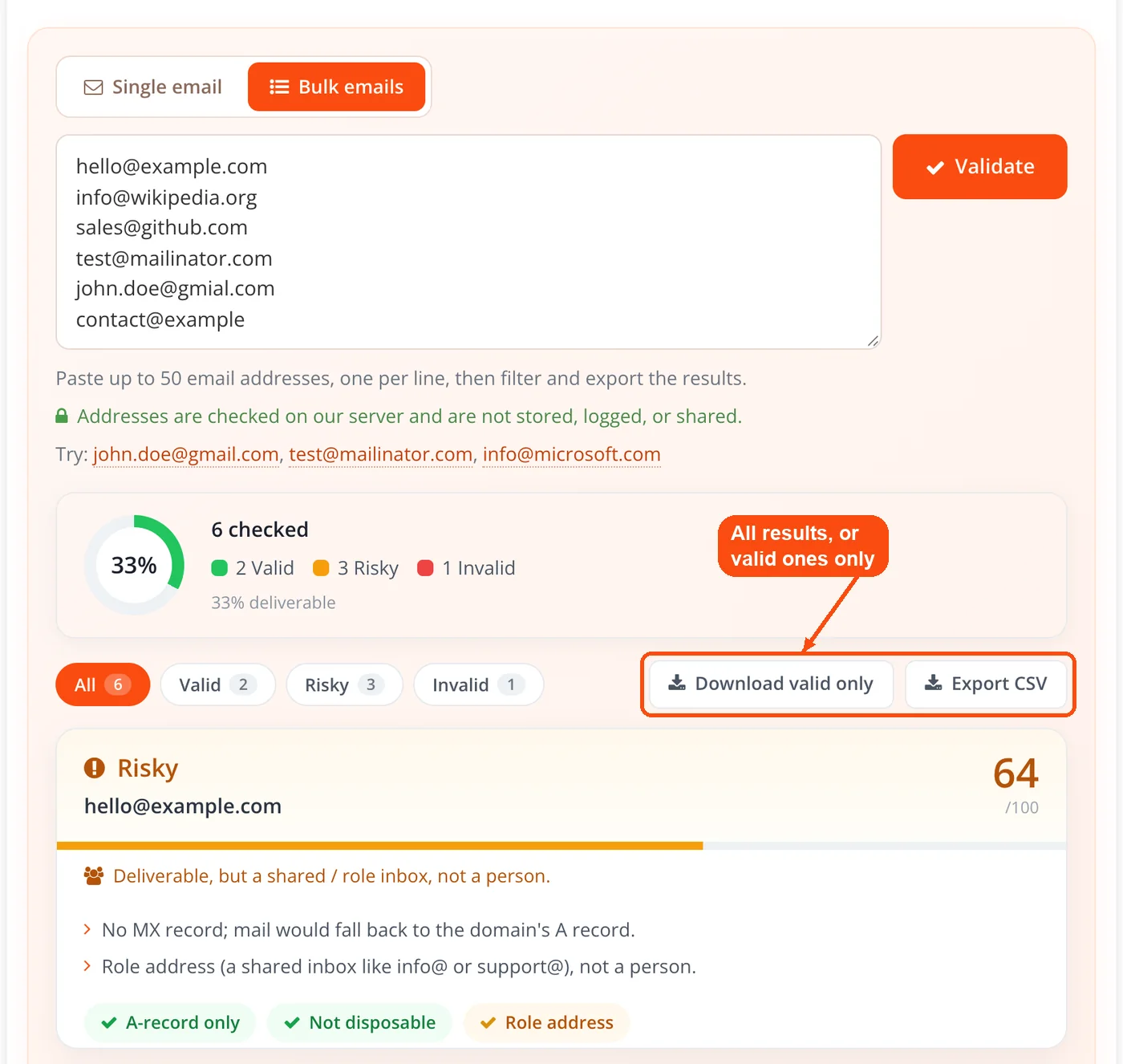
Export your clean list: Click "Export CSV" to download every result as a spreadsheet-ready file, or "Download valid only" to get just the addresses that passed.
Run another batch: Replace the list with your next group of up to 50 addresses and click Validate again. Repeat with each new batch.
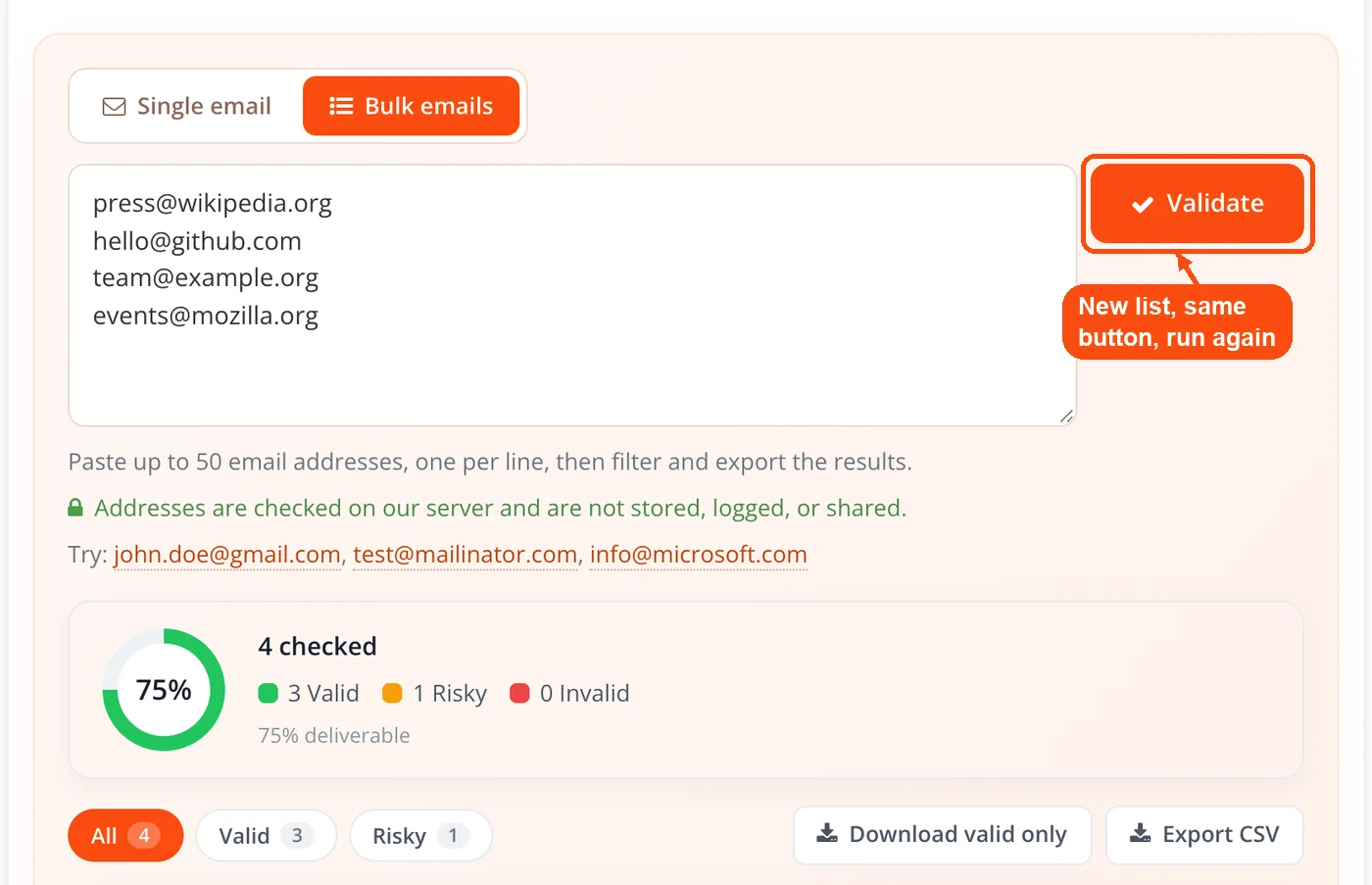
The whole process takes under 10 seconds for most batches. There's no queue, no waiting, and no credit system to worry about.
ToolsPivot's Email Validator Features
Free bulk email validator (up to 50 addresses): Check multiple emails in a single pass instead of entering them one at a time. Paste an entire column from Google Sheets or Excel and get results for all 50 at once.
Syntax and format checking: The tool flags addresses that break RFC 5322 formatting rules, like missing @ symbols, spaces in the username, double dots, or invalid special characters. These would bounce instantly from any mail server.
Domain verification: Each address gets a DNS lookup to confirm the domain actually exists and has mail exchange (MX) records configured. Typos like "gmial.com" or completely fake domains get caught here.
Disposable, role and free-provider flags: Addresses from temporary inbox services, shared role inboxes like info@ or sales@, and free providers like Gmail are each flagged, and every address gets a score out of 100 with a suggested action. The tool deliberately skips a live SMTP mailbox probe, because from a cloud server that check gives false answers for Gmail, Outlook and accept-all domains.
CSV export: Download results in comma-separated format that opens directly in Excel, Google Sheets, or any spreadsheet app. Each row includes the email address and its validation status.
Valid-only download: Grab a CSV of just the addresses that passed, ready to import into your email platform without filtering by hand.
No registration required: The validator runs entirely without an account. No email sign-up, no credit card, no "free trial" that expires after three checks. Just open the page and start validating.
Generous daily allowance: Up to 2,000 address checks a day are free. Validate a batch of 50, paste the next batch, and go again. Process hundreds of emails in batches at your own pace.
What Each Validation Result Means
After you hit Submit, every address in your list gets tagged with a status. Knowing what each status means helps you decide which emails to keep, which to remove, and which to double-check manually.
Valid means the address passed all checks. The format follows RFC standards, the domain exists and accepts mail, and nothing flags it as disposable. Keep these addresses, though no tool can promise a specific mailbox is still active.
Invalid means something failed during verification. The format might be broken, the domain might not exist, or it might have no way to receive mail. Remove these from your list immediately. Sending to invalid addresses causes hard bounces that damage your sender reputation with providers like Gmail, Outlook, and Yahoo.
Risky means the domain can receive mail but something about the address calls for caution. It comes from a disposable provider, or weaker warning signs stack up, such as a domain with no MX record combined with a role address like info@ or a random-looking name. Review these by hand before you send. Check the domain's DNS records for more context on its mail configuration.
Why Use ToolsPivot's Email Validator
Zero friction: No account creation, no software downloads, no browser extensions. Open the page, paste addresses, get results. That's three clicks from start to finish, compared to tools like ZeroBounce or NeverBounce that require registration before verifying a single email.
Protect your sender reputation: Internet service providers track your bounce rate closely. Sending to addresses that don't exist triggers hard bounces, and a bounce rate above 2% can land your domain on blacklists. Run your list through the validator before every campaign to keep bounces near zero. Use the blacklist lookup tool to check if your domain is already flagged.
Save money on email platforms: Mailchimp, ConvertKit, and most email service providers charge based on list size. If 15-25% of your contacts are invalid (common for lists older than a year), you're paying for dead weight. Cleaning just 500 bad addresses from a 5,000-contact list could save $10-30 per month depending on your provider.
Catch typos before they cost you: People misspell their own email addresses more often than you'd think. "john@gmial.com" and "sarah@yaho.com" look close enough to pass a quick glance, but they'll bounce every time. The validator's domain check catches these so you can reach out for corrections.
Batch processing without bulk pricing: Most competitors charge for bulk verification or limit free checks to 3-5 emails. Here, you can check 50 at a time and up to 2,000 a day, so you can work through a large list without paying per address.
Exportable results for your workflow: CSV and text exports mean you can feed clean data straight into your CRM, email platform, or comma-separated formatting tool. No copy-pasting results one by one.
Works on any device: You can use the email validator online free of charge on desktop, tablet, and mobile. Validate addresses from your phone while reviewing a signup sheet at an event or conference. No app install needed.
Who Needs Email Validation (and When)
Email addresses decay faster than most people realize. Industry data suggests 22-30% of addresses go stale every year as people switch jobs, abandon old accounts, or change providers. That means a list you built 18 months ago could have a quarter of its contacts dead on arrival.
Email marketers before campaign sends
Running a promotion to your full subscriber list? Validate the batch first. A single campaign with a 10%+ bounce rate can trigger spam filters at Gmail and Outlook, pushing your next emails straight to junk folders. Marketers using platforms like Mailchimp or HubSpot should clean their lists quarterly at minimum. Pair validation with a keyword density check on your email copy to avoid spam trigger words too.
Freelancers and agencies managing client contacts
Clients hand over contact lists pulled from trade shows, old CRMs, and purchased databases. Half the time, these lists haven't been cleaned in years. Validate before importing into any platform to protect the client's domain reputation and your own credibility.
SaaS companies validating signups
Fake signups eat support time and distort your metrics. Users entering "test@test.com" or disposable addresses from services like Guerrilla Mail inflate your user count while providing zero engagement. Spot-checking new signups in batches helps separate real users from noise.
Sales teams qualifying prospects
Cold outreach to bad addresses wastes time and hurts deliverability. Before loading a prospect list into your sales tool, run it through validation. Focus your effort on addresses confirmed as real, and skip the ones that would bounce. Check the domain age of prospect companies for extra qualification context.
Event organizers cleaning attendee data
Registration forms collect typos. Attendees rush through fields on mobile and misspell their own addresses. Validate your attendee list 48 hours before sending confirmation emails or event updates, so you catch errors while there's still time to fix them.
Verification vs. Validation: What's the Difference?
These two terms get used interchangeably, but they describe different levels of checking. Knowing the difference helps you pick the right depth for your situation.
Validation checks whether an email address follows the correct format. It confirms the structure (username@domain.com), flags invalid characters, and verifies that the domain part looks legitimate. Validation happens instantly because it doesn't contact any external server. It catches obvious errors like missing @ symbols or spaces, but it can't tell you if the mailbox actually exists.
Verification goes deeper. It queries DNS servers for MX records, connects to the mail server via SMTP, and simulates a message delivery to check if the specific mailbox is active. This takes a few seconds per address because it involves real network communication with remote servers. Verification catches addresses where the format looks fine but the mailbox has been deleted or the domain stopped accepting mail.
ToolsPivot's tool does validation plus the DNS half of verification. It starts with format validation, then confirms the domain publishes MX records (or an A record that can take mail) for every address you submit. It stops short of the SMTP mailbox probe on purpose, because from a cloud server Gmail, Outlook and accept-all domains answer it unreliably, which would turn into false valid and invalid results. For deeper investigation into a specific domain's configuration, try the hosting checker or server status checker.
Tips for Better Validation Results
The validator's accuracy depends partly on how you prepare your list. A few small habits make a big difference.
Trim whitespace before pasting. Extra spaces before or after an address can cause false invalid results. If you're copying from a spreadsheet, use the TRIM function in Excel or Google Sheets first. The duplicate line remover can also clean up messy lists before validation.
Fix obvious typos manually. If you see "mike@gogle.com" in your list, correct it to "mike@google.com" before running validation. The typo catcher suggests the likely fix for common misspellings, but correcting the source data yourself keeps the error from coming back. Common misspellings include "gmial" for "gmail," "yahooo" for "yahoo," and "hotmial" for "hotmail."
Validate in batches of 50 for large lists. The tool accepts 50 addresses per run. For a list of 200 contacts, run 4 batches. Export each batch's CSV results, then combine them in a spreadsheet.
Re-validate quarterly. Email addresses go inactive constantly. Someone leaves a company, their work email gets shut down within days. A Gmail user abandons their account, and it stops accepting mail after extended inactivity. Lists older than 90 days deserve another pass through the validator, especially before high-volume sends.
Cross-check risky results. Addresses that come back as "risky" aren't necessarily bad. A role address may be the right contact at a company, and a domain without an MX record can still take mail through its A record. Decide case by case. You can also run the domain through the WHOIS lookup tool to check if it's a legitimate, active domain.
Common Questions About ToolsPivot's Email Validator
Yes. You can validate up to 50 email addresses per run and up to 2,000 checks a day. There's no account required, no credit system, and no paid tier. The CSV exports are also free.
The format check and the domain check are reliable, because they rest on RFC rules and live DNS records. What no outside tool can reliably confirm is whether one specific mailbox still exists: Gmail, Outlook and accept-all domains answer that question unreliably, so the tool does not guess. Treat a valid result as a strong signal, not a delivery guarantee.
No. The validator never contacts the recipient's mail server. It reads public DNS records for the domain, so the address owner won't receive anything, and the check leaves no trace in their inbox.
The web tool accepts 50 addresses per batch. For larger lists, paste the next batch after each export. A 200-address list takes four batches. Export each batch as CSV and combine the files in a spreadsheet or conversion tool.
It means the domain can receive mail but the address deserves a second look. It comes from a disposable provider, or several weaker warning signs stack up, such as a domain with no MX record combined with a role address or a random-looking name. The address might still be fine, so decide based on who you are emailing.
Each address starts from its domain check: 92 points when the domain publishes MX records, 72 when mail can only fall back to its A or AAAA record. A disposable domain is capped at 35 and always marked risky, a random-looking username costs 18 points, and a role address such as info@ costs 8. A score of 70 or more is valid, 40 to 69 is risky and below 40 is invalid, while a broken format scores 0 and a domain that cannot receive mail scores 12.
Email addresses you enter are processed in real time and aren't stored after your session ends. The tool doesn't save, share, or sell the addresses you validate. Your list stays between you and the tool. For more on domain-level privacy, run a quick email privacy test.
NeverBounce limits free checks to 3 addresses and requires registration. ZeroBounce offers 100 free monthly verifications but also requires an account. ToolsPivot lets you check 50 per batch, up to 2,000 a day, with zero sign-up. For large-scale enterprise validation, paid tools offer API access and deeper analytics, but for quick list cleaning, ToolsPivot gets the job done faster.
An address can look perfectly formatted and still fail. The most common reasons: the domain expired, it was never set up to receive mail, or its MX records were removed during a server migration, so nothing will accept mail for it. Run suspect domains through a domain-to-IP lookup to check if the server is responding at all.
For lists under 1,000 contacts that you email regularly (weekly or biweekly), quarterly validation is enough. For larger lists, older databases, or any list you haven't mailed in 90+ days, validate before sending. The cost of a 10-minute validation session is nothing compared to the damage a 5%+ bounce rate does to your sender score.
Yes. Addresses from known disposable and temporary inbox services, such as Mailinator or 10MinuteMail, are flagged as disposable and marked risky even when the domain can still receive mail, because those inboxes vanish soon after signup.
Directly, yes. Removing invalid addresses before sending keeps your hard bounce rate below 2%, which is the threshold most ISPs use to flag potential spam senders. Email service providers like Gmail and Outlook track bounce rates per sending domain, and consistent low bounces build a positive sender reputation over time. Pair clean lists with properly configured SSL certificates on your sending domain for maximum deliverability.
Use Export CSV if you want every result with its status in a spreadsheet, CRM, or email platform. Most tools (Mailchimp, HubSpot, Salesforce) accept CSV natively. Use Download valid only when you just want a clean CSV of the addresses that passed.


