Domain Age Checker
Check how old any domain is with this free domain age checker. See the registration date and age from RDAP, plus the first time the site was archived online, its registrar, expiry, name servers, and status. Check one domain or paste a list.
About Domain Age Checker
A domain age checker tells you when a domain name was first registered and how long it has existed. The ToolsPivot Domain Age Checker reports that registration date from RDAP, the structured successor to WHOIS, and pairs it with the first date the site was archived by the Wayback Machine, so you can see registration age and content age as two separate numbers. Paste one domain or a list of up to 50, and every result names its source and the time it was checked.
What This Domain Age Checker Tool Does
Version 2.0 answers two questions that most free checkers collapse into one: how old is the domain, and how old is the site? Those are different facts. A domain registered in 2009 that sat parked until 2022 has roughly 17 years of registration age and about 4 years of content age, and only one of those numbers describes an actual website.
ToolsPivot reads structured RDAP data for the registration date, age, registrar, name servers, domain status, DNSSEC, and expiry with a days-left countdown. It resolves the IP through DNS-over-HTTPS. It runs keyless, with no API key, no signup, and no daily cap. Where a registration date genuinely is not published, it says so instead of guessing.
Registration dates matter in practical work. SEO teams check them during backlink prospecting. Domain investors verify auction listings before bidding. Fraud analysts treat a two-week-old domain behind a store claiming a decade of trading as the red flag it usually is. The tool exists to answer one question quickly and to be straight with you about the cases where the answer is not available.
How ToolsPivot Domain Age Checker Works
- Enter the domain or paste a list. Type a bare domain or a full URL. Input is normalized to the registrable domain, so the scheme, path, and www prefix are stripped, and multi-part endings like co.uk are handled correctly.
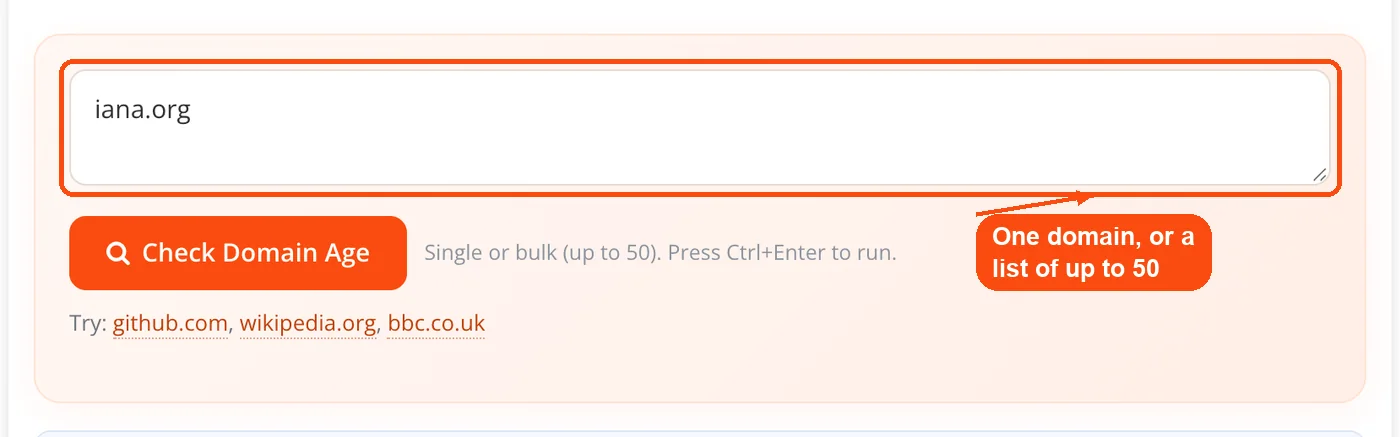
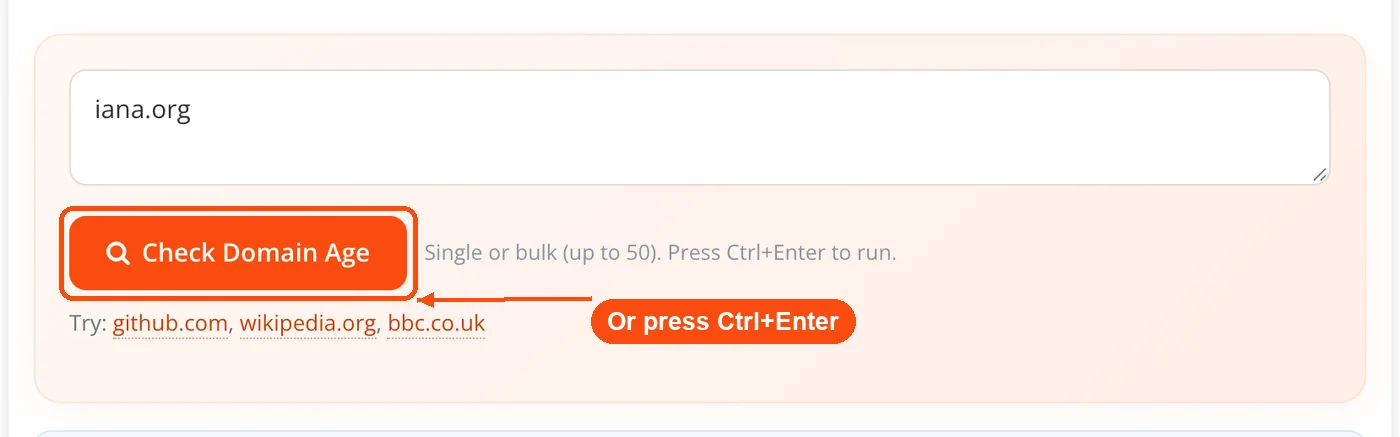
- Run the check. Press the Check Domain Age button, or use Ctrl+Enter. Use it on one domain, or switch to domain age checker bulk mode and paste up to 50 domains per run.
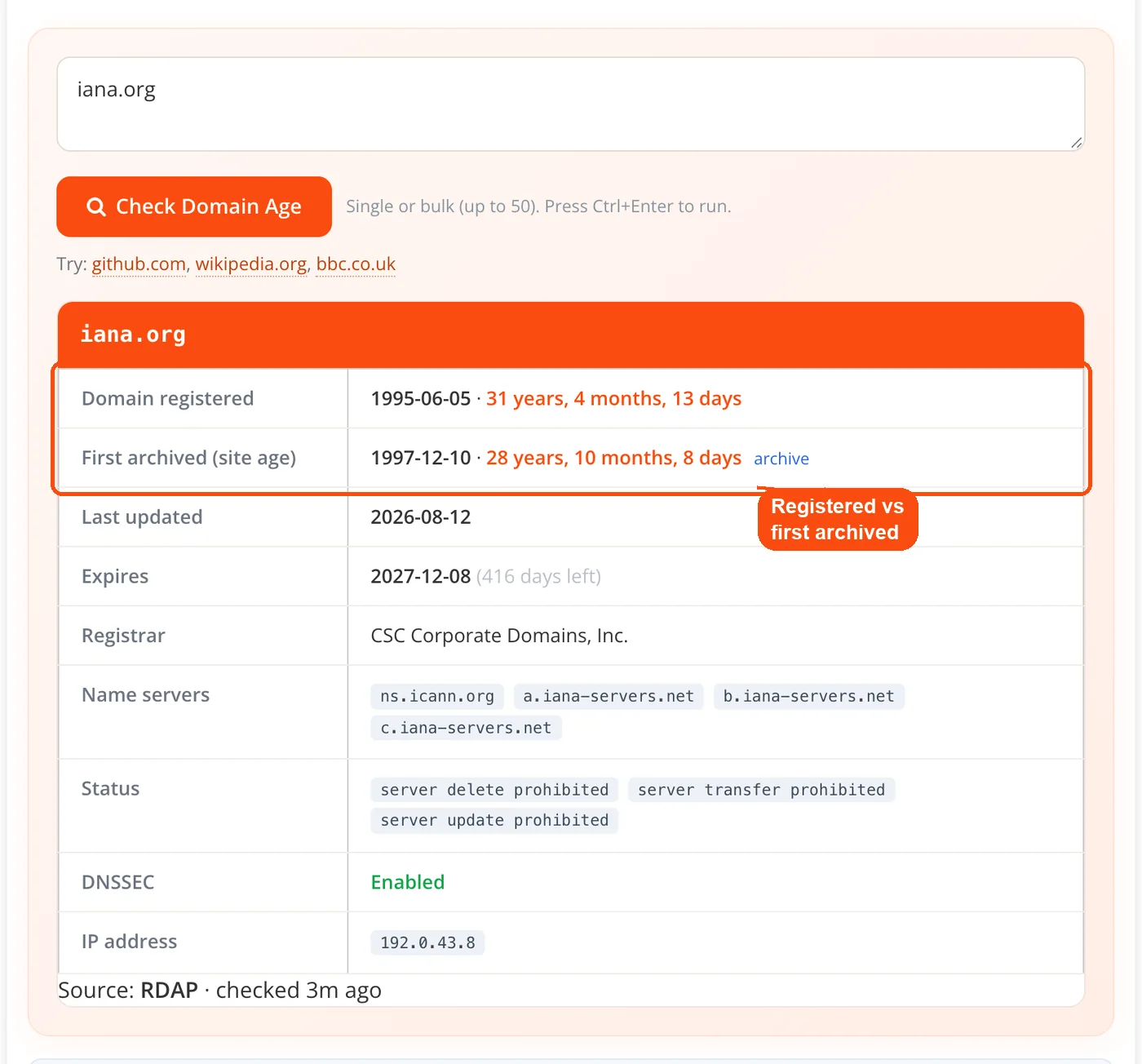
- Read the two ages. The card shows the registration date and age from RDAP alongside the first archived capture from the Wayback Machine, with registrar, name servers, status, DNSSEC, IP, and expiry countdown.
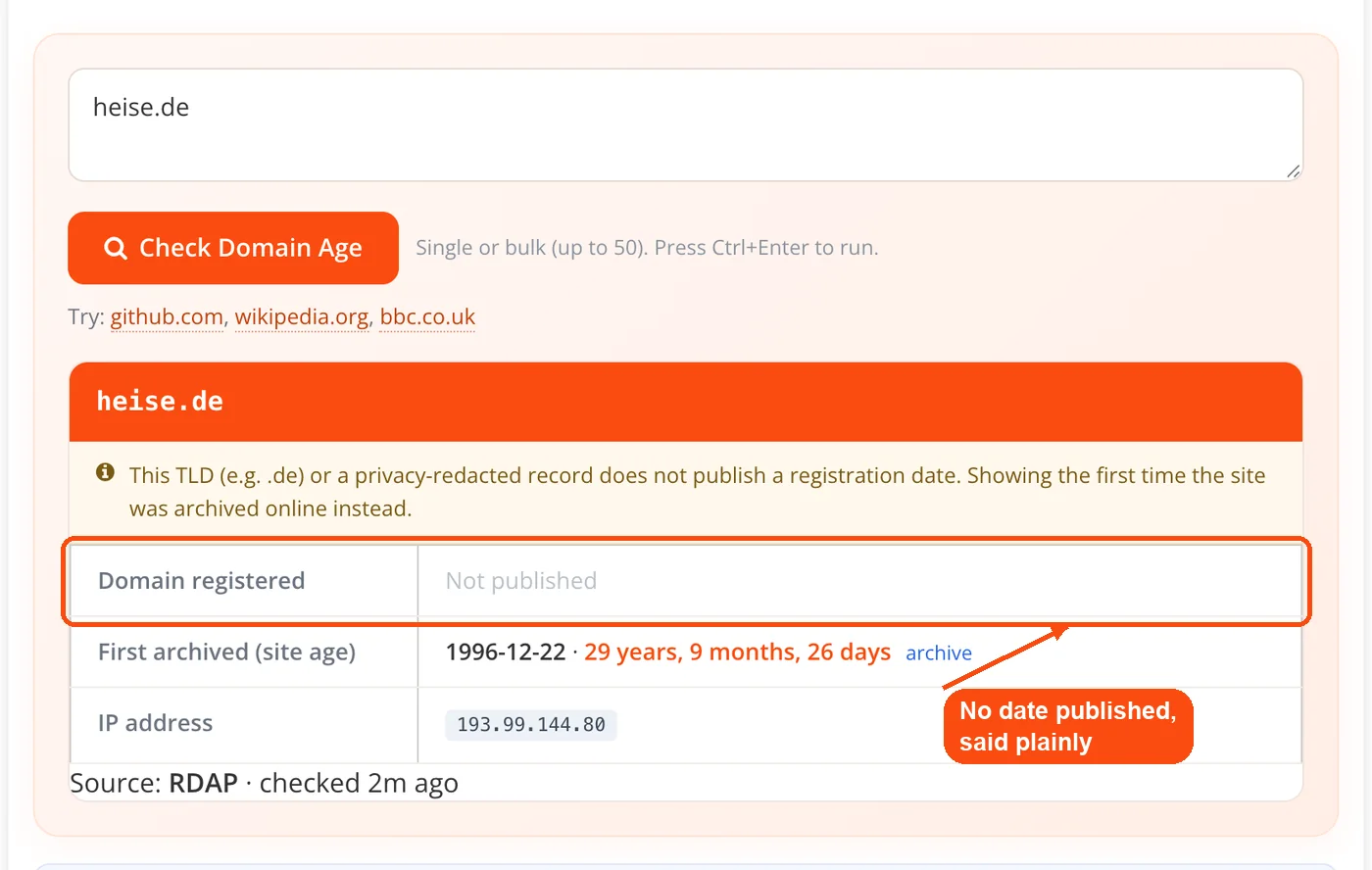
- Check the flags. If the archived content predates the current registration date, the result is flagged as a possible dropped and re-registered domain. If no registration date is published, the field reads Not published.
- Export the results. A list returns a table with copy, CSV, and JSON export for handing off to a spreadsheet or a script.
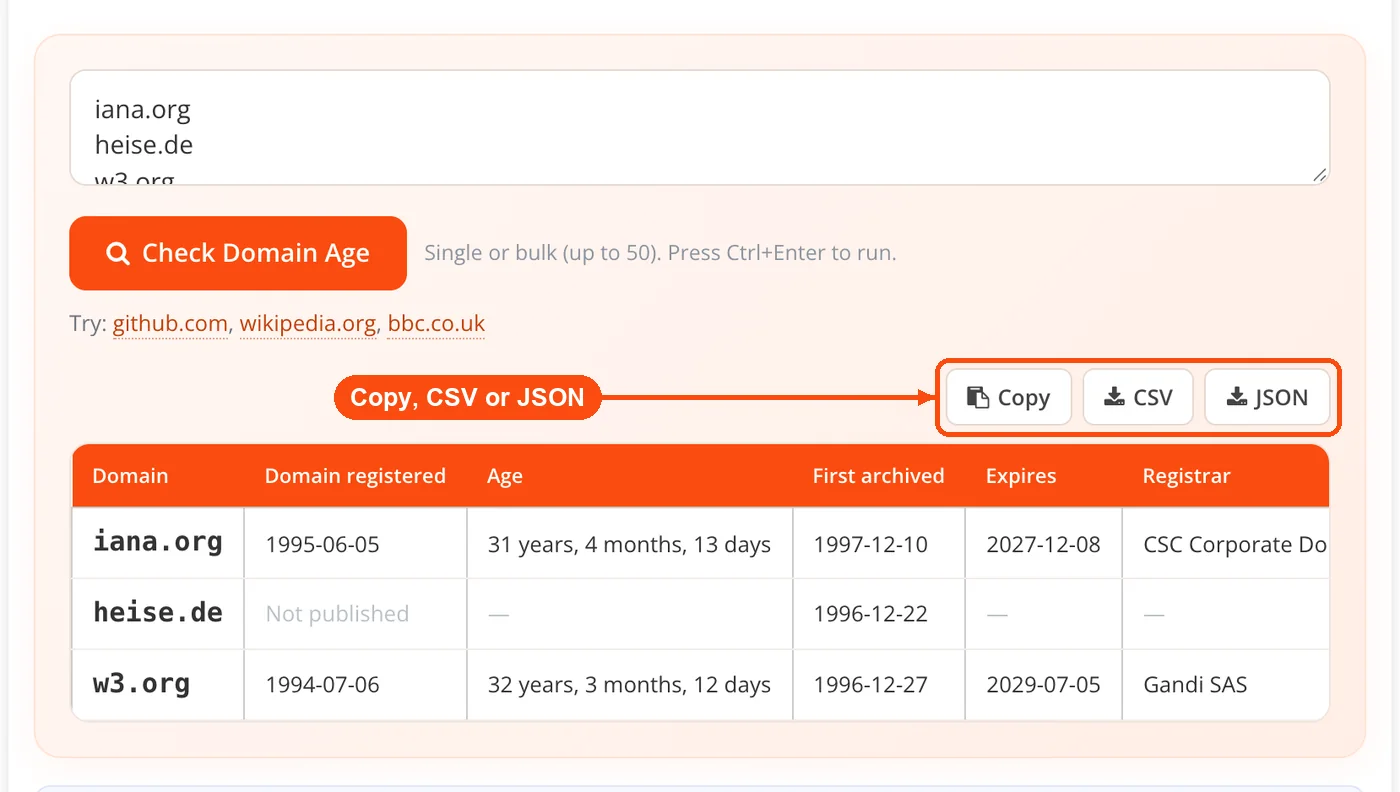
Every lookup runs server-side and each result footer states the method used and when the check ran. Results are cached for an hour, so a repeat check on the same domain within that window returns the stored answer rather than a fresh query.
What Each Field Means
| Field | Source | What it tells you |
|---|---|---|
| Domain registered, plus age | RDAP registration event | When the name was first claimed at a registrar |
| First archived, or site age | Wayback CDX first capture | The earliest date the site was archived with content |
| Last updated | RDAP events | When the registration record last changed |
| Expires, plus countdown | RDAP events | Days remaining before renewal is due |
| Registrar | RDAP | Which company manages the registration |
| Name servers | RDAP | Whether DNS runs on Cloudflare, Route 53, or shared hosting |
| Status | RDAP | Locks, holds, redemption, and pending-delete states |
| DNSSEC | RDAP | Whether the zone is cryptographically signed |
| IP address | DNS-over-HTTPS A record | Where the domain currently resolves |
| Not published, or re-registration flag | Handling logic | Honest labelling where a date is missing or contradicted |
Domain Age and Site Age Are Not the Same Number
Domain age is registration age. Site age is when content first appeared. The gap between them is often the most useful thing on the screen.
A wide gap usually means the domain was parked, held defensively, used only for email, or bought and sat on. A narrow gap means someone registered a name and built on it promptly. An inverted gap, where the archive holds captures older than the registration date, is the interesting case: it suggests the domain lapsed and was re-registered, which resets the creation date at most registries while the old content stays in the archive. The tool flags that automatically rather than leaving you to spot it.
Treat the first Wayback capture as a floor, not a launch date. The archive crawls what it reaches, so a site can go live weeks or months before its first capture, and a site that blocked crawlers may have no captures at all. It is evidence that content existed by a certain date, not proof of when it started.
Where the Data Comes From
RDAP is queried first through the rdap.org bootstrap. It returns structured JSON rather than the free-text output that legacy WHOIS scrapers have to parse, which makes it faster and more consistent, and it covers gTLDs plus the many ccTLDs that expose RDAP endpoints. The Wayback CDX API supplies the first capture. Google DNS-over-HTTPS resolves the A record.
When RDAP publishes no registration date, which happens with .de and with GDPR-redacted records, the tool falls back to a Certificate Transparency first-seen date from crt.sh and labels the registration date Not published. Certificate Transparency logs are public records of issued TLS certificates, so a first-seen entry establishes that the domain existed and had a certificate by that date. It is a floor, not a registration date, and the tool never presents it as one. If you want the raw record alongside the parsed view, the WHOIS lookup tool returns the underlying registration fields, and the SSL checker inspects the current certificate directly.
Reading Your Results
A long registration is a weak signal, not a strong one. Domains renewed a year at a time are common for legitimate businesses and spam alike. Google's historical-data patent is frequently cited as proof that registration length is a trust signal, but that patent describes catching throwaway spam domains, not rewarding old ones.
A recent last-updated date rarely means a sale. Registrars touch the record for renewals, DNS edits, contact changes, and privacy toggles. Read it alongside status codes: clientTransferProhibited is routine, while redemptionPeriod or pendingDelete means the domain is in trouble and may become available.
Name servers and IP tell you the current setup, not the history. They describe where the site lives today. To find the provider behind the IP, pass it to the hosting checker, map the address with domain into IP, or check neighbours on the same network with the Class C IP checker. For the full record set, the DNS lookup returns A, MX, NS, and TXT entries.
Domain Age and SEO: What the Evidence Actually Says
Domain age is not a Google ranking factor. John Mueller of Google has said so bluntly, answering "No, domain age helps nothing" when the question was put to him, and he has attributed the persistence of the belief largely to people selling aged domains. This tool reports age as a research signal, not a ranking metric, and the note appears on the tool itself rather than only in the fine print.
The correlation that keeps the myth alive is real but misread. Ahrefs looked at 1.3 million random US keywords and found that 72.9% of pages in the top 10 were more than three years old, with the average page at position one around five years old. That study measures page age, not domain age, and it describes what old pages accumulate rather than what age confers. Years give a page time to earn links, build topical coverage, and gather engagement. The years are not doing the work.
So the useful reading is comparative. A competitor ranking well on an 18-month-old domain tells you the niche is winnable and their content and links are strong. A twelve-year-old domain stuck on page two tells you age guarantees nothing. Age is a baseline to compare against, and it is most useful next to other data, which is why pairing a check with the domain authority checker, the backlink checker, or a broader website SEO audit answers more than age alone can.
For anyone considering an aged domain as a shortcut: the history matters far more than the number. A clean two-year-old domain beats a penalized fifteen-year-old one. Check what the domain used to be in the archive, review the link profile, and run it through the website safety checker and a blacklist lookup before money changes hands.
Who Uses a Website Domain Age Checker
SEO professionals pull age during audits and prospecting. Knowing a client's domain has six months of history rather than six years sets realistic timelines. In bulk, a pasted list of link prospects surfaces the ones registered last month.
Domain investors verify listings before bidding. A name advertised as premium aged should have a registration date that supports the claim, and the re-registration flag catches the case where the archive shows an older life than the current record admits. When the name you wanted turns out to be young, the domain availability checker shows what is still open to register outright.
Fraud and trust analysts use registration dates as a first filter. Phishing infrastructure is typically days or weeks old because it gets reported and taken down, so a store claiming ten years of trading on a three-month-old domain is worth a second look.
Journalists and researchers check whether a site's stated history matches its record. A publication citing years of reporting on a domain registered in March is a story in itself.
Developers and agencies check age when inheriting projects, where a domain's history helps explain existing page authority and shapes migration planning.
How It Compares to a Typical Free Checker
| Capability | Domain Age Checker v2.0 | Typical free checker |
|---|---|---|
| Data method | RDAP-first, structured JSON | Often a legacy WHOIS scrape |
| Registration age and site age | Reported as two separate numbers | Frequently one number, or merged into the earliest date found |
| No published registration date | Labelled Not published, with a Certificate Transparency first-seen floor | Blank, "Unavailable", or Wayback only |
| Re-registration | Flagged automatically | Usually left to you to cross-check by hand |
| Bulk | Up to 50 per run, with CSV and JSON export | Commonly 5 to 20, export varies |
| Source disclosure | Method and check time on every result | Rarely stated |
Some of these are table stakes rather than advantages, and it is worth saying so. Bulk checking, CSV export, caching, and pairing RDAP with the Wayback Machine all exist elsewhere; minoka.de, RankWatch, and SE Ranking each cover part of this ground. What is genuinely uncommon is the Certificate Transparency fallback when a registry publishes no date, the automatic re-registration flag, and the refusal to merge two different ages into a single flattering number.
Honest Limitations
Redacted and ccTLD registration dates cannot be recovered keylessly. Where a registry does not publish a creation date, no free tool can produce one, ToolsPivot included, and any tool that shows you a confident date for a .de domain is showing you something other than the registration date. The Certificate Transparency fallback gives a floor, not the real answer.
The first Wayback capture is a floor too. Sites that blocked crawlers, launched between crawls, or were never archived will read younger than they are, or show nothing at all.
The re-registration flag is a signal, not a verdict. Archive captures predating a registration date usually mean the domain dropped and was re-registered, but subdomain quirks and archive oddities can produce the same pattern. Treat it as a prompt to look closer.
Hour-long caching means a check run moments after a registration change may return the previous state. And RDAP coverage, while broad, is not universal; a minority of ccTLDs expose no RDAP endpoint at all.
Frequently Asked Questions
Yes, and it requires no account, no API key, and no email. There are no daily caps, and bulk runs accept up to 50 domains at a time.
Domain age is when the name was registered; site age is when content first appeared on it. A domain registered in 2009 but parked until 2022 has about 17 years of domain age and 4 years of site age. The tool shows both rather than merging them.
No. Google's John Mueller has said domain age helps nothing for rankings. Older domains often rank well because of the links and content built up over years, not because of age itself.
RDAP first. RDAP is the structured successor to WHOIS, so this works as a WHOIS domain age checker but returns consistent JSON instead of free text. It covers gTLDs and the many ccTLDs that publish RDAP endpoints.
Because the registry does not publish one, which is common for .de and for GDPR-redacted records. In that case the tool shows a Certificate Transparency first-seen date as a floor and labels the registration date honestly rather than inventing an age.
It means the archived content predates the current registration date, which usually indicates the domain lapsed and was re-registered by someone new. Most registries reset the creation date on re-registration, so the domain looks new despite an older history.
Up to 50 per run. Results appear in a sortable table with CSV, JSON, and copy export.
Yes. Input is normalized to the registrable domain, so the scheme, path, and www prefix are removed automatically and multi-part endings like co.uk are handled correctly.
Any TLD with an RDAP endpoint, which covers .com, .org, .net, .io, .co, and most country-code extensions. A minority of ccTLDs expose no RDAP, and those fall back to archive and Certificate Transparency dates.
It is accurate as a floor, meaning the site existed with content by that date. It is not the launch date, because the archive only records what it managed to crawl.
Yes, server-side for one hour, which keeps repeat checks fast and reduces load on the upstream sources. A change made minutes ago may not appear until the cache expires.
Age alone is not a reason to buy. Check what the domain was previously used for, review its backlink profile, and screen it for penalties and blacklisting first, because a clean young domain beats a penalized old one.


