Blacklist Lookup
Run a free blacklist check to see whether an IP address or domain is on email spam blacklists (DNSBLs / RBLs). Enter an IP, or a domain and we find its mail-sending IP. Each list is shown honestly as Listed, Clean, or Not-checked — we never fake a clean result.
About Blacklist Lookup
A blacklist lookup, or blacklist check, tests whether an IP address or domain appears on the DNS-based blocklists (DNSBLs, also called RBLs) that mail providers use to decide whether to accept or reject incoming email. You enter an IP, or a domain and the tool finds the mail-sending IP behind it, then queries more than 20 public blacklists at once and reports each one as Listed, Clean, or Not checked. It runs entirely server-side over standard DNS, with no account, no API key, and no paid data feed in the middle.
Most people only discover a listing after the damage is done: messages start bouncing, or they quietly land in spam and open rates fall off a cliff. A single misconfigured server, a noisy neighbor on shared hosting, or an IP inherited from a previous tenant can put you on Spamhaus, Barracuda, or SpamCop without any warning. The fix always starts with an honest picture of where you actually stand, which is the part most free checkers get wrong.
How ToolsPivot Blacklist Lookup Works
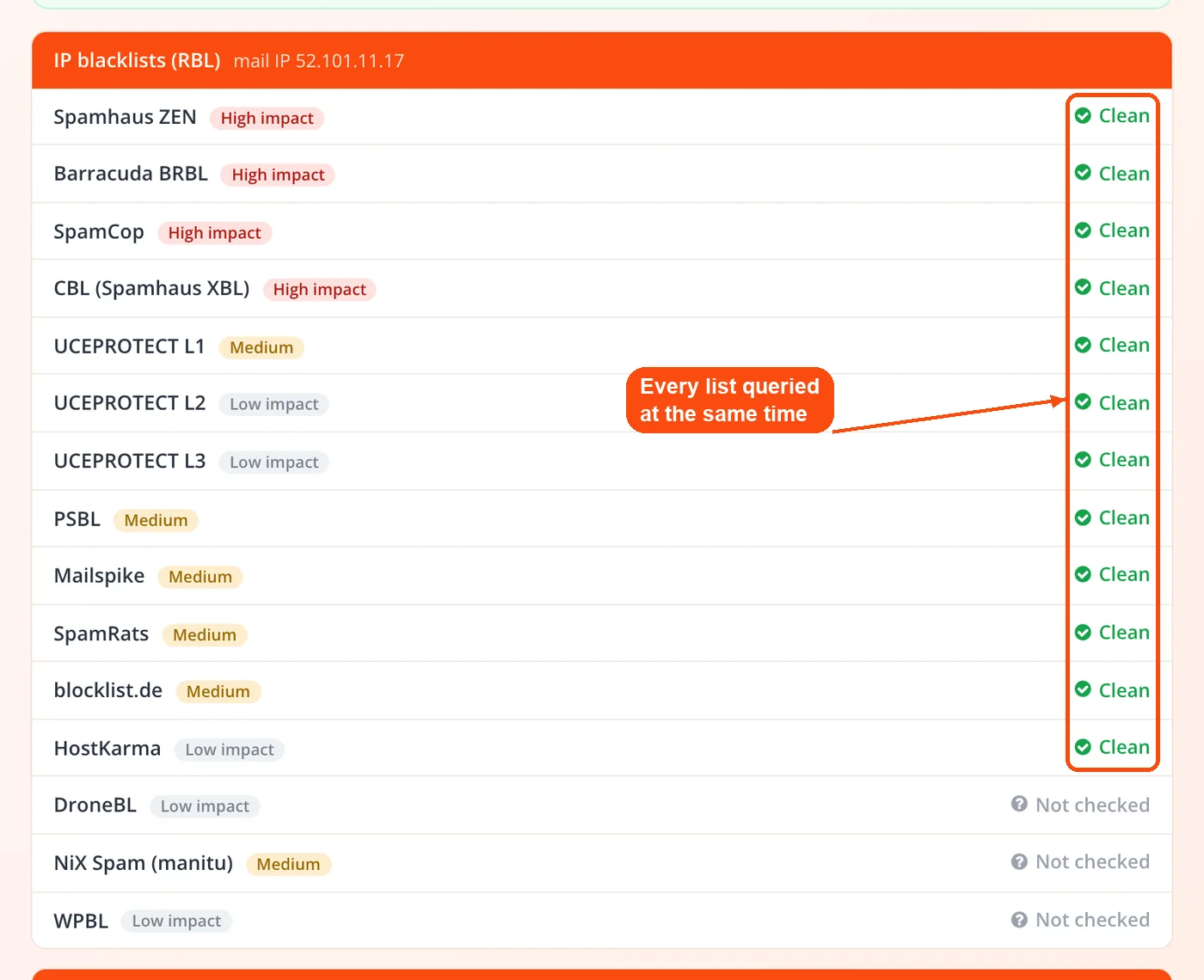
ToolsPivot Blacklist Lookup turns your input into a batch of DNS queries and reads the answers the way a real mail server would. The whole sweep finishes in a few seconds because every list is queried at the same time rather than one after another.
- Enter an IP or domain. Type a single IPv4 or IPv6 address, a domain, or a mail-server hostname. You can paste up to six targets, one per line, to run a quick blacklist check IP by IP or domain by domain, with a summary for each.
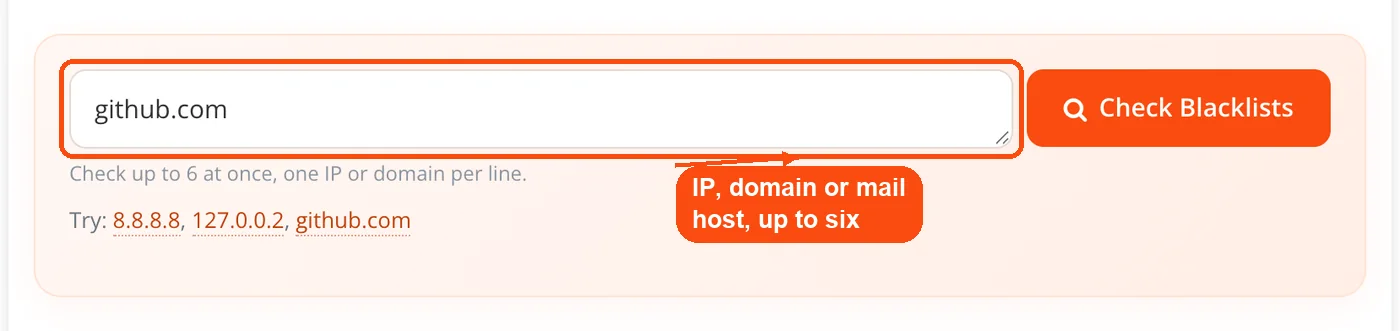
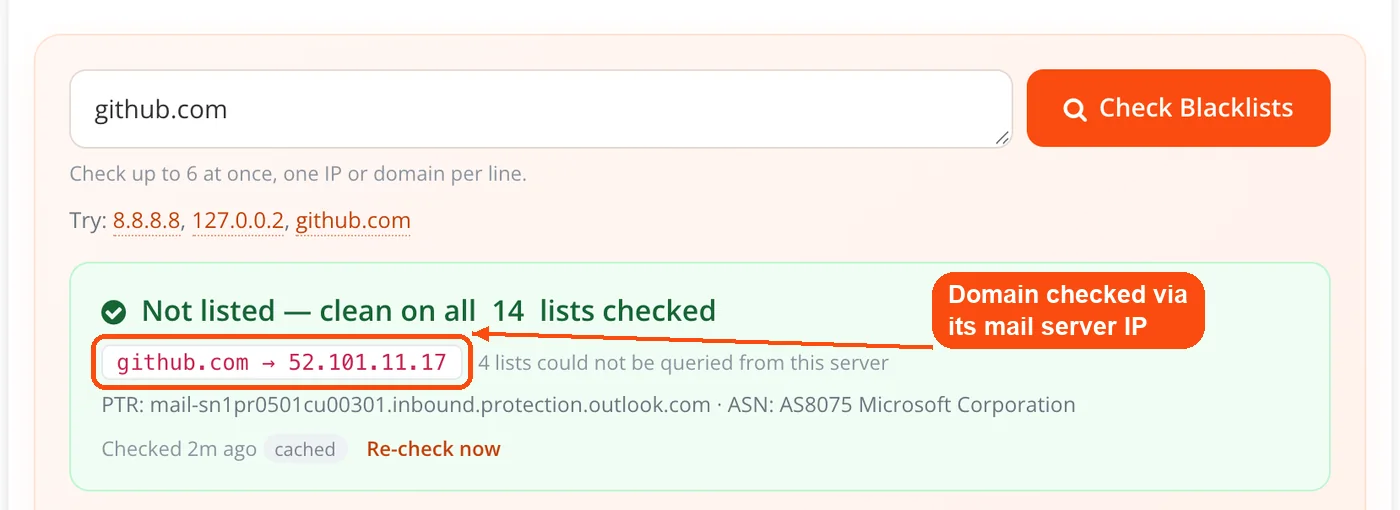
- The tool routes the query. An IP goes straight to the IP-based lists. A domain is checked against the domain lists, and the tool also reads its MX records, resolves the mail server's IP, and runs that address through the IP lists too.
- Every list is queried at once. Each blocklist receives a standard DNS lookup, and an answer in the 127.0.0.0/8 range means listed while no record means clean.
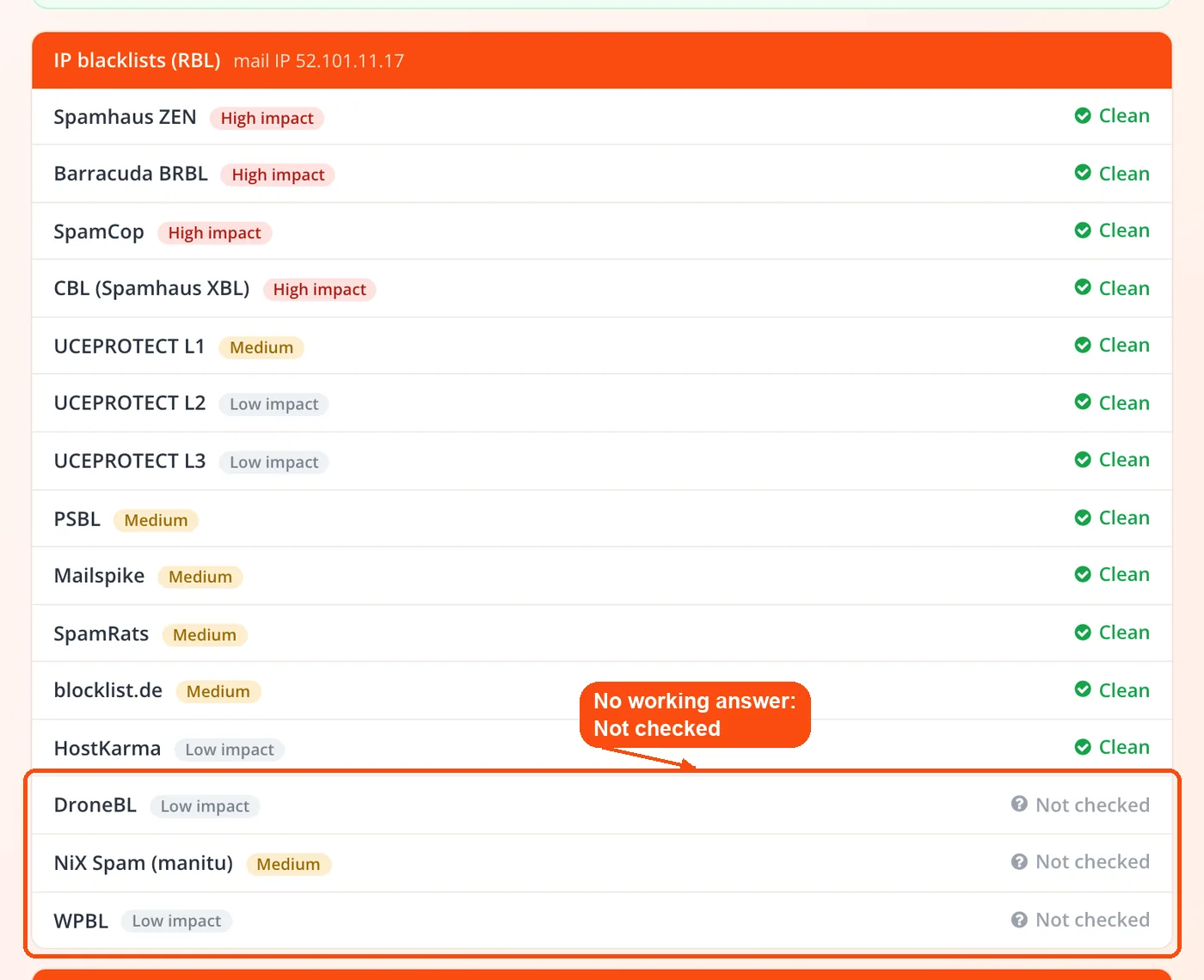
- Each list self-tests before reporting. Before trusting a clean result, the tool confirms the list actually answered, so a refused query is never dressed up as a pass.
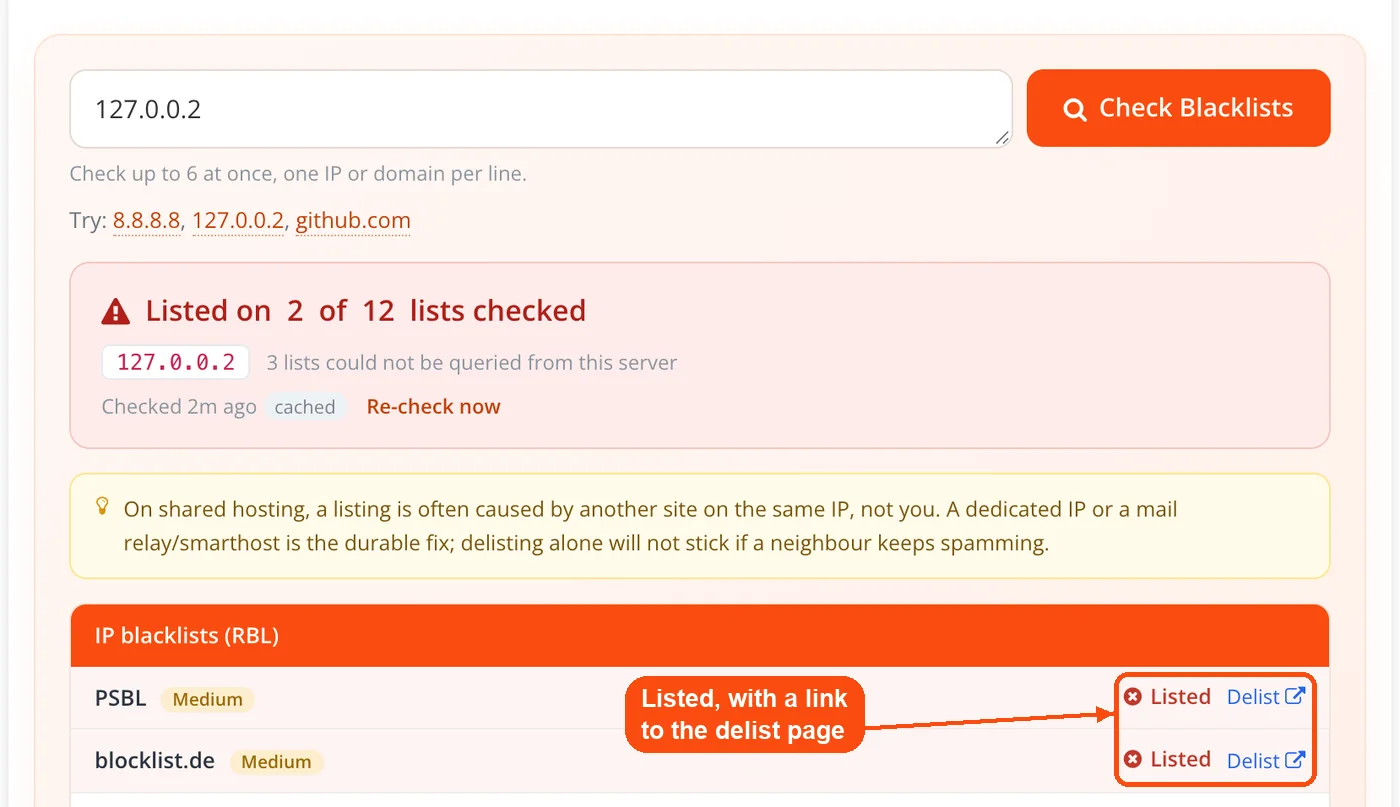
- Read the report and act. Each result shows its status, an impact tier, and a direct link to that provider's removal page when you are listed.
If you are not sure which IP your mail actually sends from, check it first with the my IP address tool, or pull your MX entries with a DNS lookup so you check the right address from the start.
What the Blacklist Lookup Checks
The tool reports far more than a plain listed-or-clean flag for each database. Every result carries the context you need to judge how much a listing matters and what to do next.
- 20-plus DNS blocklists: Queries the lists that carry real weight, so one pass doubles as a Spamhaus blacklist check, covering Spamhaus ZEN (which bundles SBL, XBL, and PBL), Barracuda, SpamCop, SORBS, and UCEPROTECT, alongside the domain lists Spamhaus DBL, SURBL, and URIBL.
- Listed, Clean, or Not checked: Each list gets its own line with a plain-language verdict. There are no vague reputation scores to interpret and no color-coded guesswork.
- Impact tier per list: Every result is tagged High, Medium, or Low so an obscure regional list never sets off the same alarm as a Spamhaus hit that Gmail and Microsoft 365 actually enforce.
- Mail-server resolution for domains: Enter a domain and the tool finds the sending IP through its MX records, because the lists that block email delivery apply to that IP, not to the domain name.
- CDN and proxy awareness: If a domain resolves to a network like Cloudflare, checking that address tells you nothing about deliverability, so the tool flags it and checks the real mail-server IP instead.
- PTR and network context: For the address checked, the report also resolves the PTR (reverse DNS) record and the ASN and ISP that own the IP, which matters because mail servers weigh reverse DNS when judging a sender.
- Direct delisting links: Any listed result links straight to that provider's removal page, so you skip the hunt through documentation.
- IPv4, IPv6, and domain support: The tool expands and reverses IPv6 addresses correctly, so modern dual-stack mail servers get checked the same way as legacy IPv4 hosts.
Pair the results with a server status check to confirm your mail server is actually online, or run a website safety scan to rule out malware that might be quietly generating the spam that got you listed.
The Honest Not Checked Verdict
The Not checked verdict is the feature that separates this tool from most free blacklist checkers, and it exists because several of the most important lists refuse queries from public or cloud-hosted DNS resolvers. Spamhaus, Barracuda, and SpamCop all push heavy users toward paid data feeds, and when a query arrives through a public resolver they either block it outright or hand back a special sentinel answer instead of real reputation data.
The danger is subtle. Some public resolvers respond to a blocked Spamhaus query with an empty result that looks identical to a genuine clean answer, so a naive tool cheerfully reports you as clean on Spamhaus when in reality Spamhaus never answered at all. That is the worst possible outcome, because it tells you nothing is wrong on the exact lists that matter most. Here, every blacklist check, Spamhaus included, returns either a real answer or Not checked.
To stop that, ToolsPivot runs a per-list self-test using each list's documented test entry before it trusts any clean result. If a list does not behave the way it should, that list is marked Not checked rather than reported as clean, and this reachability result is cached briefly so repeat checks stay fast. You end up with a report that admits what it could not confirm, which is more useful than a green light built on a query that was silently refused. When a list reads Not checked, confirm it directly on that provider's own lookup page.
Reading Your Blacklist Report
Not every listing carries the same weight, and treating them all as equal wastes time. The impact tier next to each result tells you how seriously to take it.
A hit on Spamhaus or Barracuda is the urgent kind. These high-impact lists are referenced directly by Gmail, Microsoft 365, and most corporate mail servers, so a listing here can block a large share of your mail immediately. Treat either one as a same-day problem.
Mid-tier lists like SpamCop and SORBS affect a smaller slice of receivers but still cause real delivery trouble with some ISPs and enterprise setups. SpamCop uses a time-based system that clears a listing on its own once reports stop, usually within a day or two, while SORBS tends to hold on longer and wants an explicit removal request.
Lower-impact lists such as UCEPROTECT Level 2 and Level 3 and various regional blocklists rarely cause noticeable problems on their own. The signal to watch is accumulation: one minor listing is usually noise, but flags on three or more lists at once mean something in your sending setup needs attention even if no single list is high-impact.
IP Blacklist Check vs Domain Blacklists
Blacklists come in two distinct types that work in different ways, and knowing which one flagged you decides how you respond. Confusing them sends people chasing the wrong fix.
IP-based blacklists such as Spamhaus SBL, Barracuda, and SpamCop track the server IP addresses that send spam. If your IP is listed, mail from that server can be blocked no matter which domain you send from. Shared hosting users are the most exposed here, because one bad neighbor on the same IP can drag the whole address down with them. You can confirm which host and IP you are on with the hosting checker.
Domain-based blacklists such as SURBL, URIBL, and Spamhaus DBL track domain names that appear inside spam messages. Your sending IP can be spotless, but if your domain shows up in the links or body of reported spam, you land on these lists anyway. This is common when someone spoofs your domain in a phishing run, and a domain blacklist check catches it even when your sending IP comes back clean. Check your registration details with the WHOIS lookup tool, and set up SPF, DKIM, and DMARC through your domain DNS configuration to make spoofing harder to pull off.
ToolsPivot Blacklist Lookup checks both types in one pass, which is why a blacklist check for domain names triggers the MX-based mail-server check as well as the domain-list check.
When to Run a Blacklist Check
A spam blacklist check earns its keep at a handful of specific moments rather than as a daily ritual. These are the times a quick lookup saves you from a delivery mess.
- Before deploying a new IP: Reassigned IP addresses often carry reputation baggage from a previous owner, so check any new server address before it sends a single message.
- Before a major campaign: Email marketers on platforms like Mailchimp, SendGrid, or HubSpot should verify the sending IP before a big send, since one listing can sink an entire campaign's inbox placement. Cleaning the list first with the email validator helps too.
- Right after a security incident: When a compromised server starts pumping out spam, check your status the moment cleanup is done so you know exactly which lists flagged you and can start removals the same day.
- When mail suddenly bounces or lands in spam: A fresh listing is one of the first things to rule out when deliverability drops without an obvious cause.
- During infrastructure audits: Documenting a clean blacklist status alongside an SSL certificate check gives you a tidy snapshot of sending health for clients or compliance records.
Edge cases matter here too. If your mail routes through a third-party relay or a provider like Google Workspace, the address that actually needs checking is the relay's IP, not your web server's, which is exactly why the domain path resolves MX records for you.
Getting Delisted After a Listing
Finding a listing is the easy part, and removal follows a specific order that each provider handles differently. Rushing it usually gets you relisted.
First, find the root cause before you request anything. Common triggers include a compromised server sending spam, an open mail relay, poor list hygiene hitting spam traps, or a shared IP problem. A quick email privacy test can surface exposed addresses that spammers target.
Second, fix the problem before requesting removal, because most lists will reject the request or relist you at once if the underlying issue is still live. Then follow each provider's process: Spamhaus wants a clear explanation of what broke and what you fixed through its self-service portal; Barracuda takes an online form and usually clears within a day; SpamCop removes listings automatically once reports stop; and SORBS needs a manual request with evidence and can take longer.
Finally, monitor after removal. Some lists relist quickly if they detect repeat trouble, so re-check with the Re-check now button (which bypasses the short result cache for a fresh live query) a few days later. Confirm the server is responding with the ping tool, and keep an eye on domain registration details so nothing shifts at the registrar without your knowledge.
Limitations of Blacklist Lookup
A blacklist lookup answers one narrow question well, and it helps to know where its edges are. Being upfront about these limits is part of reading the results correctly.
Lists that block this server's resolver will read as Not checked rather than clean, and those should always be confirmed on the provider's own lookup page before you consider yourself in the clear. This is a deliberate honesty choice, not a bug: a Not checked verdict is telling you the truth about what could not be verified.
On shared hosting, a listing is often caused by another site sharing your IP, and delisting alone will not hold if that neighbor keeps sending spam. The durable fix in that case is a dedicated IP or a mail relay or smarthost, and the tool flags this whenever a shared-IP target comes back listed. A blacklist listing also affects email deliverability, not search rankings, so a hit here will not move your SEO directly, though a security-focused listing that triggers browser warnings can hurt traffic. For overall site health, pair a check with a full SEO audit.
Frequently Asked Questions
Yes, you can run a blacklist check free of charge, with no registration required. You can check any IP or domain without creating an account or entering payment details. A fair-use cap of 200 fresh checks per day per visitor keeps the blocklist operators from refusing our queries. There are no locked features or premium tiers.
The tool sends a DNS query to each blocklist, reversing the target IP and prepending it to the list's zone name. An answer in the 127.0.0.0/8 range means listed, and no record means clean. All the lists are queried at once and compiled into a single report.
Not checked means a list refused or failed to answer the query, so the tool will not claim you are clean on it. Several major lists block public DNS resolvers, and this verdict flags those cases instead of hiding them. Confirm any Not checked list on the provider's own page.
DNSBL stands for DNS-based blocklist and RBL stands for real-time blocklist, and the terms are used interchangeably. Both hold databases of IPs and domains tied to spam and answer DNS queries from mail servers checking sender reputation.
Yes, and shared hosting is the most common reason. If another site on your IP range sends spam, the whole range can get flagged. Compromised sites, inherited IPs from previous tenants, and misconfigured mail servers also trigger listings without any intent on your part.
Because the blacklists that block email delivery apply to the sending IP, not the domain name. When you enter a domain, the tool reads its MX records, resolves the mail server's IP, and checks that address against the IP lists as well as checking the domain against the domain lists.
Treat it as urgent, since Gmail, Outlook, and most corporate servers reference Spamhaus directly. Find and fix the root cause first, then submit a removal request through the Spamhaus self-service portal with a clear explanation of what happened and what you changed.
For most senders, a weekly check is a reasonable baseline. Check more often if you run high-volume campaigns, and always check after migrating servers, deploying a new IP, or resolving a security incident.
No, blacklists track IP addresses and domains, not individual email addresses. To run an email blacklist check on your sending setup, enter your outgoing mail server's IP or your sending domain, and the tool will resolve the mail infrastructure from there.
It depends on the list. SpamCop clears automatically within 24 to 48 hours once reports stop, Barracuda usually processes requests within a day, and Spamhaus takes 24 to 72 hours with a written explanation. SORBS can take several days and needs a manual request with documentation.
Yes, results are cached for a short window so repeat checks stay fast, and each result shows when it was fetched and whether it came from cache. The Re-check now button forces a fresh live query that bypasses the cache entirely.


