A video downloader is an online tool that saves a video from a web link straight to your device, no app install required. ToolsPivot's video downloader is a universal one: paste a link from almost any public video site, pick a quality from 4K down to 240p, and the file downloads as a standard MP4 or an MP3 audio file. It's the catch-all that handles the links dedicated downloaders miss, and it runs completely free with no account and no daily limit.
What the Video Downloader Does
The ToolsPivot video downloader fetches a public video from a pasted URL and hands you a clean, ready-to-save file. It reads the page, lists every quality the source actually offers, and lets you choose one before anything downloads. Under the hood it runs on the yt-dlp engine with ffmpeg for merging and audio conversion, the same open-source stack that powers most serious archiving workflows.
It's built for people who keep running into walls with single-platform tools. Content creators saving reference clips, teachers building offline lesson material, researchers archiving public sources, and social media managers repurposing footage all hit the same problem: their go-to grabber handles one site but chokes on Vimeo, Dailymotion, or a niche conference site. This one engine covers more than a thousand sites, so one tool replaces a folder full of bookmarked downloaders.
The old way meant juggling several sketchy sites, fighting pop-ups, and settling for a muddy 720p file with no audio. Here you paste once, see a real quality ladder with file sizes, and get a full-resolution MP4 that actually keeps its sound.
What Makes This Different From SaveFrom and 9xbuddy
Most free downloaders fail at one specific technical step, and that's where this tool wins. Modern sites split high-resolution video and audio into separate streams (the DASH format), so a downloader has to re-join them. Tools like 9xbuddy often can't mux those streams in real time, so they fall back to a low-resolution progressive file or hand you 1080p with the audio out of sync. This tool merges the best video and audio with ffmpeg, so your 1080p and 4K files arrive complete and in sync.
The second difference is the experience around the download. SaveFrom and 9xbuddy lean on ad networks, redirect pages, and pop-ups, and several cap free downloads at low quality or push a paid plan for HD. ToolsPivot serves one clean engine across every supported site, gives you a genuine 4K ladder with merged audio, offers MP3 extraction, stores none of your files, and runs in 18 languages. There's no upsell, no quality paywall, and nothing pushing you toward a paid plan.
Key Benefits
One tool for every site. A single engine handles Vimeo, Dailymotion, social platforms, and hundreds of lesser-known video hosts, so you stop hunting for a site-specific downloader.
True 4K with audio. High-resolution streams are merged with the best audio track into one MP4, so 1080p and 4K files never arrive silent or out of sync.
Free and unlimited. Every quality is available at no cost with no account, no daily cap, and no HD paywall that competitors hide behind.
Real privacy. No login and no signup means nothing ties a download to you, and temporary merge or audio files are deleted the moment they're sent.
MP3 in one click. Any supported video can be saved as audio, which is handy for lectures, podcasts, interviews, and music you have the rights to.
No ads or redirects. The interface skips the pop-up gauntlet that makes most free downloaders feel unsafe to use.
Works in 18 languages. The interface and status messages are written natively for an international audience, not machine-translated.
Core Features
Universal site support. The yt-dlp engine recognizes more than a thousand public video sites, covering far more than the social platforms most downloaders limit themselves to.
Automatic quality ladder. The tool builds a clean list of the best file at each resolution, from 4K down to 240p, so you pick once instead of scrolling through dozens of near-identical formats.
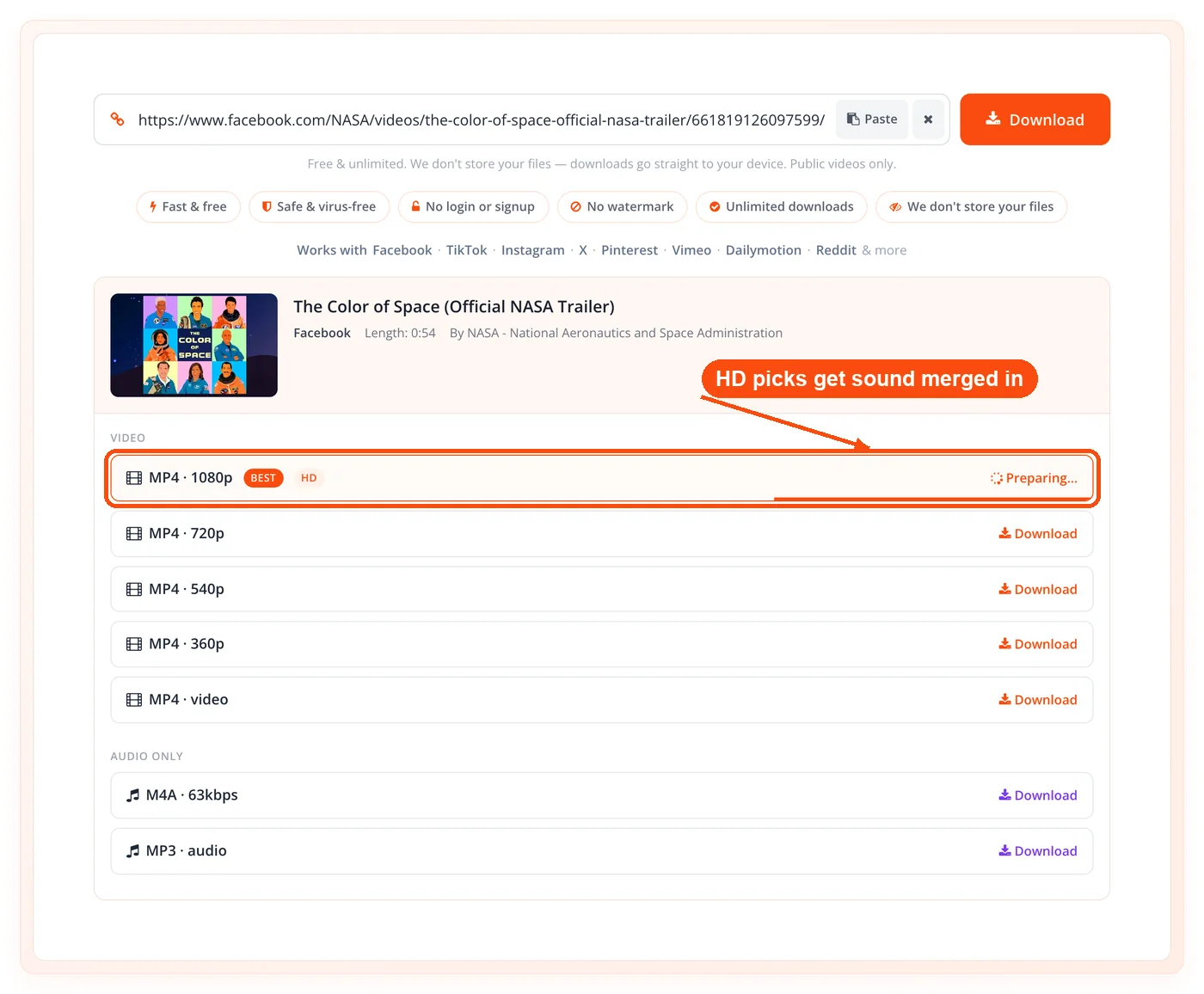
Audio merging with ffmpeg. Video-only streams are joined with the best available audio into a single MP4, which is how full 4K downloads keep their sound.
MP3 audio extraction. Convert any supported video to an MP3 file when you only need the sound.
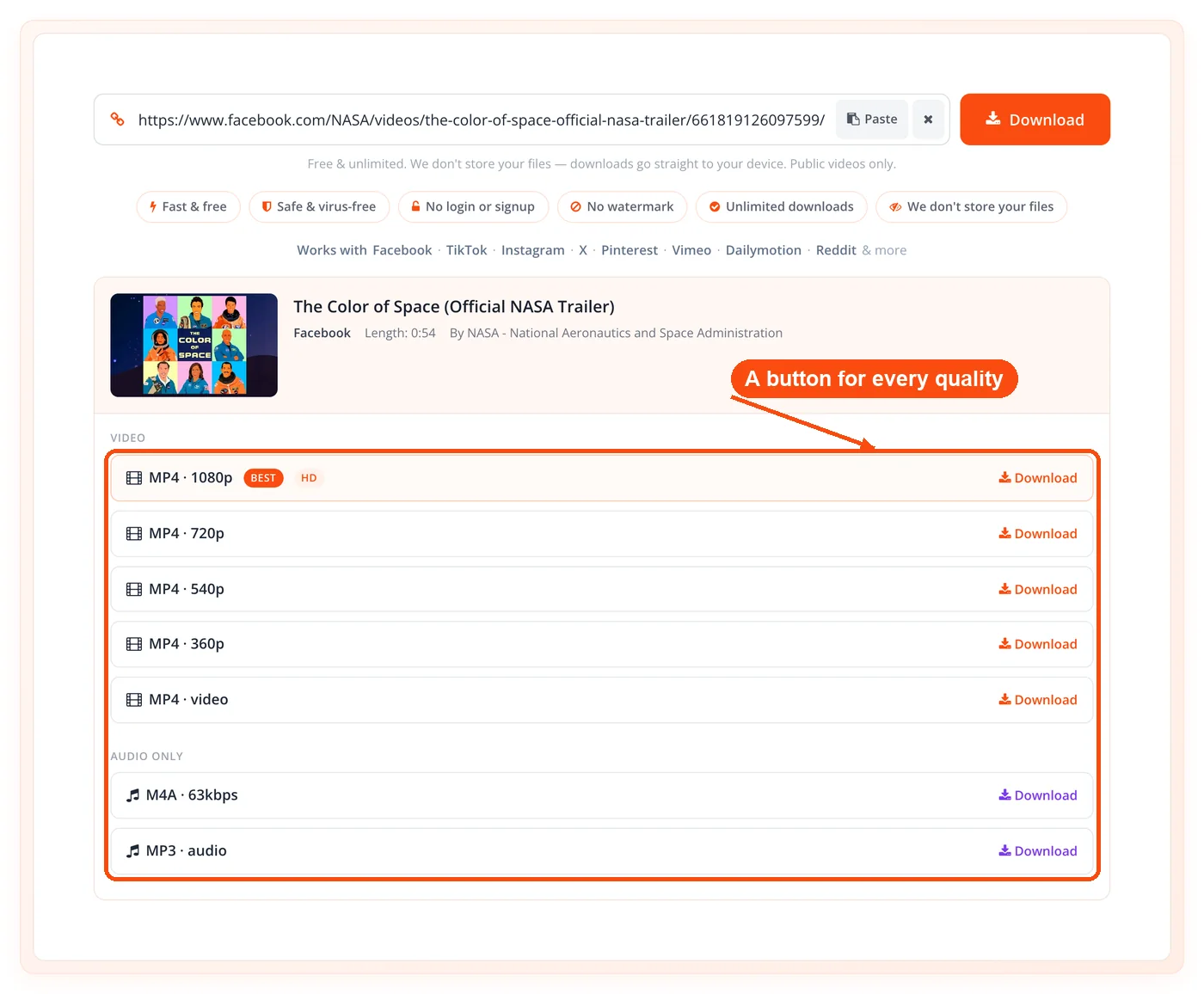
Instant metadata preview. Before you commit, the page shows the thumbnail, title, length, and a download button with the file size for each quality.
Ready-to-play streaming. Files that are already in a playable MP4 format pass straight through for the fastest possible download.
Multi-video link handling. When a link points to several videos, each one is listed as a separate item you can download individually.
Wide device compatibility. MP4 is the default output, so files play on phones, tablets, smart TVs, and desktops without extra conversion.
Built-in safety limits. Time and size guardrails keep the tool fast and stable instead of hanging on enormous or broken files.
No-install workflow. Everything runs in the browser on our server, so there's nothing to download to your machine except the video itself.
How It Works
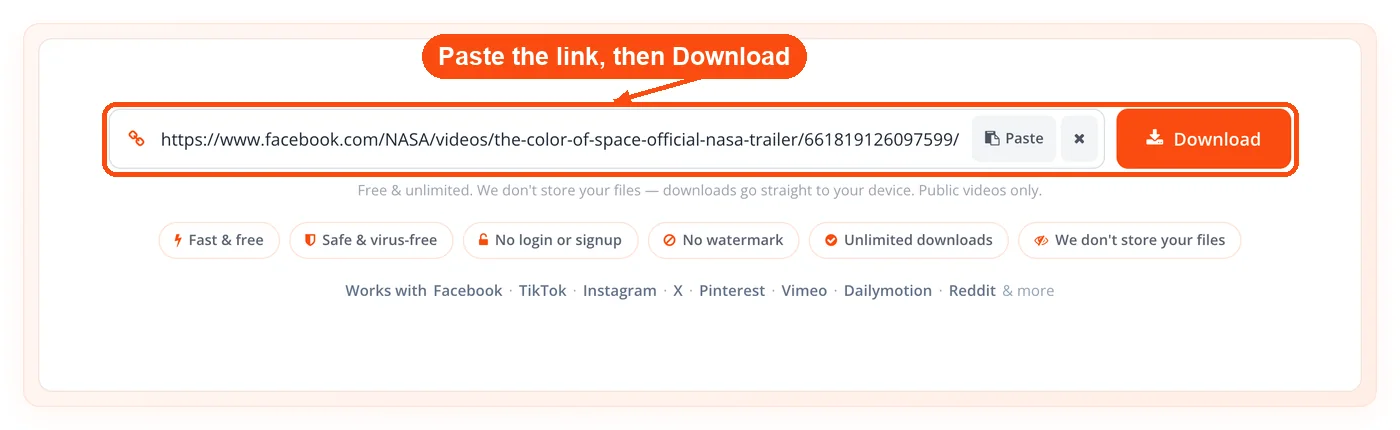
- Paste the video link. Copy the URL of any public video and drop it into the box, then hit Download.
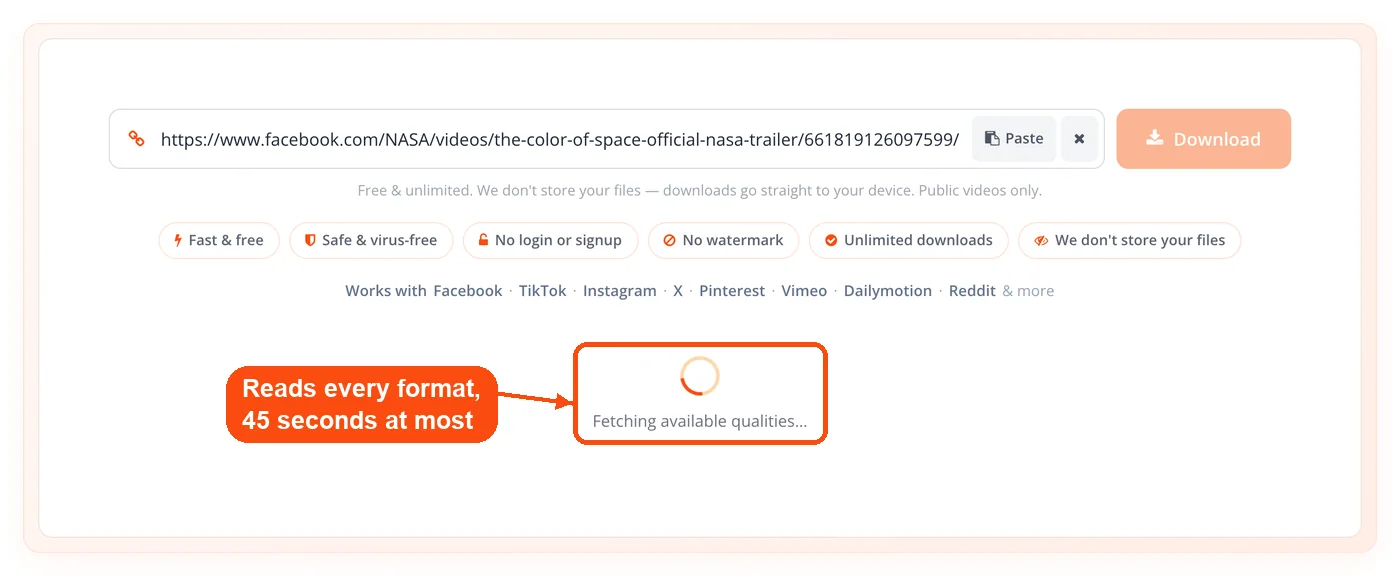
- Let the engine read it. The server fetches the page and pulls every available format with yt-dlp, working within a 45-second window so you're never left waiting.
- Pick your quality. The tool shows the thumbnail, title, and length alongside a download button for each resolution, plus the file size when the site reports one.
- Save the file. Choose a quality or the MP3 option, and the file downloads straight to your device in seconds. High-resolution picks are merged with audio first, then sent.
The whole flow happens on the tool's own server, so the quality you see is the real quality the source offers, not a watered-down fallback.
Who Should Use It
This tool is most useful when a single-platform downloader can't reach the video you need. Anyone who works with footage from many different sources benefits from one engine that handles them all, especially when audio quality and resolution actually matter.
Content creators save reference clips, B-roll, and competitor videos for study or remixing under fair use.
Educators and students build offline libraries of lectures, documentaries, and tutorials for classrooms with unreliable internet.
Researchers and journalists archive public videos before they disappear, keeping a local copy of primary sources.
Social media managers pull their own published footage back down to repurpose across platforms.
Podcasters and musicians extract audio from videos they own or have licensed for editing and reuse.
It's the wrong tool for private, login-walled, or DRM-protected content, which it won't access by design.
Real Workflows
Creator Saving Reference Footage
A creator wants to study three competitor intros posted on Vimeo and Dailymotion for their next video.
The result is a tidy local reference pack, full resolution and ready to edit, gathered in minutes.
Teacher Building an Offline Lesson
An instructor preparing for a classroom with patchy Wi-Fi needs documentary clips and a narrated summary.
- Download each clip in 720p to keep files light for a school laptop
- Pull the audio of one interview as MP3 for a listening exercise
- Generate a spoken summary with the text-to-speech converter
- Share each saved file to student devices through a QR code
The lesson runs smoothly offline, with no buffering to derail the class.
Researcher Archiving a Public Source
A journalist needs to preserve a public press conference video before it's edited or removed.
The archive holds a complete, verifiable copy for citation and review.
Supported Sites and Quality
The tool supports almost any public video site, not just the big social platforms. Because it runs on yt-dlp, it recognizes more than a thousand sources, including Vimeo, Dailymotion, and countless smaller hosts. YouTube is not supported. Quality goes up to 4K when the source provides it, and MP4 is the default output for the widest device support.
Output formats: MP4 video by default and MP3 for audio-only extraction.
Resolution range: A best-file-per-resolution ladder from 4K down to 240p.
Source limit: Public videos only, since the engine can't reach private or DRM-protected content.
You can also resize or repurpose exported frames and thumbnails with the image resizer once your video is saved, or trim a single still down to size with the crop image tool, which helps when prepping assets for a thumbnail or a blog post.
Responsible and Legal Use
Downloading a video is legal when you own the content, have permission, or the material is in the public domain. Saving copyrighted video without authorization can break a platform's terms of service or copyright law, so the responsibility sits with you. ToolsPivot's downloader works on public videos only and is meant for personal, educational, and fair-use purposes such as offline viewing, study, and archiving content you have the rights to.
If you plan to repost saved footage, strip identifying metadata from any exported images first with the EXIF data remover, and double-check the platform's rules before publishing.
Honest Limitations
This tool is deliberately scoped, and a few limits are worth knowing before you start. Being upfront about them saves you a failed download.
Time limits exist. A 45-second fetch limit and a 180-second download limit keep the service responsive, so very long videos or slow source servers can occasionally time out.
File sizes are capped. Merged video files are limited to 700 MB and MP3 files to 300 MB, which means a long 4K video may exceed the cap and need a lower resolution instead.
Public videos only. Private, login-walled, paywalled, and DRM-protected content won't download, by design and for legal reasons.
Quality depends on the source. The tool can't create a 4K file that doesn't exist; it only offers the resolutions the original video actually contains.
Sites change. Video platforms update their systems often, so an occasional link may fail until the engine catches up, which is normal for any downloader.
Not a bulk playlist tool. Multi-video links are handled as separate items rather than a single one-click archive of an entire playlist or channel.
Frequently Asked Questions
A video downloader is an online tool that saves a video from a web link directly to your device. Our version is universal, handling almost any public video site and outputting standard MP4 or MP3 files with no app to install.
Yes, it's completely free with no account, no daily limit, and no quality paywall. Every resolution the source offers, including 4K, is available at no cost.
No, there's no signup, login, or download required. The tool runs entirely in your browser, and only the video itself reaches your device.
It supports more than a thousand public video sites through the yt-dlp engine, including Vimeo and Dailymotion; YouTube is not supported. It covers far more than social platforms, which is what makes it a catch-all tool.
Yes, you can download up to 4K when the source video provides that resolution. High-resolution streams are merged with the best audio so the file keeps its sound.
Many downloaders can't merge the separate video and audio streams that high-resolution formats use. This tool uses ffmpeg to join them, so your 1080p and 4K files arrive complete and in sync.
Yes, any supported video can be saved as an MP3 file. This is useful for lectures, interviews, podcasts, and music you have the rights to use.
It runs one clean engine across every supported site, with no ads, redirects, or HD paywall. You get a real 4K ladder with merged audio and MP3 output, while tools like SaveFrom and 9xbuddy often cap quality or strip the audio.
No, the tool stores none of your files. Temporary merge and MP3 files are deleted the moment they're sent to your device.
Yes, merged video files are capped at 700 MB and MP3 files at 300 MB. A 45-second fetch and 180-second download window also apply, so extremely long videos may need a lower resolution.
No, the tool works on public videos only. Private, login-walled, and DRM-protected content can't be accessed, both by design and for legal reasons.
Downloading is legal when you own the content, have permission, or the video is public domain. Saving copyrighted material without authorization may violate a platform's terms or copyright law, so use the tool for personal and fair-use purposes.
Yes, the tool runs in any modern mobile browser, and MP4 output plays natively on phones, tablets, and smart TVs without extra conversion.
Yes, the interface and status messages are available in 18 languages, written natively rather than machine-translated for an international audience.
