AI Keyword Cluster Ideas
Get a pillar → child topical map for any keyword. Each child is tagged with search intent and recommended content type, so you know exactly what to write.
About AI Keyword Cluster Ideas
ToolsPivot's AI Keyword Cluster Generator is a free keyword clustering tool that groups related search terms into topic-based clusters using artificial intelligence, giving you a ready-made content plan in seconds. Enter a seed keyword, pick a search intent and funnel stage, and the tool returns organized keyword groups sorted by search intent. Unlike most clustering tools that require you to paste hundreds of pre-researched keywords first, ToolsPivot generates the clusters and the keywords for you, with no sign-up or download needed.
How to Use ToolsPivot's AI Keyword Cluster Generator
Enter your topic: Type a broad keyword or phrase into the "Seed Keyword" field. This is your pillar topic, like "email marketing" or "home workout routines."
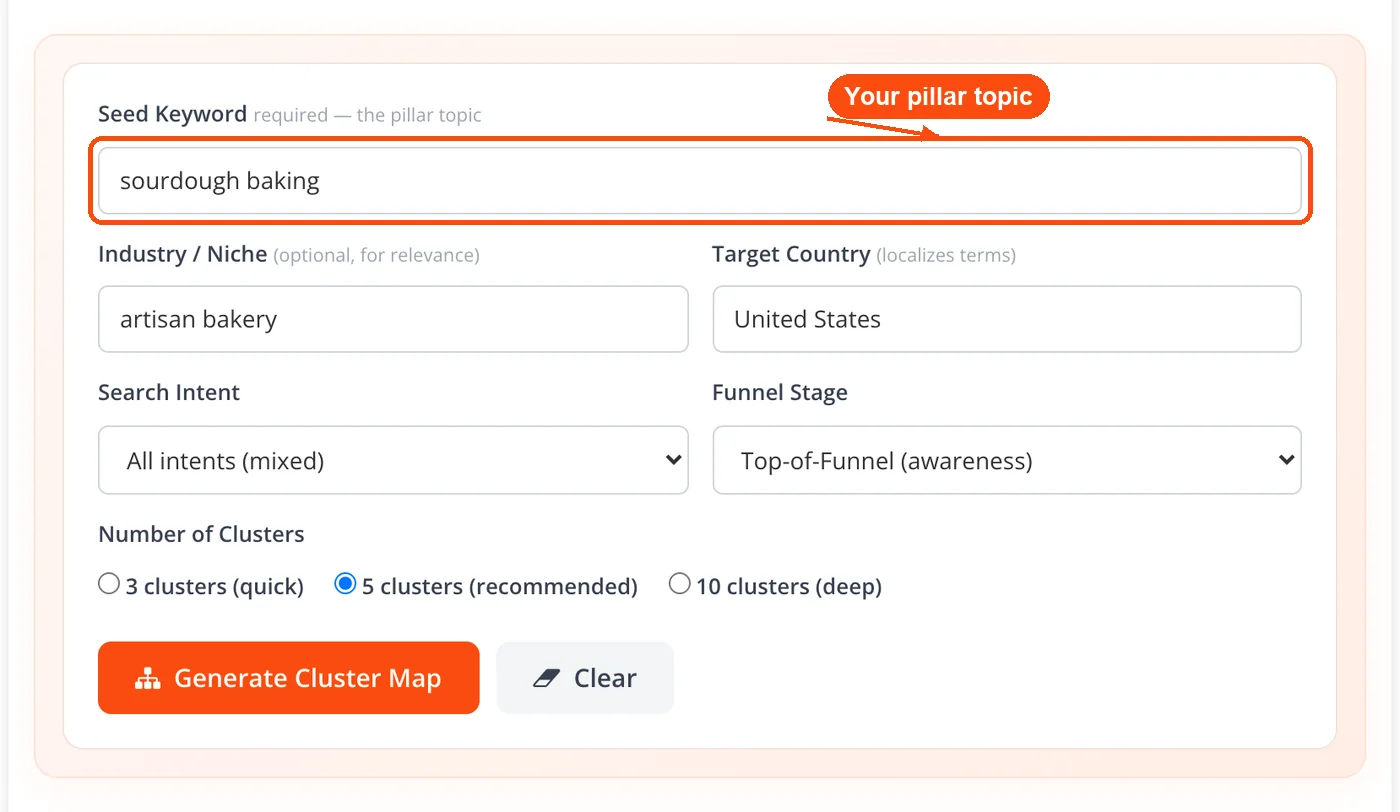
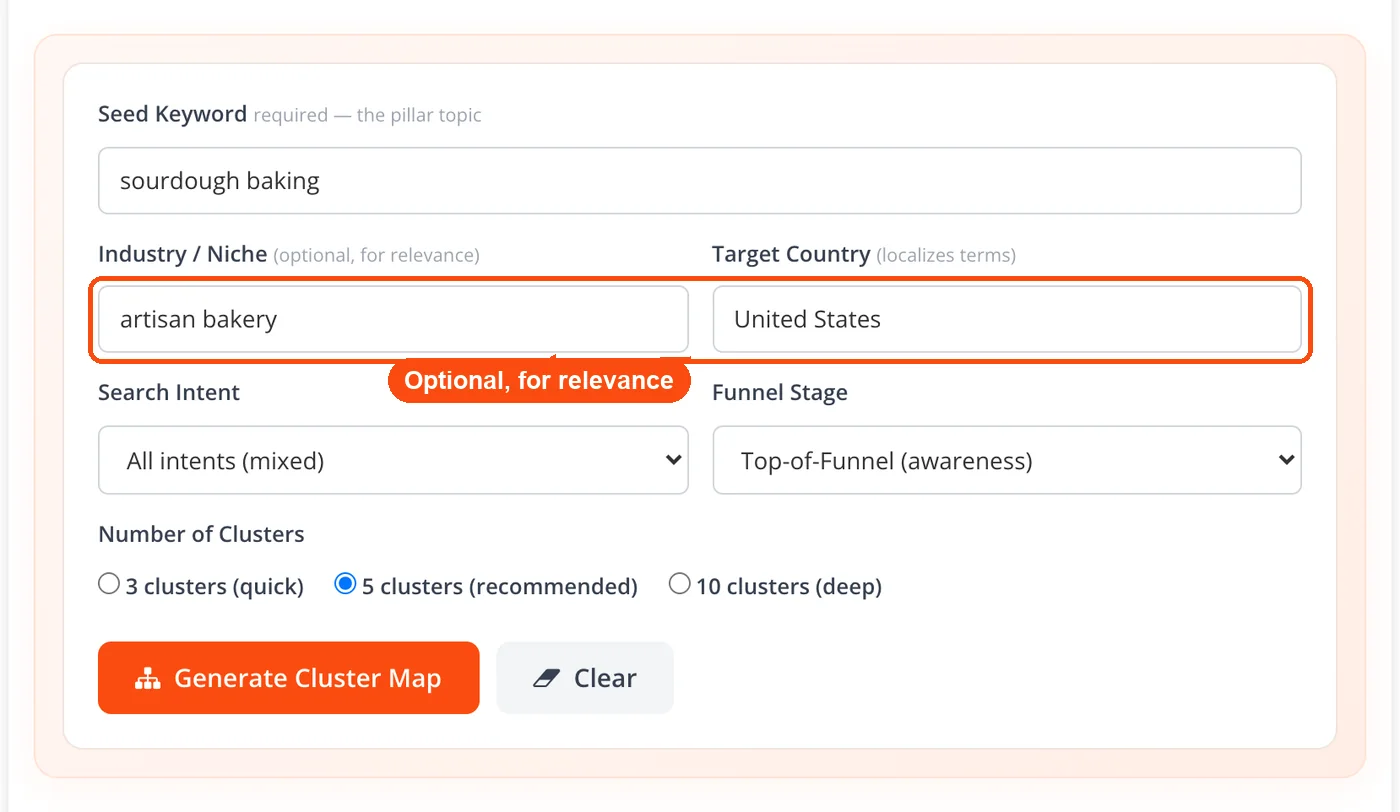
Add your niche and country: Optionally fill in "Industry / Niche" to keep the keywords relevant to your field, and "Target Country" to localize the terms. The more specific you are, the tighter the clusters.
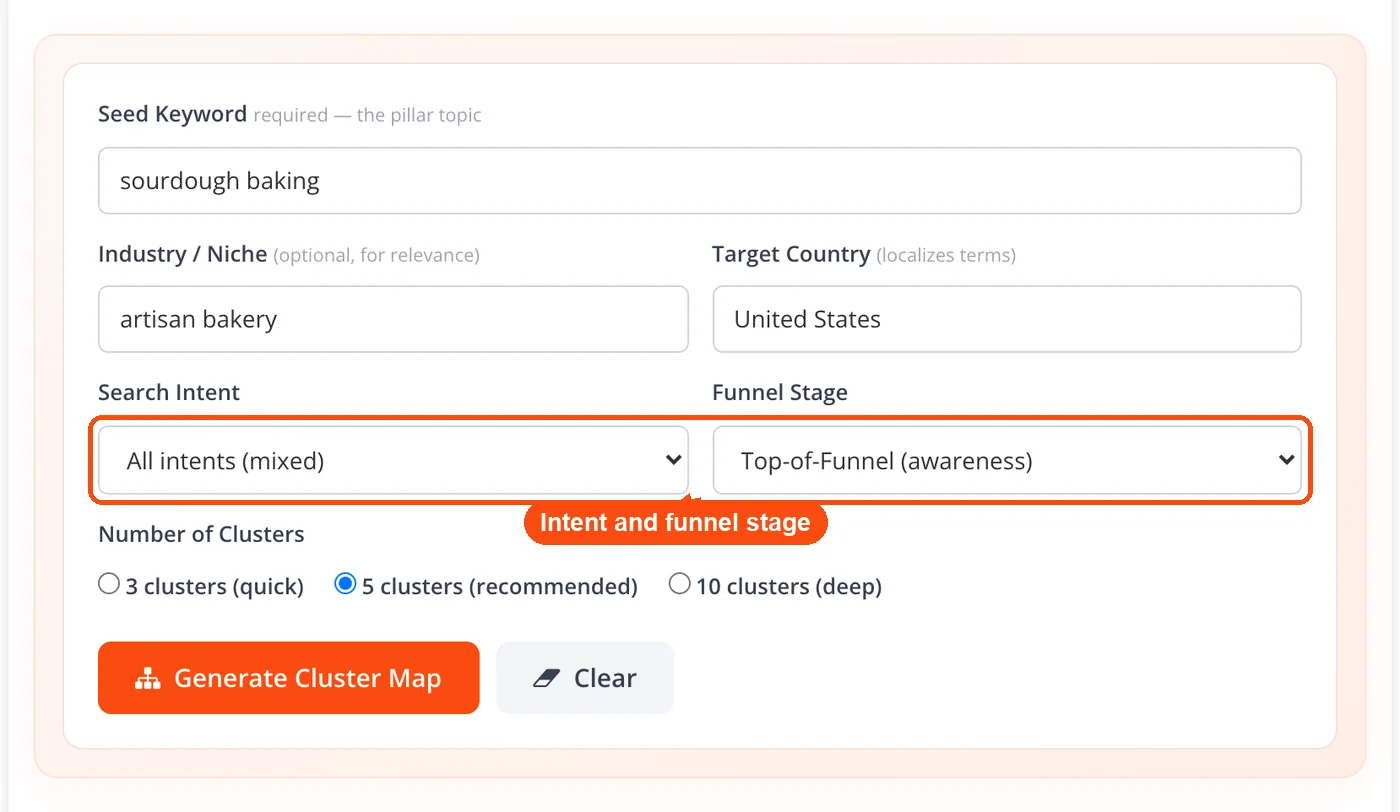
Set intent and funnel stage: Pick a search intent (all intents mixed, or informational, commercial, transactional, or navigational only) and a funnel stage (top, middle, or bottom of the funnel). These settings shape the focus of the generated clusters.
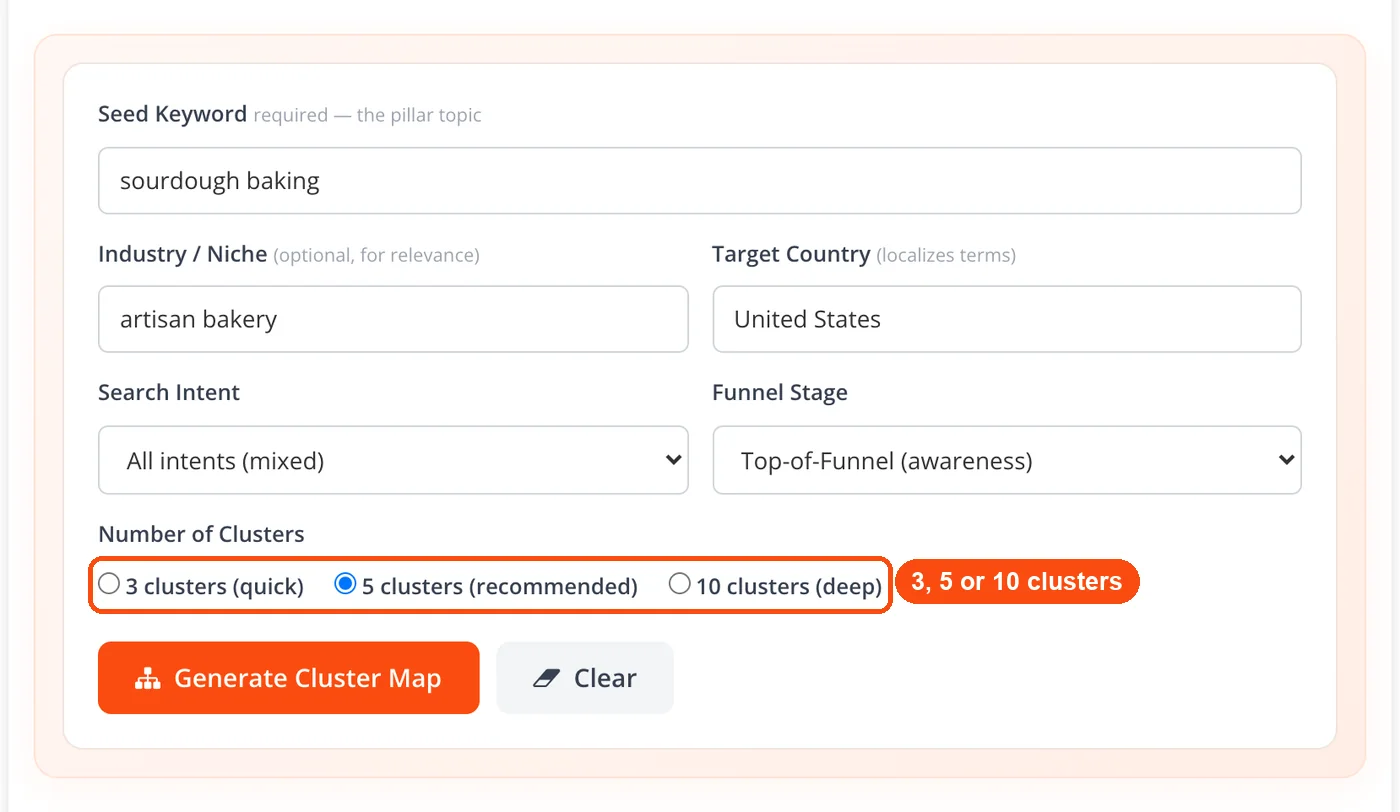
Choose how many clusters: Select 3 clusters for a quick plan, 5 (recommended), or 10 for a deep map. Planning a content calendar or a whole site section? Go deeper.
Click Generate: Hit "Generate Cluster Map." ToolsPivot's AI returns keyword clusters with a summary, the search intent and best content format for every keyword, and totals by intent. Download the map as a CSV, copy all keywords or a single cluster, or send any keyword to the title generator.
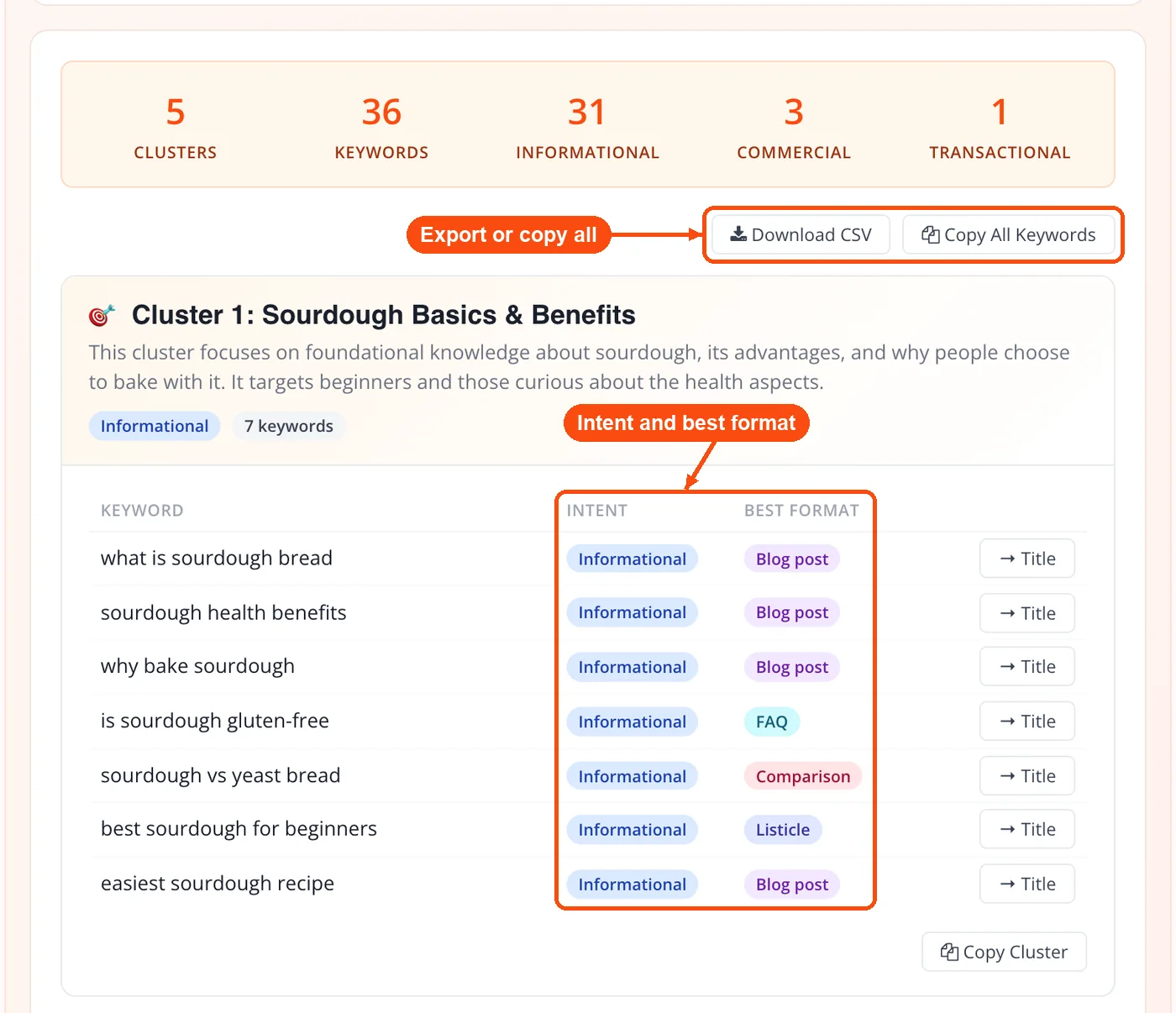
The whole process takes about 10-15 seconds. No account creation, no credit card, and up to 30 free AI generations a day.
What This Keyword Clustering Tool Does
Most free keyword tools give you a flat list of terms. This one does something different: it thinks in groups, and each group is an SEO keyword cluster you can build one page around. Here's what the generator actually produces and why each piece matters for your SEO workflow.
Intent-based cluster grouping: Keywords aren't just grouped by word similarity. The AI analyzes search intent (informational, commercial, transactional, navigational) and sorts terms into clusters that belong on the same page. That means fewer pages competing against each other for the same query.
Pillar and subtopic mapping: Each cluster naturally suggests a pillar page and supporting articles. If your seed keyword is "project management," you might get clusters around tools, methodologies, team workflows, and certification paths. That's four potential content hubs from one input.
Intent and funnel targeting: Pick one search intent (or all intents mixed) and a funnel stage. An informational, top-of-funnel map leans toward guides and how-to topics, while a transactional, bottom-of-funnel map leans toward product and comparison terms. This saves editing time later because the clusters already match the stage you are writing for.
Niche and country context: Adding an industry such as "SaaS marketing" or a target country such as "India" keeps the keywords relevant to your field and localizes the terms. Same seed keyword, very different output.
Copy and CSV export: Once the clusters are generated, copy all keywords or a single cluster with one click, download the full map as a CSV, or send any keyword to the AI meta title generator. Either way, the data is yours to drop into Google Sheets, Notion, Trello, or whatever planning tool you prefer.
Semantic keyword expansion: The AI doesn't just repeat variations of your seed term. It pulls in related concepts, long-tail phrases, and question-based queries that a manual brainstorm would likely miss. Pair this with the long-tail keyword generator for even deeper coverage.
Benefits of ToolsPivot's AI Keyword Cluster Generator
Skip the manual sorting: Grouping 500 keywords by hand in a spreadsheet takes hours. The generator handles this in seconds, and it catches intent overlaps that are easy to miss when you're staring at rows of data.
Avoid keyword cannibalization: When two pages target the same cluster of terms, they compete with each other in Google's results. This tool groups related terms together so you can target each cluster with a single, focused page. Use the keyword rank checker to monitor which pages rank for which terms after publishing.
No registration wall: Most keyword cluster tools (Keyword Insights, SE Ranking, thruuu) require an account or a paid plan before you see any results. ToolsPivot needs zero sign-up and shows the full cluster map right on the page.
Content planning in one step: Each cluster is basically a content brief waiting to happen. You get the topic, the supporting keywords, and a sense of user intent, all from one generation. That's enough to outline a blog post, brief a freelance writer, or map out a site section.
Works at any skill level: Freelance bloggers use it to plan their editorial calendar. SEO agencies use it to map client content strategies. E-commerce managers use it to organize product category pages. The tool scales to whatever you need.
Pairs well with other ToolsPivot tools: Start with the keyword research tool to find your seed terms. Run them through the cluster generator. Then write your content and check it with the keyword density checker to make sure you've covered the cluster naturally.
Single Keywords vs. Keyword Clusters: What Actually Changes
Targeting one keyword per page used to work. Google's algorithm was simpler, and ranking for "best running shoes" meant stuffing that exact phrase into your title, headers, and body text. That approach stopped working around 2015 when RankBrain started interpreting query meaning rather than just matching words.
Search engines now understand that "best running shoes," "top-rated shoes for running," and "what running shoes should I buy" all mean roughly the same thing. If you write three separate articles for those phrases, Google has to pick which one to show. Often, it picks none of them because the signals are diluted across pages.
Keyword clustering solves this by grouping those three phrases (and 10-20 more like them) into one cluster. You write one strong article targeting the full cluster, and Google rewards the depth. Data from Semrush shows that pages optimized for keyword clusters rank for roughly 3x more individual search terms than pages targeting a single keyword. That translates directly into more organic traffic from the same amount of writing effort.
So what does this look like in practice? Say you run a fitness blog and your cluster contains "home dumbbell workout," "dumbbell exercises at home," "best dumbbell routine no gym," and "full body dumbbell workout plan." Instead of four thin posts, you write one 2,000-word guide covering all four angles. You rank for all of them. Your readers get a complete resource. Google sees topical depth. Everyone wins.
ToolsPivot's generator does the grouping step automatically. You don't need to pull keyword lists from Ahrefs or Google Keyword Planner first, paste them into a spreadsheet, and manually sort by intent. Just enter your topic, and the AI handles the rest. If you want to check the search volume behind specific terms afterward, run them through a keyword CPC calculator or cross-reference with Google Search Console data.
Putting Your Clusters to Work
Getting clusters is step one. Turning them into published content that ranks is where the real value shows up. Here are three ways real users apply the output from this tool.
Building a blog content calendar
A freelance content writer working across multiple niches generates clusters for each client's core topics. One seed keyword like "personal finance tips" might return 6-8 clusters covering budgeting, investing, debt payoff, credit scores, saving strategies, and retirement planning. Each cluster becomes one article slot in a monthly calendar. The writer checks each article against the readability checker before delivery and runs it through the plagiarism checker to confirm originality. That's 6-8 weeks of content planned in under a minute.
Structuring an e-commerce category page
An e-commerce manager running a Shopify store selling outdoor gear enters "camping equipment" as the seed keyword. The clusters come back organized around tents, sleeping bags, cooking gear, lighting, and backpacks. Each cluster maps to a product category page, and the keywords within each cluster become the H2s and product descriptions on that page. The manager then writes meta titles using the AI meta title generator and descriptions with the meta description generator, all matched to the cluster's primary keyword.
Planning a pillar content hub for an agency client
An SEO agency mapping out a content strategy for a SaaS client enters "customer relationship management" into the tool. The clusters reveal subtopics like CRM software comparisons, CRM for small business, CRM integrations, CRM data migration, and CRM reporting dashboards. The agency builds a pillar page covering CRM broadly, then creates supporting articles for each cluster. Internal links between the pillar and cluster pages tell Google the site has deep expertise on the topic. The agency validates the site's overall health with the website SEO checker before the content goes live.
Common Questions About AI Keyword Clustering
A keyword cluster is a group of search terms that share the same meaning and intent, so one page can rank for all of them. Here is a keyword cluster example: a cluster for home workouts could hold home dumbbell workout, dumbbell exercises at home and full body dumbbell workout plan, all answered by one guide. This tool builds clusters like that, with a pillar topic and child keywords, from a single seed keyword. Keyword cluster mapping then gives each cluster one page, which is why every cluster in the map comes with a pillar page and a content type.
Yes, it is a 100% free keyword cluster tool with no account required. There's no credit card prompt and no feature locked behind a paywall, and you get 30 free AI generations per day (shared with the AI meta title and description tools). Enter your keyword, generate clusters, and copy or download the results as CSV. Your seed keyword and settings are sent to the AI model to build the map, and no personal details are needed.
SERP-based clustering (used by tools like thruuu and ContentGecko) groups keywords that share overlapping search results on Google. AI-based clustering, which ToolsPivot uses, groups keywords by semantic meaning and search intent using natural language processing. Both approaches are valid. SERP-based clustering shows you how Google groups terms right now. AI clustering helps you discover related terms you haven't thought of yet.
The clusters are primarily designed for Google SEO and blog content planning. But the keyword groups also work well for YouTube video planning (each cluster maps to a video topic) and Amazon product listing copy (each cluster suggests category keywords). For YouTube specifically, you can extract tags from competitor videos using the YouTube tag extractor and combine those with your cluster output.
Cluster size depends on the topic's breadth. Narrow seed keywords like "keto breakfast recipes" might produce clusters of 5-8 terms each. Broad terms like "digital marketing" generate larger clusters with 10-15+ keywords. The AI adjusts automatically based on how many semantically related terms exist for your input.
Keyword clusters group individual search terms that share the same intent and should be targeted on a single page. Topic clusters are a content architecture strategy where one pillar page links to multiple supporting pages covering subtopics. They work together: keyword clusters tell you which terms go on each page, and topic clusters tell you how those pages connect to each other.
The AI generator gives you a strong starting point, but pairing it with manual research makes the output even better. Use the questions explorer tool to find real questions people ask about your topic, then fold those into your cluster-based content plan. You can also run your primary keywords through ToolsPivot's keyword research tool for volume and competition data.
The tool works best with English-language keywords since the AI model processes English semantic relationships most accurately. You can enter keywords in other languages, but the cluster quality may vary. For English content targeting the US, UK, Canada, Australia, or India markets, the results are consistently strong.
Search behavior shifts over time, so regenerating clusters every 3-6 months for your core topics is a good practice. Seasonal topics (like "holiday gift ideas" or "tax preparation") benefit from fresh clusters before each peak season. The tool is free and instant, so there's no reason not to refresh your data regularly.
Yes, and this is one of the most practical uses. Generate clusters for your main topics, then compare the clusters against your existing pages. If two articles target keywords from the same cluster, consolidate them into one stronger page. Use the word counter tool to check whether the merged article hits a competitive word count (1,500+ words for most topics).
Mid-range specificity works best. Too broad ("marketing") returns clusters that are too scattered. Too narrow ("blue size 10 running shoes for women") leaves little room for grouping. Aim for 2-3 word phrases that describe a clear topic: "email marketing," "home renovation tips," or "vegan protein sources." Add context in the Industry / Niche field if you want tighter results.


