A Facebook video downloader is an online tool that saves public Facebook videos, Reels, and Watch clips to your device as MP4 video or MP3 audio. The ToolsPivot Facebook Video Downloader solves a problem the platform leaves wide open: Facebook gives most viewers no built-in save button, so a clip you want for offline viewing or a presentation slips away the moment you scroll past it. Paste a link, pick a quality, and the file lands on your phone or computer in seconds. It works for marketers archiving campaign videos, students saving lecture clips, and anyone who wants a video available without a connection.
What the Facebook Video Downloader Does
The tool fetches a public Facebook video from a link and hands you a downloadable MP4 or MP3 file. You paste a Facebook URL, the server reads the video's metadata and available formats, and you choose the quality you want. Under the hood, ToolsPivot runs the yt-dlp engine with ffmpeg on the server, so it pulls clean source files instead of screen-recorded copies.
Primary users and use cases: Social media managers, content creators, educators, and researchers use this tool most. A marketer saves a viral Reel to study its pacing. A teacher downloads a public explainer clip to play in a classroom without buffering. A small business owner archives its own published videos before a page cleanup.
The problem it fixes: Facebook is built to keep you watching inside the app, not to let you keep a copy. Browser tricks and right-click saves usually fail or grab a thumbnail instead of the video. This tool returns a working MP4 in HD or SD, with an MP3 option when you only need the audio.
Key Benefits
Real HD output. Most free downloaders cap you at blurry SD. This tool offers the highest quality Facebook serves for that video, then merges the audio so HD files actually play with sound.
MP3 audio extraction. Pull just the audio from any supported clip when you want a podcast segment, a voiceover, or background music for a project. Pair an extracted track with the text to speech converter if you need a narrated version instead.
No ads or redirect traps. Sites like getfvid and fdown bury the download button under pop-ups and fake "download" links. The tool shows you the file and nothing else.
No account, no login. You never sign up, hand over an email, or install an extension. Open the page and paste a link.
Nothing is stored. The tool keeps no copy of the video and logs no download history. Your activity stays yours.
Works in 18 languages. The interface adapts to your language, so the same workflow serves users from São Paulo to Jakarta.
Unlimited and free. There is no daily cap, no premium tier, and no watermark added to your file.
Honest about what it can't do. Private videos and anything behind a login return a clear message instead of a broken download or a misleading "processing" spinner.
Core Features
Facebook-only validation. The tool accepts links from facebook.com, fb.watch, and fb.com, and rejects anything else with a plain message. That keeps the service focused and predictable.
Reels and Watch support. Short-form Reels and longer Watch clips both work, not just standard feed videos. Paste the share link from any of the three.
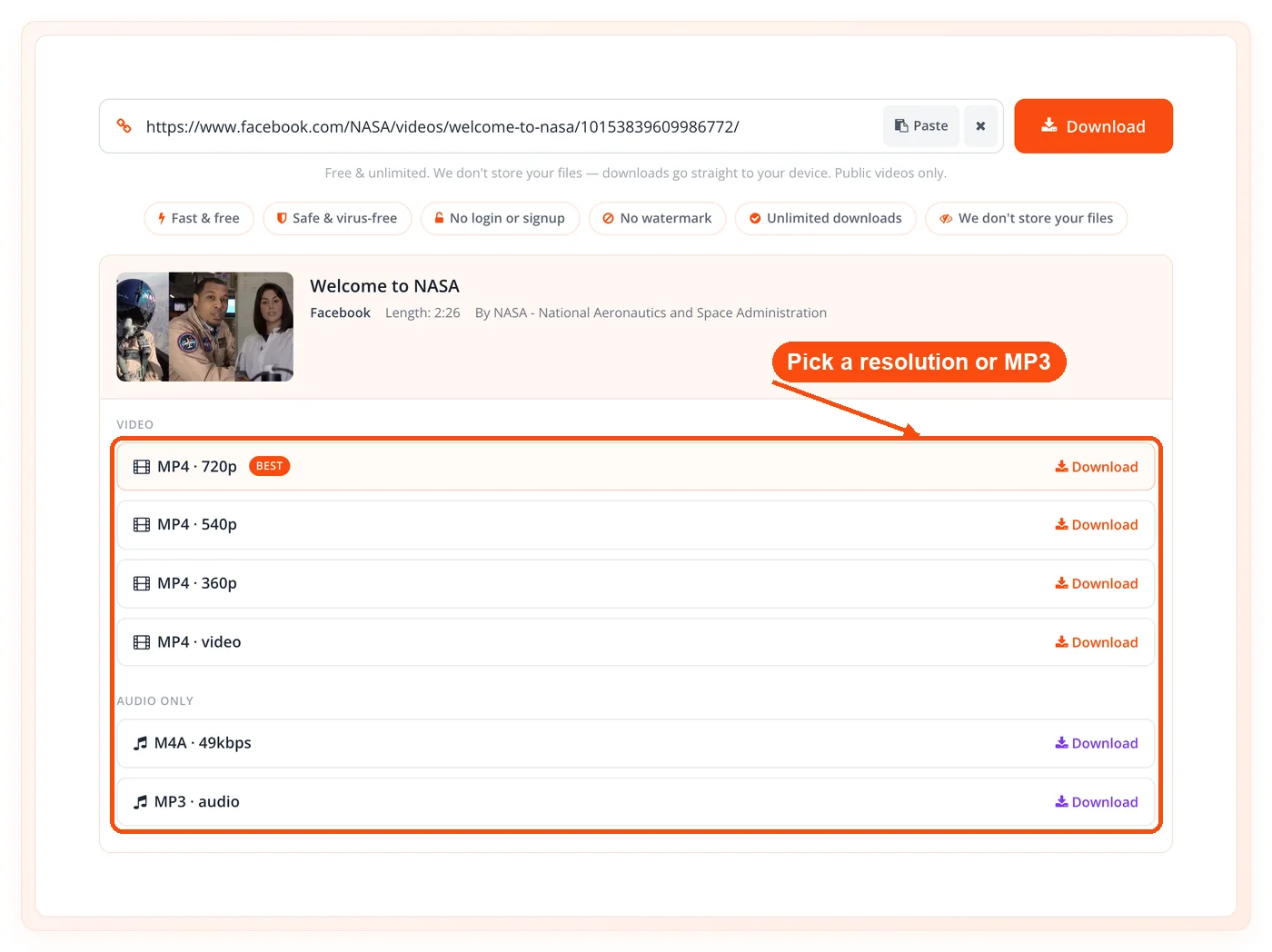
HD and SD quality picker. After the tool reads the video, it lists every available quality, up to twelve options, so you choose the resolution that fits your storage and purpose.
Audio merging with ffmpeg. Higher resolutions on Facebook often ship as video-only streams. The tool merges the matching audio track into a single MP4 automatically, so HD files never arrive silent.
Progressive MP4 streaming. When Facebook serves a combined video-and-audio file, the tool streams it straight through without re-processing, which makes those downloads near-instant.
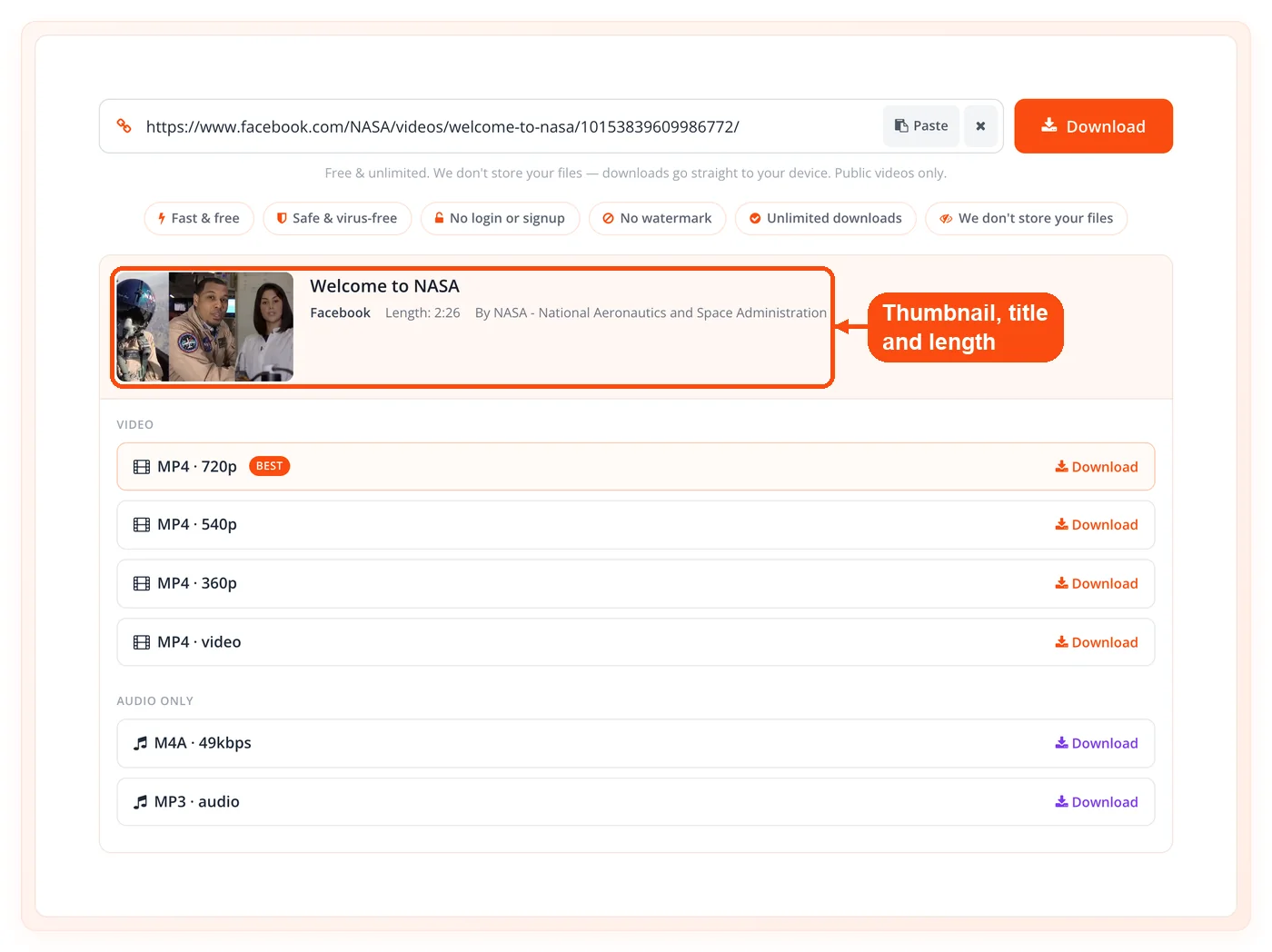
Metadata preview. Before you commit, you see the thumbnail, title, and length. That confirms you grabbed the right clip, which matters when several videos share similar names.
Ten-minute result caching. Once the tool reads a link, it caches the result for ten minutes. Re-checking the same video or switching quality is faster because the lookup already ran.
Cross-device access. The tool runs in any modern browser on Windows, macOS, Android, and iOS. No app, no plugin, no operating-system limits.
Clear failure messages. Links that need a login, point to a private post, or sit on a non-Facebook host return a specific reason rather than failing silently.
How It Works
Copy the Facebook video link. On desktop, click the three-dot menu on the video and choose "Copy link." On mobile, tap Share, then "Copy link." Reels and Watch clips use the same Share menu.
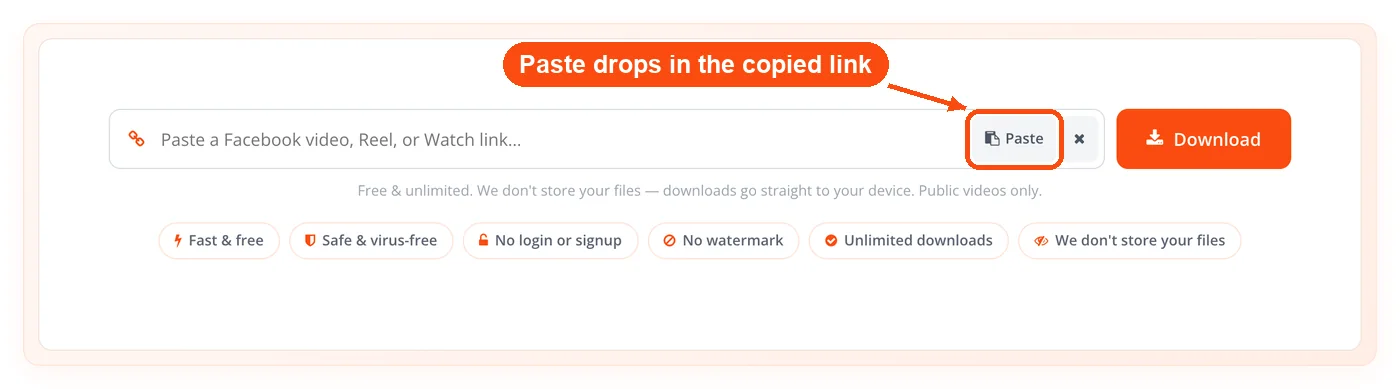
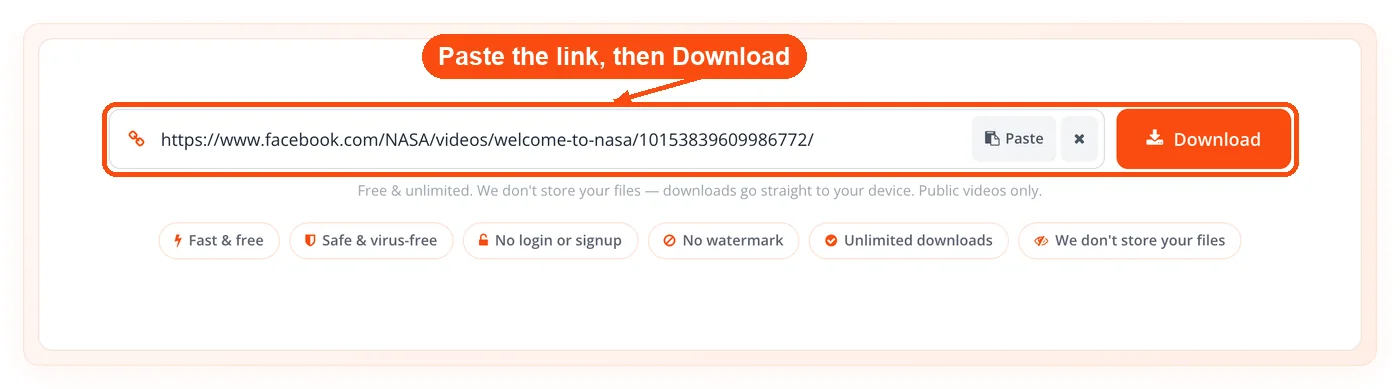
Paste it into ToolsPivot. Drop the URL into the input box on the Facebook Video Downloader page and submit. The server confirms it is a real Facebook link before doing anything else.
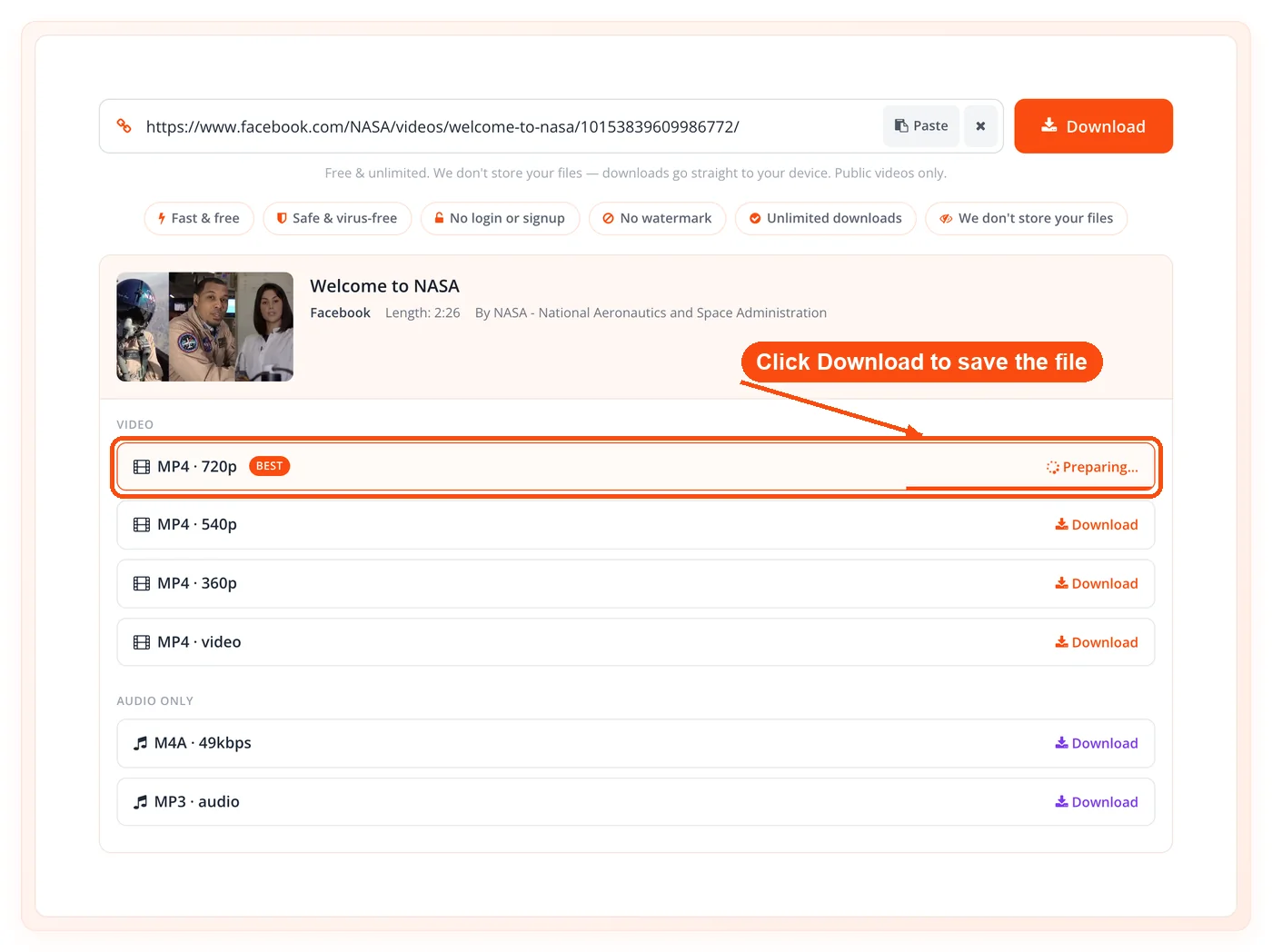
Review the preview. The tool reads the video and shows the thumbnail, title, length, and a list of qualities. This fetch finishes in seconds for most public clips.
Pick HD, SD, or MP3. Choose a video resolution for a full MP4 or select the MP3 option to save audio only. The tool prepares the exact file you picked.
Save to your device. Click download and the file transfers to your phone or computer. From there you can play it offline, edit it, or move it into a project folder.
When to Use a Facebook Video Downloader
A Facebook video downloader earns its place whenever you need a clip to live outside the app. That covers offline viewing, content archiving, and any workflow where a streamed video isn't reliable enough.
Offline viewing. Save a public tutorial or talk before a flight, a commute, or a trip where data is scarce or expensive.
Content repurposing. Marketers and editors pull a clip into editing software to cut highlights, add captions, or build a recap reel.
Archiving your own videos. Page owners back up published videos locally before a redesign, a migration, or an account cleanup.
Classroom and training material. Educators download public explainer videos to play in lessons without depending on the venue's internet.
Research and analysis. Social media analysts collect public campaign videos to study trends, hooks, and pacing across competitors.
Audio-only needs. Podcasters and musicians extract MP3 tracks from public clips for transcription, sampling references, or offline listening.
Private content and anything requiring a login will not work by design, which is intentional rather than a flaw.
Use Cases
Social Media Marketer
Context: A brand manager wants to study a competitor's viral Reel before planning the next campaign.
Process:
- Copy the public Reel's share link from Facebook.
- Paste it into the Facebook Video Downloader and pick HD.
- Save the MP4 and open it in an editor to analyze pacing and hooks.
Result: The team builds a data-backed brief in an afternoon instead of rewatching the clip on a phone.
Educator Building a Lesson
Context: A teacher found a public science explainer on Facebook and wants to show it in class.
Process:
- Copy the video link from the Watch page.
- Download it in SD to keep the file small and classroom-friendly.
- Drop the MP4 into the lesson slides for offline playback.
Result: The lesson runs smoothly even when the room's Wi-Fi drops, with no buffering in front of students.
Small Business Archiving
Context: A shop owner is cleaning up an old Facebook page and wants local backups of every video first.
Process:
- Copy each public video link from the page.
- Download HD MP4 copies one by one through the tool.
- Store the files in a dated folder alongside captions saved with the word counter tool.
Result: The page gets a fresh start with nothing lost, and the originals stay ready for reuse.
Podcaster Pulling Audio
Context: A podcaster wants a public interview clip's audio as a reference for a transcript.
Process:
- Copy the Facebook video link.
- Choose the MP3 option to extract audio only.
- Run the file through a transcription workflow, then tidy the text with the grammar checker.
Result: A clean reference track and transcript, without downloading a full HD video you don't need.
HD vs SD: Which Quality Should You Pick
Pick HD when the video's detail matters and SD when file size or speed matters more. HD preserves the original sharpness, which is what you want for editing, presentations, or any clip you'll watch on a large screen. SD produces a much smaller file that downloads faster and plays fine on a phone, which suits quick offline viewing or messaging.
Key points:
- Choose HD for editing or big screens: Maximum detail, larger file, slower download.
- Choose SD for phones and quick saves: Smaller file, faster transfer, lower detail.
- Availability varies by video: A clip uploaded in low resolution won't offer a true HD option.
Is It Legal to Download Facebook Videos
Downloading your own Facebook videos is generally fine, while downloading someone else's depends on copyright and how you use the file. The person who created a video owns its copyright the moment it exists, so saving another creator's clip without permission can raise legal issues, especially if you republish it or use it commercially. Personal, private viewing of a public video is the lowest-risk use, but it is not a guarantee of permission. This is general information, not legal advice, and Facebook's own terms of service add their own rules on top of copyright law.
Key points:
- Your own content: Saving videos you posted is the safest case.
- Others' content: Get permission before reusing, editing, or republishing.
- Public does not mean free to reuse: A public post is still copyrighted.
Limitations to Know
The Facebook Video Downloader works only with public videos and a defined set of formats, and it is upfront about every boundary. These are deliberate design choices that keep the service fast, private, and predictable.
- Public videos only. Private posts, friends-only videos, and anything that needs a login return a clear "can't download" message. The tool never tries to bypass Facebook's privacy.
- No live streams or Stories. It handles standard videos, Reels, and Watch clips. Live broadcasts and Stories are outside its scope.
- Facebook hosts only. Links must come from facebook.com, fb.watch, or fb.com. Other platforms are rejected with a plain message. For YouTube visuals, the YouTube thumbnail downloader is the right tool instead.
- Size caps on processing. Merged MP4 files are capped at 700 MB and MP3 extractions at 300 MB, which covers the vast majority of clips but not extremely long videos.
- Time limits on each step. Reading a link times out at 45 seconds and a download at 180 seconds, so an unusually slow or oversized source may not complete.
- Fresh links only. You can download only a video the tool just read for you. Old or expired result links won't work, which keeps stale files from being served.
Tips for Content Creators and Marketers
Treat downloaded clips as raw material, not finished posts, and your repurposing will hold up better. The cleanest workflow is to save the HD source, edit it in your own software, and add fresh captions rather than reposting a video as-is. Before you publish anything built from a downloaded clip, confirm you have the right to use it, since a public video is still someone's copyrighted work.
Key points:
- Save HD for editing headroom: Lower resolutions limit what you can crop or zoom.
- Add original captions: Rewrite, don't copy, and check flow with the readability checker.
- Verify rights before reposting: Permission protects your account and your brand.
When you build a new post around repurposed footage, the paraphrasing tool and the article rewriter help you turn a video's talking points into original copy, and the Open Graph generator makes sure your share preview looks right when the new post hits Facebook and LinkedIn. Creators chasing reach on multiple platforms can also tighten their YouTube metadata with the YouTube tag extractor.
How This Tool Compares to getfvid and fdown
ToolsPivot delivers real HD with merged audio, an MP3 option, and zero ad redirects, while getfvid and fdown are single-purpose sites that often cap quality at SD and bury downloads under ads. Users of those long-running sites routinely complain about pop-ups, redirect chains, and silent HD files that play without sound. Some rival downloaders advertise private video downloads, which this tool deliberately does not do, because pulling private content means working around a person's privacy settings.
The practical difference is what you get and what you give up. The tool asks for no login, no email, and no installed extension, and it stores nothing after your download finishes. You can verify a downloaded thumbnail's source with the reverse image search or strip location data from any saved frame using the EXIF data remover before you reuse it. For most people who just want a clean Facebook clip without the ad gauntlet, that focus is the whole point.
Frequently Asked Questions
Copy the video's link from Facebook's Share or three-dot menu, paste it into the Facebook Video Downloader, and pick a quality. The file then saves directly to your device.
Yes, the tool is completely free with no daily limit, no account, and no premium tier. Every quality, including HD and MP3, is available at no cost.
Yes, the tool supports standard Facebook videos, Reels, and Watch clips. Paste the share link from any of the three into the input box.
No, the tool works with public videos only and returns a clear message for anything that needs a login. This is intentional and protects people's privacy settings.
Paste the video link, then choose the MP3 option instead of a video resolution. The tool extracts the audio and saves it as a single MP3 file.
You get the highest resolution Facebook serves for that specific video, which is often true HD. The tool merges audio into HD files automatically so they never play silent.
No, the entire tool runs in your web browser. There is no app, plugin, or extension to install on any device.
No, ToolsPivot keeps no copy of your video and logs no download history. The result is processed and served, then nothing is retained.
Yes, the tool works in any modern mobile browser on iOS and Android. Use the Share menu in the Facebook app to copy the link, then paste it in.
The most common reasons are a private post, a link that needs a login, or a URL from a non-Facebook site. The tool shows a specific message explaining which one applies.
Downloading your own videos is generally fine, while others' videos depend on copyright and how you use them. Saving a public clip for personal viewing is lowest-risk, but this is general information, not legal advice.
Merged video files are capped at 700 MB and audio at 300 MB to keep processing fast and reliable. These caps cover almost every typical clip, though very long videos may exceed them.
No, the tool handles standard videos, Reels, and Watch clips, not live broadcasts or Stories. Those formats fall outside what it supports.
The Facebook Video Downloader interface is available in 18 languages. The same paste-and-download workflow stays identical across all of them.
