About URL Shortener
A URL shortener converts a long web address into a short one that redirects to the original page. The ToolsPivot URL Shortener is a free link shortener that runs on our own servers: it gives you a link on our domain and adds a custom name, a QR code, a click counter, and an optional expiry date without asking for an account. Long tracking URLs break across lines in email, eat characters on X, and look untrustworthy in a text message. A short link fixes all three in about a second.
Most free shorteners charge for the parts you need. Bitly's free tier allows 5 new links a month and shows an ad page before the redirect. TinyURL gives unlimited links but no click data unless you pay. This tool gives you both as a free URL shortener, no sign-up needed.
What a URL Shortener Actually Does
A URL shortener stores your long destination in a database, assigns it a short code, and redirects anyone who opens that code to the original address. The short link is not a copy of your page. It is a pointer, and the redirect happens at the server before the visitor's browser ever loads anything.
That pointer model is why short links do things a raw URL cannot. The server sits between the click and the destination, so it can count the click, refuse an expired link, or screen the destination for malware first.
It also creates a dependency. If the service that owns the redirect disappears, every link you shared stops working. Google's goo.gl shortener stopped serving previously inactive links in August 2025, and anyone who had printed those links found out the hard way.
How ToolsPivot URL Shortener Works
- Paste your destination. Drop the full address into the input field, including the https:// prefix. Open the Options panel if you want a custom name or an expiry date.
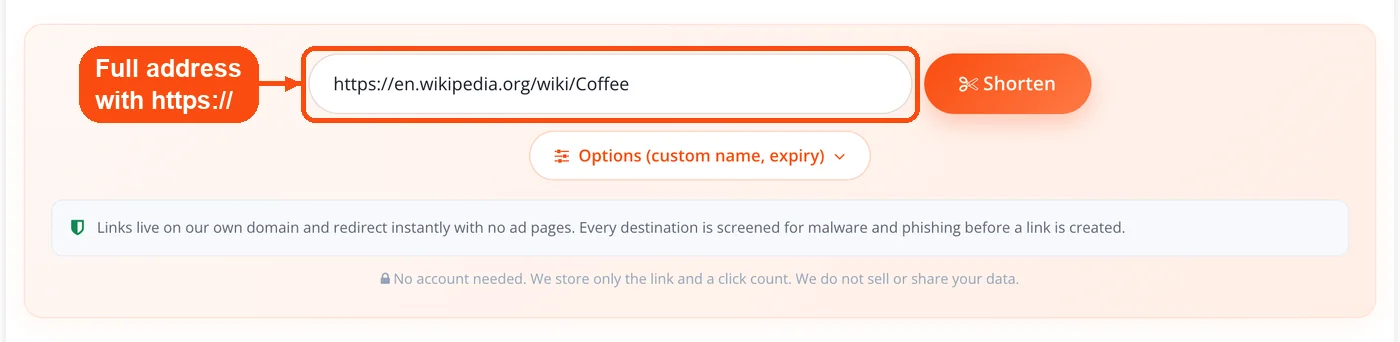
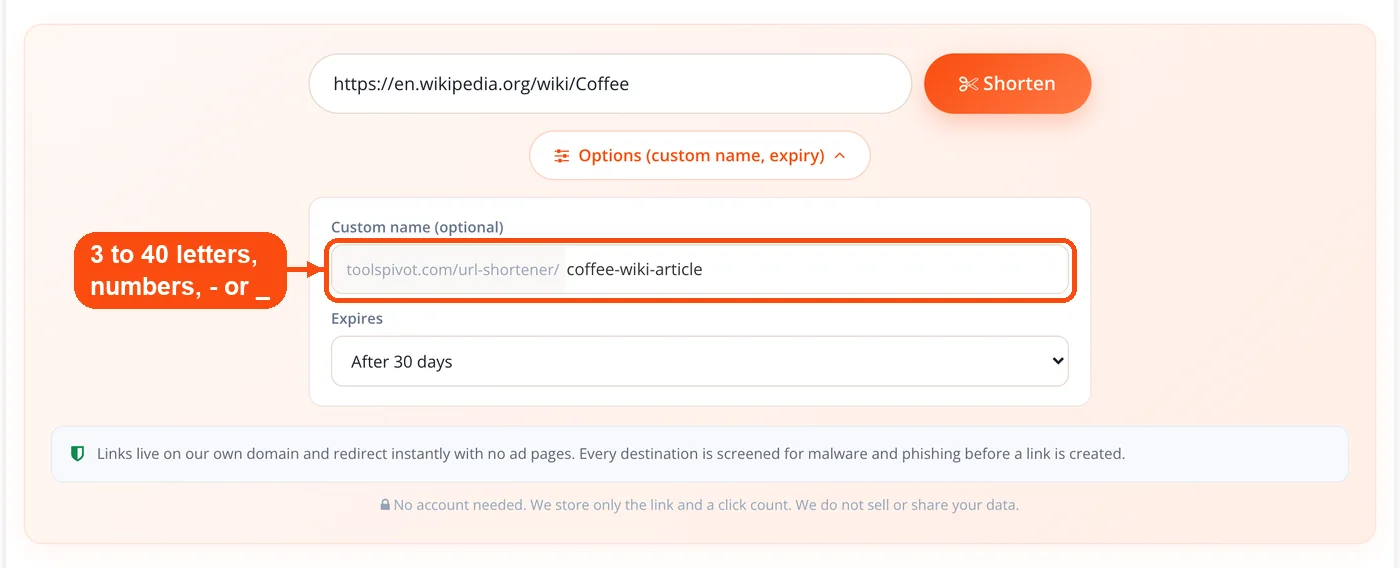
- Add a custom name (optional). Type 3 to 40 characters using letters, numbers, hyphens, or underscores. The server checks the name against existing links and rejects collisions immediately.
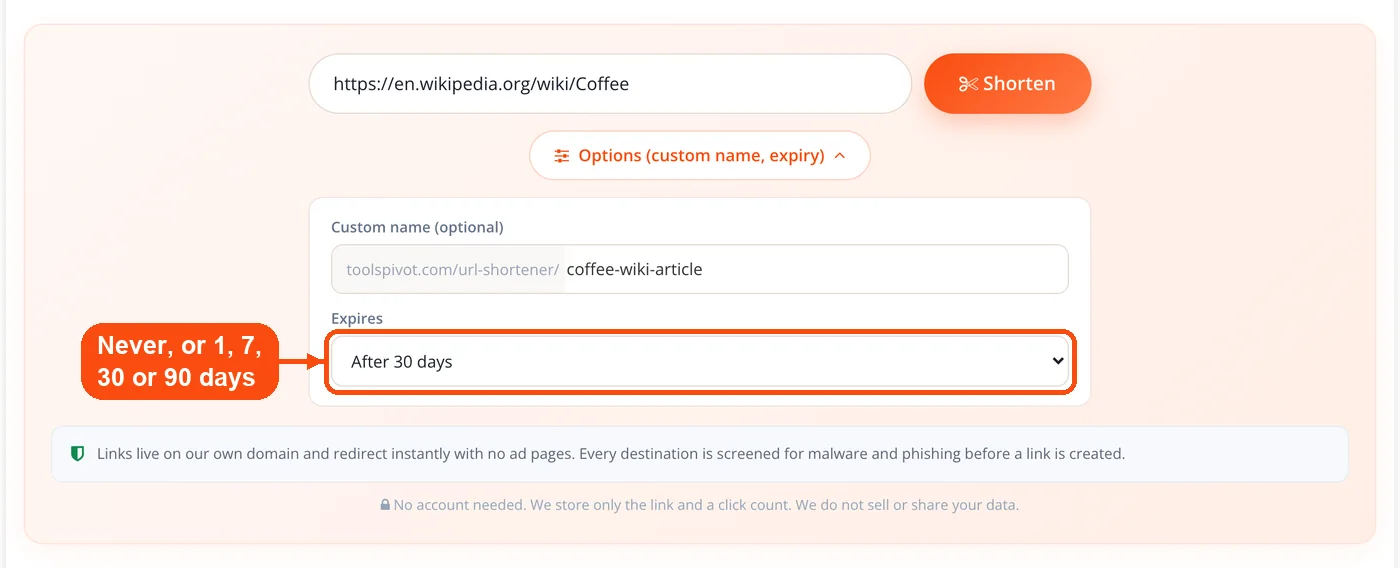
- Choose an expiry (optional). Pick Never, 1 day, 7 days, 30 days, or 90 days. Leave it on Never and the link stays live indefinitely.
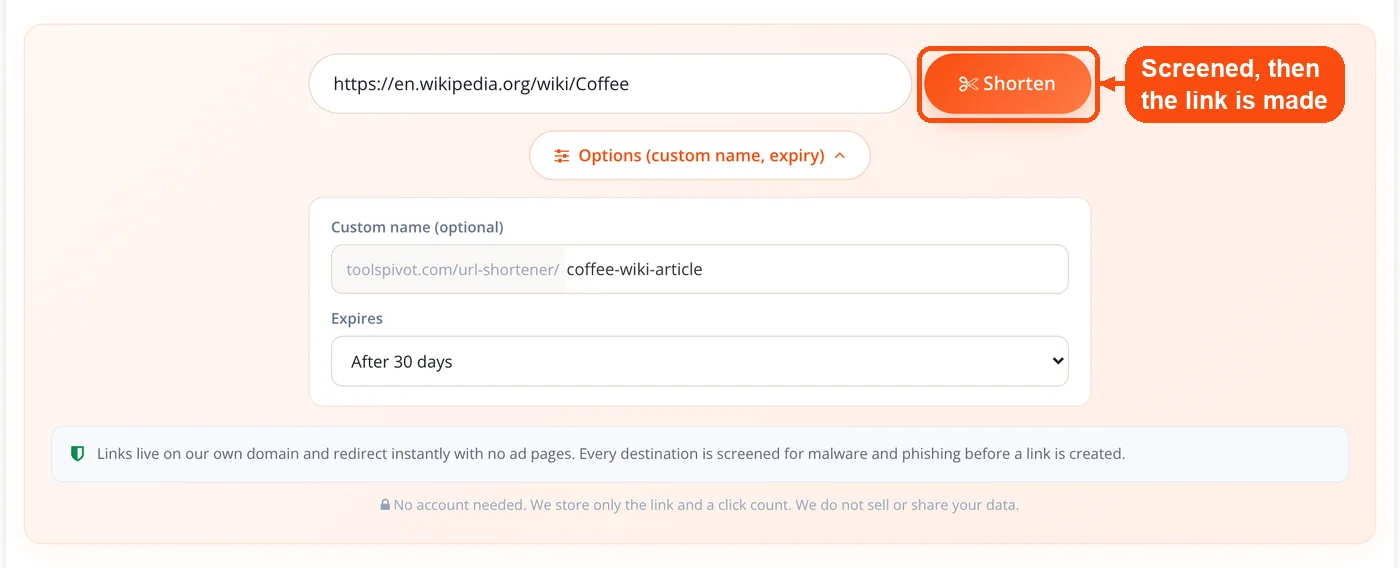
- Submit. The server validates the address, screens it for malware and phishing, generates a random six-character code if you did not supply a name, and writes the pairing to the database.
- Copy the link or download the QR code. Your short link, its live click count, the destination, and the expiry date all appear together. The QR code is generated locally and downloads as a PNG.
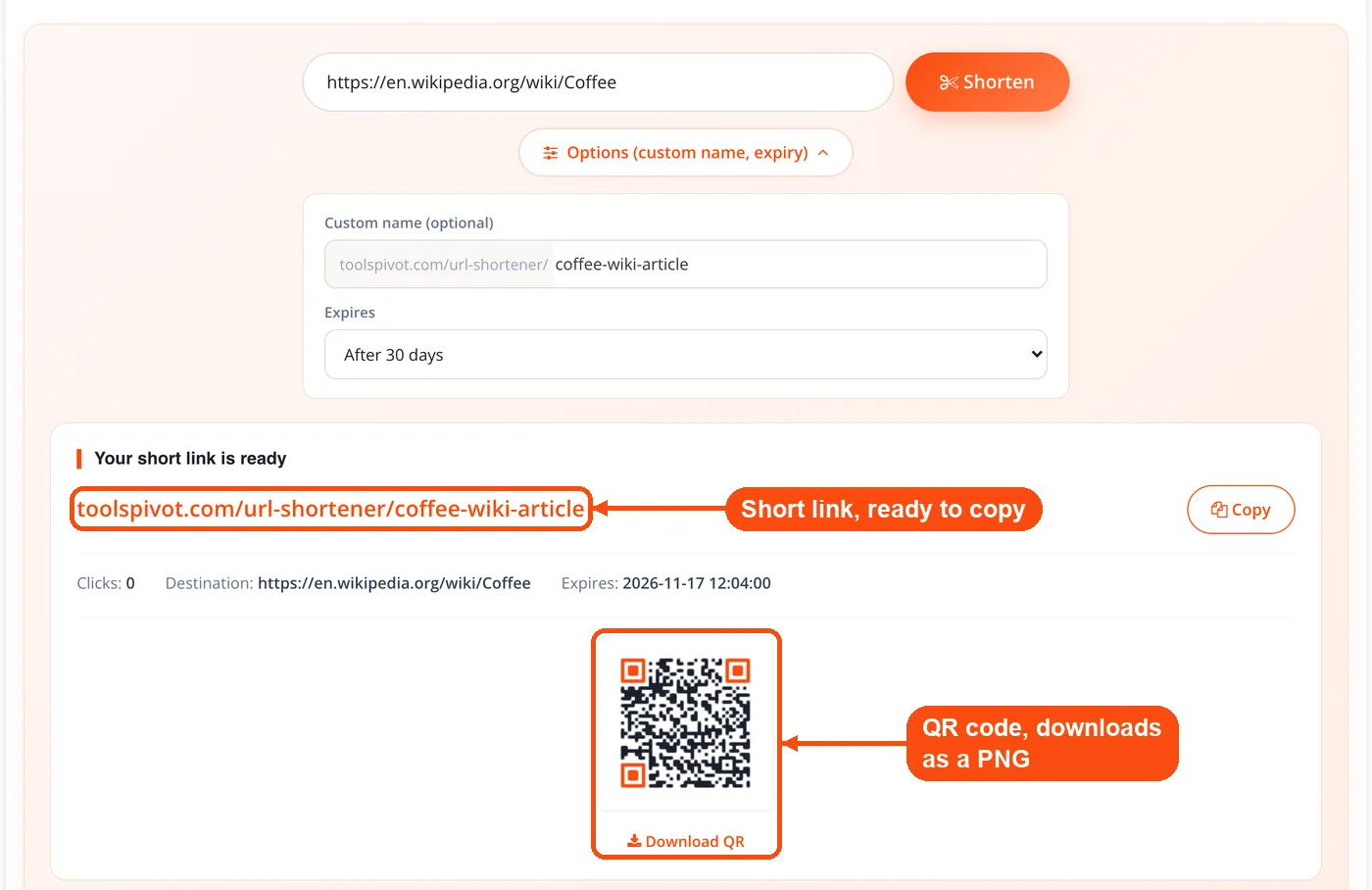
This URL shortener generator does the entire create step on our servers, not in your browser. That is a deliberate change from the previous version, which relied on an external service that is no longer maintained.
Safety Screening Before a Link Is Created
Every destination is screened before the short link exists, not after someone reports it. Five checks run in sequence, and a failure at any stage means no link is created.
- Public address only. The URL must be a reachable http or https address. IP literals, localhost, and private network ranges are rejected, which blocks a common class of server-side request abuse.
- No self-referencing links. A destination pointing back at our own domain is refused, so nobody can build a redirect loop.
- No shortener chaining. Links pointing at other shorteners or link-logging services are blocked, which prevents someone from hiding a destination behind two hops.
- Blocklist check. The domain is compared against a maintained list of known bad hosts.
- Google Web Risk lookup. The destination is checked against Google's malware and phishing data, the same source that powers our website safety checker.
A per-IP rate limit and a hidden honeypot field sit in front of all this to stop bulk automated submissions. Screening at creation keeps the domain itself trustworthy, which matters more than it sounds: once a shortener domain gets flagged, every link on it inherits the warning.
Anyone receiving a short link can inspect it first. Add a + to the end, or append ?p=1, and a preview page shows the real destination with a safety note. For a second opinion on a domain, the blacklist lookup checks it against major spam and reputation databases.
Custom URL Shortener Features and Limits
| Feature | Detail |
|---|---|
| Custom name | 3 to 40 letters, numbers, hyphens, underscores. Collision-checked at submit |
| QR code | Generated for every link, downloadable as PNG |
| Click counter | Incremented on each redirect, visible on the result panel |
| Expiry | Never, 1 day, 7 days, 30 days, or 90 days |
| Preview page | Append + or ?p=1 to see the destination first |
| Account | None. No email, no password, no credit card |
| Redirect | Server-side, no ad page, no countdown, no interstitial |
| Safety | Google Web Risk screening plus blocklist and loop protection |
Two limits are worth stating plainly. Custom names are first come, first served, so a popular word may be taken. Links are not editable after creation, because there is no account to authenticate the owner.
What Version 2.0 Changed
The previous version called an external shortening service. When that service stopped responding, the tool stopped working. Version 2.0 rebuilt it in-house.
- Self-hosted redirect. Code lookup, click increment, and redirect all run on our infrastructure. No third-party shortener API sits in the path.
- Real custom names. Setting a URL shortener custom name was previously unavailable at any price; it is now free and collision-checked.
- Real click counts. The counter increments server-side on every redirect.
- Local QR codes. The image is produced in the page using a bundled library, not fetched from an external QR service that could log your destination.
- Expiry dates. A paid feature on most competitors, free here.
- Safety screening. Destinations are checked against Google Web Risk before a link is written.
If you are still cleaning up the URL structure that made shortening necessary, the URL rewriting tool helps you build readable permanent paths so you rely on redirects less often.
How This Free URL Shortener Compares
The gap between free shorteners is no longer about who shortens a URL. They all do that. The gap is what gets fenced off behind a plan.
Bitly. The free tier allows a small number of new links per month, currently 5, plus 2 QR codes. Since 2025, free-plan links show a full-page interstitial ad before the redirect, applied retroactively to links created years earlier. Expiry and custom domains require payment.
TinyURL. No signup, unlimited links, permanent redirects, custom aliases, and QR codes on the free plan. The tradeoff is no click data at all. Analytics start at the Pro tier.
Rebrandly. A custom domain on the free plan, capped at roughly 10 links a month.
Dub. 25 links a month with full analytics, but it requires an account and leans on custom domains.
is.gd. Free, unlimited, no account, opt-in click statistics per link, no custom domain.
Against that field, ToolsPivot combines four things usually split across tiers: no account, no monthly link cap, a click counter on every link, and a free custom name. What we do not offer is a branded domain of your own. Rebrandly and Short.io are the right choice when that is the requirement.
One honest note on speed. A short link adds a hop. It is a fast hop, but the destination's own load time dominates the experience, so run the target page through the page speed checker if clicks convert poorly. The shortener is rarely the bottleneck.
When a Short Link Earns Its Place
Shorten a URL when its length or appearance is actively costing you something. Skip it when the original link is already clean.
- Print and spoken media. A conference speaker saying "go to this link" needs something an audience can type. A 34-character link beats a 140-character registration URL on a slide, a poster, or a business card. Pair it with a QR code generator if the medium is physical.
- SMS and messaging apps. Character limits are real, and long URLs get truncated by some clients, which breaks the link entirely.
- Email campaigns. Newsletter links carrying UTM parameters routinely pass 200 characters. Some clients wrap them across lines, and a wrapped URL is a dead URL in plain-text email.
- Affiliate and campaign links. Query strings full of tracking parameters look suspicious. Shortening hides the noise without stripping the parameters, which reach the destination intact.
- QR-first campaigns. A shorter destination produces a lower-density QR code, which scans faster and survives being printed small or reproduced badly. Test the result with the QR code scanner before you send it to a printer.
- Time-limited offers. Set a 7-day or 30-day expiry so a coupon link stops working when the promotion ends, instead of lingering in a screenshot forever.
Skip shortening when the URL is already under 50 characters, when the platform requires a visible destination, or when you are building backlinks. The next section explains why that last case matters.
Short Links and SEO: The Honest Version
Short links from this tool are not a link building instrument. Our redirect sends a noindex, nofollow directive, which tells search engines not to index the short URL and not to pass ranking signals through it. That is a deliberate anti-abuse measure, and it means a shortened link on a forum or a comment will not build authority for your destination.
This is where a lot of published advice goes wrong. Articles routinely claim a 301 redirect through a shortener passes link equity like a direct link. Most shorteners apply nofollow precisely because their domains would otherwise be strip-mined. Check any short link yourself with the HTTP header checker, which shows the status code and directives returned.
Use short links for distribution: social, email, print, messaging, QR. Use direct URLs anywhere a search engine is supposed to notice the link. To see what a redirect chain resolves to before sharing it, the link analyzer maps it out.
Mistakes That Break a Short Link Strategy
Not testing the link before distribution. A typo in the destination carries through to the short version, and you will not notice until the first click lands on a 404. Open your own short link once before it goes anywhere.
Shortening an already-short URL. If the original is 35 characters, replacing it with a 34-character link that adds a redirect hop gains you nothing.
Using short links in paid ads. Google Ads and Meta both have policies on destination transparency and redirects. Ad creative built on third-party short links gets disapproved.
Sharing a link whose destination has moved. The redirect keeps working; the page behind it does not. On long campaigns, audit destinations with the broken link checker, then open a batch at once with the bulk URL opener to confirm they resolve.
Assuming the destination is secure because the short link is. Our redirect is served over HTTPS. The page you land on may not be. Confirm with the SSL checker when shortening someone else's URL for an audience.
Forgetting how the link previews. Social platforms pull title and image metadata from the final destination, not the short URL, so a broken Open Graph tag produces a bare grey card. Check the destination with the Open Graph checker before a launch post.
Encoding parameters wrong. Campaign URLs with spaces or special characters in a UTM value can break on submit. Run them through the URL encoder and decoder first.
Honest Limitations
Our short links are not as short as bit.ly. A link on this tool looks like toolspivot.com/url-shortener/x7kp2a, roughly 34 characters. A bit.ly link is about 20. If absolute character count is the only thing you care about, a dedicated short domain wins.
The click counter is a counter, not analytics. You get a total. There is no geography, device, referrer, or time-series breakdown, and no dashboard listing every link you have made. Copy your link when you create it, because there is no account to retrieve it from later.
Links cannot be edited or deleted by you. No account means no ownership record, so a destination cannot be changed after creation. Set an expiry at creation if you may need the link to stop working.
Safety screening is not a guarantee. Google Web Risk catches known malware and phishing hosts. A destination that is clean at creation and compromised a week later will pass screening and still redirect. Screening lowers the risk; it does not eliminate it.
No branded domain. Every link uses toolspivot.com. If your requirement is links on your own domain, this is the wrong tool.
No API and no bulk creation. Links are created one at a time, and the per-IP rate limit keeps it that way.
Frequently Asked Questions
Yes, and there is no account, no email, and no payment step. There is no monthly cap on how many links you create, though a per-IP rate limit prevents automated bulk submissions.
Only if you choose an expiry. The default is Never, which keeps the link live indefinitely. You can also set it to stop working after 1, 7, 30, or 90 days.
Yes. Custom names accept 3 to 40 letters, numbers, hyphens, and underscores, and the server checks availability when you submit. If the name is taken, you will be asked for another.
Add a + to the end of the short link, or append ?p=1. A preview page shows the real destination and a safety note before you continue.
No. The redirect carries a noindex, nofollow directive, so search engines will not index the short URL or pass ranking signals through it. Use direct links for link building.
Every destination is screened against Google Web Risk for malware and phishing before a link is created, and private addresses, redirect loops, and links to other shorteners are all rejected. Screening reduces risk but cannot detect a site that gets compromised after the link exists.
Yes. Query strings including utm_source, utm_medium, and utm_campaign pass through the redirect to the destination untouched, so Google Analytics attributes the visit correctly.
URL shortener tracking means the redirect server records each click before it sends the visitor on. This is a URL shortener with tracking in its simplest form: every link has a click counter that increments on each redirect. It reports a total only, with no breakdown by country, device, or referrer.
Bitly's free plan caps new links per month and shows an interstitial ad page before the redirect. This tool has no monthly cap, no ad page, and includes a free custom name, a QR code, and an expiry option.
It depends on what the link needs to do. If you want a click count, a custom name, a QR code and an expiry date without creating an account, this tool covers all of that for free. If you need links on your own branded domain, Rebrandly or Short.io fit better, and Dub suits detailed analytics, though both of those need an account.
The short link still redirects, and the visitor lands on whatever the destination now returns, usually a 404. A shortener cannot repair a broken target.
No. Because there is no account, there is no way to verify who owns a link, so destinations are fixed once created. Set an expiry at creation if the link should stop working later.
Most ad platforms require a transparent destination URL and reject third-party redirects in creative. Short links belong in organic channels: social posts, email, messaging, print, and QR codes.
Yes. It is a URL shortener with QR codes built in: one is generated for every short link and downloads as a PNG. It is produced locally in the page rather than fetched from an external QR service.
No. Destinations pointing at other shortening or link-logging services are rejected, which stops people from hiding a final destination behind multiple hops.
Not one you can use any more. Google stopped letting people create new goo.gl short links in 2019 and has since switched off many old goo.gl links. If you need a free replacement, this tool makes a short link with a custom name and QR code, with no account.
