About Free Proxy List
A free proxy list is a public directory of proxy server addresses, each written as an IP and port pair, that route your traffic through an intermediate machine so the destination site sees the proxy's IP instead of yours. The ToolsPivot Free Proxy List pulls a continuously re-checked feed of public HTTP, HTTPS, SOCKS4, and SOCKS5 proxies from around the world, shows how fresh each entry actually is, and lets you test any single proxy on demand before you commit to it. That last part matters more than the size of the list, because free proxies die fast and a table full of dead rows is worse than no table at all.
Most free proxy pages hand you a wall of IPs and leave you to find out the hard way which ones are already offline. This one assumes the opposite, because a good free proxy list is one you can verify before you rely on it.
What a Free Proxy List Actually Gives You
A free proxy list gives you access to open proxy servers without registration, payment, or software installation. These are machines that accept connections from anyone, either because an administrator opened them deliberately or because a server was left unsecured.
The tradeoff is worth stating up front. You get no service level agreement, no support, and no guarantee the operator is not reading your traffic. In exchange, you pay nothing and start in about ten seconds. For testing geo-behavior or learning rotation, that is fine. For anything involving a password, it is not.
What ToolsPivot lists per proxy:
- Four protocols: HTTP, HTTPS, SOCKS4, and SOCKS5, each labeled per row.
- Global spread: proxies from dozens of countries, with city and ISP where the feed provides it.
- Quality signals: anonymity level, SSL support, Google-passed status, latency, and uptime percentage.
- Freshness: a last-checked timestamp on every row, color-coded so old entries are obvious.
How ToolsPivot Free Proxy List Works
The pipeline runs in four stages, with almost all the heavy work done on the free proxy list server so your browser stays quick.
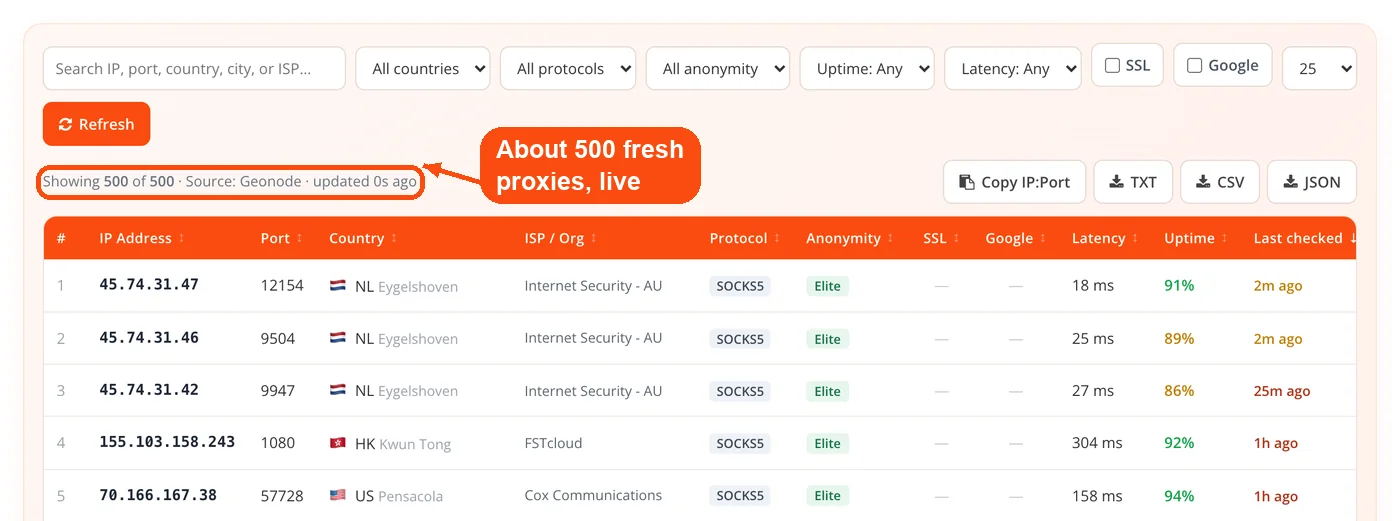
- Server-side fetch. The server pulls roughly 500 of the freshest proxies from Geonode's public API, sorted by last-checked. If Geonode is unreachable, it falls back to ProxyScrape v4. Both are fixed, trusted endpoints, and neither requires an API key.
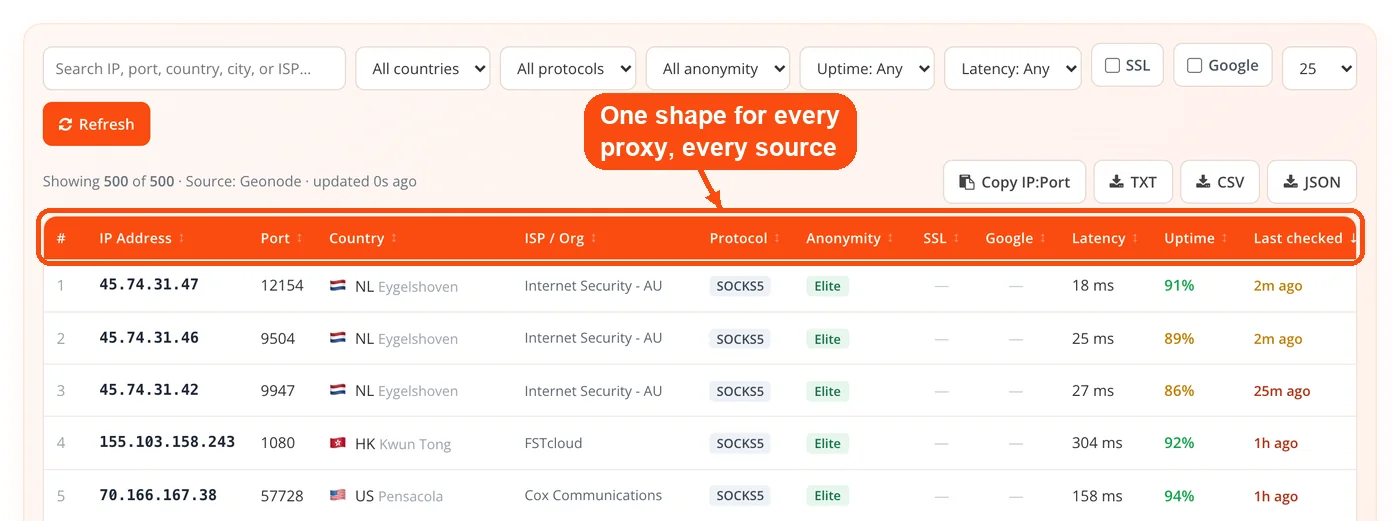
- Normalize and cache. Every proxy from either source gets flattened into one consistent shape covering IP, port, protocols, anonymity, country, city, ISP, SSL support, Google status, latency, uptime, and last-checked time. The result is cached server-side for five minutes so the upstream feeds are not hammered on every page load.
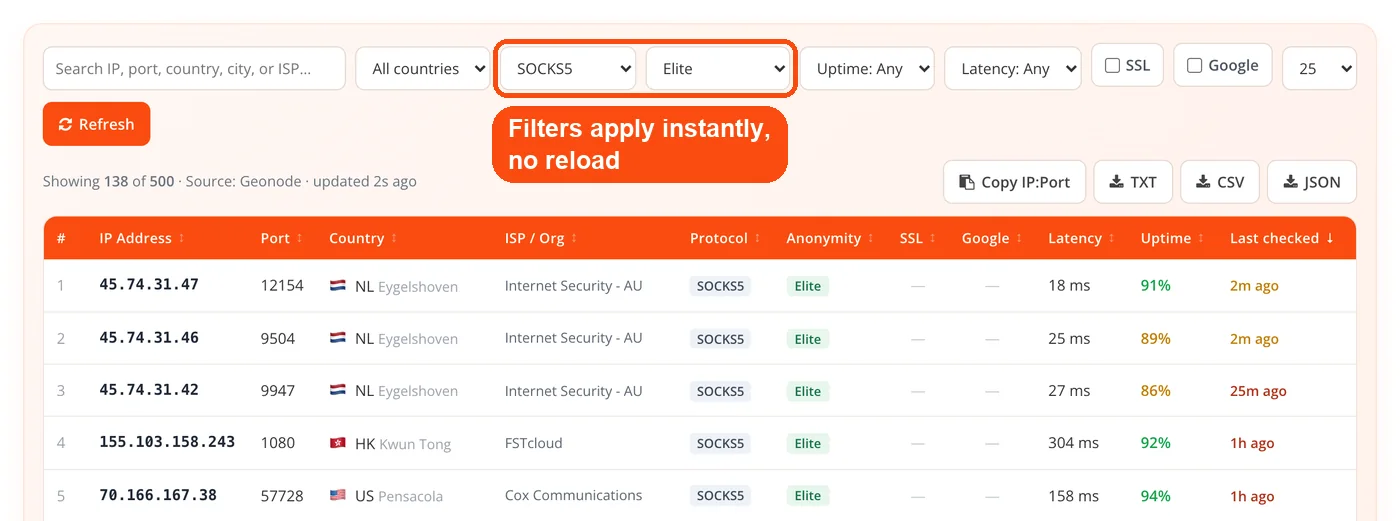
- Client rendering. Your browser downloads that normalized JSON once. Every filter, search, sort, and page change after that happens locally in vanilla JavaScript, which is why the table responds instantly with no reload.
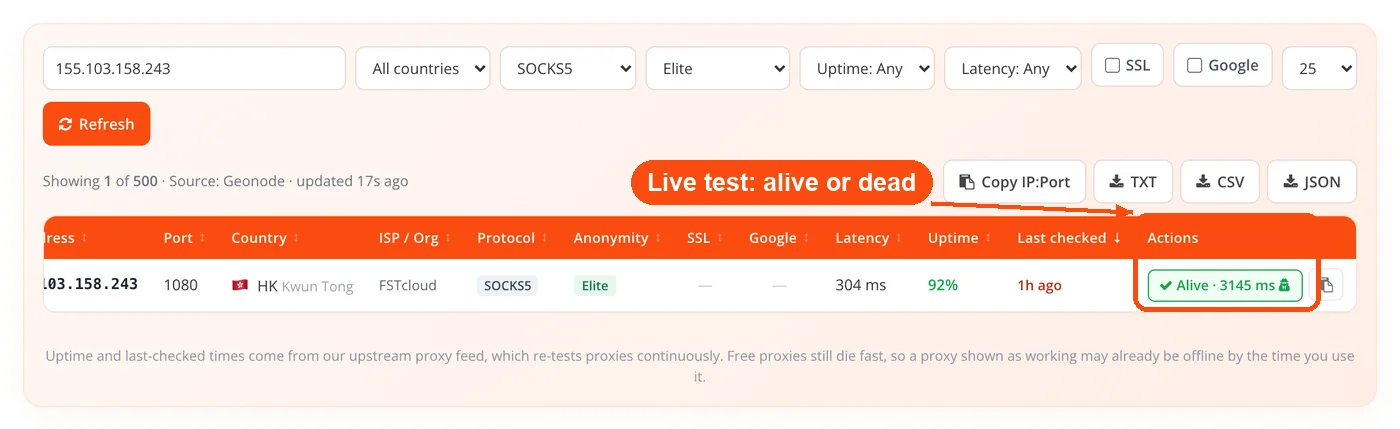
- Live test on demand. Clicking Test on any row calls a server endpoint that routes a real request through that proxy to a fixed IP-echo service, then reports whether it is alive, how many milliseconds it took, and whether your IP would actually be hidden.
No API keys are involved anywhere in that chain, and nothing you do on the page is stored.
What Each Column in the Proxy List Means
Every column comes from one of two places: the upstream feed's re-checks, or the on-demand test you trigger yourself. Knowing which is which keeps you from trusting a number more than it deserves.
- Country, city, ISP and ASN: geolocation from the upstream feed. Useful for picking a region, occasionally imprecise at city level.
- Protocol: HTTP, HTTPS, SOCKS4, or SOCKS5. A proxy can support more than one.
- Anonymity: Elite, Anonymous, or Transparent, describing how much the proxy reveals about you.
- SSL and Google: whether the proxy handles HTTPS, and whether it can reach Google without being blocked.
- Latency and Uptime: both measured by the upstream's own re-checks, not by us. Treat them as a prior, not a promise.
- Last checked: how long ago the upstream verified this proxy, color-coded green when fresh and red when stale.
- Test: the only column that reflects right now, because you triggered it yourself.
Testing a Proxy Before You Trust It
The Test button is the reason this page exists in its current form. Feed-supplied uptime tells you a proxy was working when the upstream last looked, which might have been four minutes ago, and four minutes is a long time in the life of a public proxy. ScrapeOps tested 1,200 free proxies and found roughly 2% actually worked, which tells you how much distance there can be between a list and reality.
Clicking Test routes a live request through that exact proxy and returns three things: alive or dead, the response time in milliseconds, and whether the exit IP differs from our server's IP. That third signal is the one people skip. A proxy can be alive and still be transparent, passing your real address along in an X-Forwarded-For header while you assume you are hidden. If the exit IP matches our server's IP, the proxy is not anonymizing anything.
The endpoint is guarded against SSRF, refusing private, loopback, and reserved ranges rather than letting the test be pointed at internal infrastructure.
Plenty of proxy checkers exist as standalone pages where you paste in a list and wait. What is unusual about the ToolsPivot table is that the check sits in the row itself, so verifying a candidate is one click rather than a copy, a tab switch, and a paste. For a second opinion on what a proxy is doing to your traffic, load your current IP address before and after connecting and compare.
Filtering the Free Proxy List: HTTP, SOCKS and SOCKS5
Filtering is where a 500-row table becomes a shortlist of five. All of it runs client-side, so stacking filters costs nothing.
- Country: narrow to a single region when you need geo-specific results.
- Protocol: pick HTTP, HTTPS, SOCKS4, or SOCKS5 depending on what your tool speaks. Need a free proxy list, SOCKS only? Choose SOCKS4 or SOCKS5 here. Set it to SOCKS5 and the table becomes a SOCKS5 proxy list your client can use directly.
- Anonymity: filter to Elite if privacy matters at all.
- SSL and Google: two toggles that eliminate a large share of unusable entries immediately.
- Uptime threshold: 50%, 75%, 90%, or 100%.
- Latency ceiling: under 500 ms, 1000 ms, or 2000 ms.
- Free-text search: matches across every field, including ISP and city.
A practical starting recipe: Elite, SSL on, uptime at or above 75%, latency under 1000 ms, then sort by last-checked and test the top three. If all three fail, loosen the latency ceiling before the anonymity filter. Speed you can live without; a transparent proxy defeats the point.
If you end up with a batch of IPs and want to confirm where they really resolve, run them through the bulk geo IP locator rather than trusting the country column alone.
Exporting for Scripts and Automation
Whatever filters are active define what gets exported, so you can build a shortlist visually and take exactly that shortlist into your code.
- Copy IP:Port: the filtered list straight to your clipboard, ready to paste.
- TXT: plain ip:port per line, the format most rotation libraries expect.
- CSV: every metadata field, for spreadsheet work or scoring proxies before use.
- JSON: structured output for direct consumption in a script.
If your pipeline expects a different shape than the CSV export provides, the CSV to JSON converter will reformat it without a round trip through a spreadsheet.
Who Uses a Free Proxy List
SEO teams checking localized results
Google serves different results by location, so an agency with clients in three countries cannot see accurate local rankings from one office IP. Filter ToolsPivot's list to the target country, pull a handful of Elite proxies, and feed them to a keyword rank checker to see what searchers in that market actually see. It is also worth running a page speed check through different regions, since a site that loads fast domestically can crawl from elsewhere.
Developers testing geo-behavior
If your app changes based on the visitor's country, you need to see it from those countries. Grabbing a proxy per target region is faster than provisioning VPN endpoints in a dozen places. Confirm that SSL certificates still resolve correctly through the proxy, because a surprising number of free HTTP proxies mangle HTTPS.
Small-scale scrapers and researchers
Pulling a few hundred public pages from a single IP invites a 403. Rotating through a tested handful helps. Free proxies are appropriate at this scale and stop being appropriate the moment the job must run unattended overnight.
Analysts verifying infrastructure claims
Before building anything on a proxy, it helps to know what else is true about that IP. A blacklist lookup reveals whether the address already sits on spam databases, and a DNS lookup on your target confirms you are pointing at the right infrastructure.
Finding a Fast Free Proxy: Latency and Anonymity
These are the two most misread columns on any proxy list.
Latency is a round-trip measurement in milliseconds, taken by the upstream from its own vantage point. Your latency will differ, sometimes a lot, because you are somewhere else on the internet. Use the column to rank candidates, not to predict your own experience, and sort by it when you want a fast free proxy list with the quickest entries at the top. Under 1,000 ms is comfortable for most work, 1,000 to 2,500 ms is workable for bulk collection, and anything above 5,000 ms should be a backup at best.
Anonymity is categorical, not a spectrum you can split the difference on. A Transparent proxy forwards your real IP in the request headers, so the destination site sees straight through it; it offers no privacy and exists mostly for caching. An Anonymous proxy hides your IP but announces that a proxy is in use, which some sites treat as a reason to block you. An Elite proxy strips the identifying headers so the request looks ordinary. If privacy is any part of your reason for using a proxy, Elite is the only category worth filtering to. You can see what your own requests currently reveal with the browser information tool.
Free Proxies Versus Paid Proxies
| Factor | Free public proxies | Paid proxy services |
|---|---|---|
| Cost | $0 | Roughly $2 to $15 per GB, or per-IP monthly |
| Lifespan | Minutes to hours, no warning | Contracted uptime |
| Anonymity | Mixed across all three levels | Elite by default |
| Sharing | Shared with everyone, always | Dedicated options available |
| Operator | Unknown and unvetted | Accountable, with terms |
| Best for | Testing, learning, one-off checks | Production pipelines, sustained scraping |
The honest line sits roughly here: for occasional checks, learning rotation, or testing geo-behavior by hand, a free list is genuinely enough. Once a job runs unattended, hits a protected target, or produces data you will make decisions on, the failure rate of public proxies stops being an inconvenience and becomes a data quality problem. A server status check on your target will tell you how aggressively it responds to unfamiliar traffic.
Staying Safe With Public Proxies
Every proxy on this page is operated by someone you do not know, who owes you nothing, and who can see whatever you send unencrypted. That is not a hedge; it is the actual arrangement, and ToolsPivot would rather say so than bury it.
Never send credentials through a free proxy. Not to your email, not to your bank, not to a client's CMS. If a task requires logging in, a free proxy is the wrong tool and no amount of filtering changes that. Stick to HTTPS destinations, since that encryption runs between your browser and the destination rather than between you and the proxy operator. For throwaway test accounts, use a password generator so a leak stays contained to something disposable.
Rotate often. Sitting on one IP for hours makes your pattern trivially easy to fingerprint, defeating much of the reason you reached for a proxy. And a proxy passing our test is one that worked for a single request, at one moment. It is not a promise about the next hour.
Honest Limitations
Being straight about what this tool cannot do is more useful than a longer feature list.
- Uptime and latency are inherited, not measured by us. They come from the upstream feed's re-checks. Only the Test button reflects the present moment.
- A live proxy can die seconds later. Public proxies are shared and overloaded. Testing improves your odds; it does not fix them.
- Most free proxies fail most of the time. Independent testing puts the working rate in the low single digits. Expect to test several before finding one worth using.
- The feed caps at roughly 500 entries. This is the freshest slice sorted by last-checked, not an exhaustive index of every public proxy alive.
- Geolocation can be wrong. Country is usually right; city and ISP are best-effort from the upstream.
- Streaming services will not work. Netflix and similar platforms maintain proxy IP databases, and public proxies are in them.
- No authentication support. These are open proxies by definition. Private, credentialed proxies are outside what a free list can offer.
- The five-minute cache means small delays. A proxy that just came online may not appear until the next refresh cycle.
Frequently Asked Questions
Yes, with no registration, account, or payment. The full table loads on page open, and every filter, test, and export is available immediately.
The server caches the feed for five minutes, then pulls fresh data on the next request. Individual proxies show their own last-checked timestamp, which comes from the upstream's continuous re-testing.
It is a free proxy list, public sources only: Geonode's public API is the primary source, with ProxyScrape v4 as a fallback if Geonode is unavailable. Both are fetched server-side without any API key.
It routes a real request through that specific proxy to a fixed IP-echo endpoint and reports alive or dead status, response time in milliseconds, and whether the exit IP differs from our server's IP. A matching IP means the proxy is not hiding you.
Uptime comes from the upstream feed's earlier checks, not from the present moment. Free proxies frequently die between one check and the next, which is the entire reason the Test button exists.
HTTP proxies handle web traffic and understand HTTP headers. SOCKS4 carries any TCP connection but has no authentication, and SOCKS5 adds UDP, IPv6, and authentication support, which makes it the most flexible for non-browser applications, so when you build a shortlist from the free proxy list, SOCKS5 is usually the protocol to filter for. If your script only speaks HTTP, filter to HTTP or HTTPS for a list of HTTP proxies your client understands.
Elite, if privacy matters at all. Elite strips identifying headers, Anonymous hides your IP but reveals that a proxy is in use, and Transparent forwards your real IP and provides no privacy.
They are acceptable for scraping public data at small scale, provided you rotate and stick to HTTPS targets. Never send login credentials or personal data through a public proxy under any circumstances.
No. Streaming platforms maintain databases of known proxy and VPN addresses, and public proxies are almost universally flagged in them.
Chrome uses your operating system's proxy settings, while Firefox has its own under Settings, General, Network Settings. Enter the IP and port from any row, and consider an extension like SwitchyOmega if you plan to switch often.
They solve different problems. A VPN gives you one encrypted tunnel and one IP, while a proxy list gives you many IPs to rotate through, which scraping and rank tracking require.
The main difference is the per-row live test, which lets you verify a specific proxy from within the table rather than copying it into a separate checker page. The freshness data and honest caveats about upstream-sourced metrics are also stated plainly rather than glossed over.
No API keys are used and nothing sensitive is stored. Filtering and searching happen entirely in your browser, and the live test runs server-side without retaining anything. What the proxy operator does with your traffic, however, is outside our control, and you should assume the worst. Use the website SEO checker to audit how a site you own responds to unfamiliar traffic sources.
