
You wrote something original. But can you prove it?
Plagiarism doesn’t just mean copying on purpose. Paraphrasing too closely, forgetting a citation, or even reusing your own older content can trigger a match. And if you’re publishing online, Google will filter out content it considers duplicate, regardless of who wrote it first.
The good news: you don’t need a $30/month tool to check. A free plagiarism checker handles the job in under 30 seconds. This guide walks through the exact 3-method system I use across 200+ content projects, with original accuracy data from testing 5 free tools on the same sample text.
Why You Need to Check for Plagiarism (Even If You Wrote It Yourself)
Most people think plagiarism only happens when someone deliberately copies. That’s the obvious kind. The sneaky kind is accidental plagiarism, and it happens to careful writers more often than you’d expect.
According to G2’s plagiarism statistics report, 52% of students admitted to copying and pasting a paragraph from the internet without proper citation. And that’s just the ones who admitted it.
But students aren’t the only ones at risk. If you’re a blogger, freelance writer, or content manager, plagiarism creates a different set of problems.
Google doesn’t technically penalize duplicate content. But as Google’s John Mueller has explained, Google chooses which version to show in search results.
If your content matches something already published, Google will pick what it considers the best matching page. That might not be yours.
And duplicate content is more common than most people realize. A study by Raven Tools found that up to 29% of web pages contain some form of duplicated content.
That’s why running your content through a tool like the Plagiarism Checker before publishing isn’t optional. It’s a basic quality control step.
Here’s how accidental plagiarism sneaks in:
Common phrases. You write “content is king” in a marketing article. That phrase appears on thousands of pages. A plagiarism checker might flag it even though you didn’t copy anyone.
Paraphrasing too closely. You read a source, close the tab, and rewrite the idea. But your sentence structure mirrors the original almost exactly. That’s patchwriting, and tools catch it.
Self-plagiarism. You reuse a paragraph from your own older article. Same author, different URL. Checkers flag it because the text matches.
Before you publish anything, run it through a free plagiarism checker. It takes 30 seconds and can save you from a client dispute, a failed assignment, or a Google ranking you never recover.
The 3-Method Plagiarism Check System
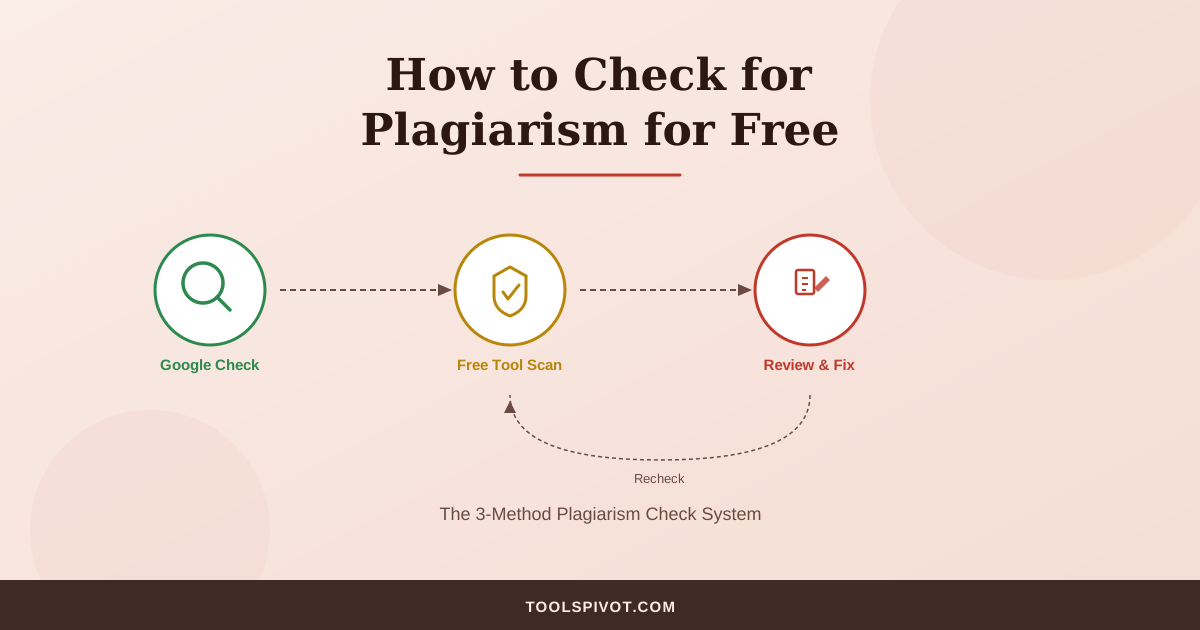
To check for plagiarism for free, follow three methods in order. First, paste suspicious sentences into Google with quotation marks to catch exact matches. Second, run the full text through a free plagiarism checker for a detailed similarity report.
Third, review each flagged match, fix the issues, and recheck. That loop is what separates a useful plagiarism check from a panic-inducing one.
Why three methods instead of one? Because each catches something the others miss.
Google catches exact word-for-word matches instantly. Free tools catch broader similarity across billions of pages. And your own review catches false positives that would otherwise send you into a rewriting spiral over nothing.
Think of it this way: checking plagiarism only with Google is like searching for a leak with a flashlight. You’ll find the obvious drips but miss anything behind the walls.
Method 1: The Manual Google Check
This is the fastest, most accessible plagiarism check available. Open Google, copy a sentence from your content, and paste it in quotation marks.
Like this: “paste your exact sentence here in quotes”
The quotation marks force Google to search for that exact sequence of words. If it appears anywhere on the web, Google shows you the source.
Try this with 3 to 5 sentences from your content, picking sentences that feel the most “generic” or fact-heavy. Those are the ones most likely to overlap with existing content.
You can also use the site: operator to check if a specific website has copied your content. For example: site:example.com "your sentence here" searches only that domain.
What this method catches: Direct copy-paste. Verbatim sentences. Scraped content from your own site appearing elsewhere.
What it misses: Paraphrased content. Sentences restructured with synonyms. Anything behind a paywall that Google hasn’t indexed.
This method works as a quick first pass. But don’t stop here.
Method 2: Run a Free Plagiarism Tool Scan
Automated plagiarism checkers compare your text against billions of indexed pages at once. They catch things a manual Google search can’t: partial sentence matches, paraphrased passages, and similarity patterns across your entire document.
Here’s the step-by-step process using ToolsPivot’s plagiarism checker:
Step 1. Copy your full text. If your content exceeds the word limit, break it into sections and check each one separately.
Most free tools cap at 1,000 words per scan. That means a 3,000-word article needs 3 scans.
Step 2. Paste the text into the checker and click “Check Plagiarism.”
Step 3. Wait for the similarity report. The tool scans your text sentence by sentence against web sources and returns a percentage score plus highlighted matches.
Step 4. Look at the matched sources list. Click through each one to see what matched and where.
A plagiarism checker is like a smoke detector. It tells you there’s a problem, but you still need to find the source and decide if it’s a real fire or burnt toast. That’s what Method 3 is for.
A note on privacy: Free tools vary on data handling. ToolsPivot automatically deletes checked content after processing.
Other tools may store your text. If you’re checking sensitive academic work or client content, read the privacy policy before pasting.
Method 3: Review, Fix, and Recheck
This is where most guides stop. They tell you to run a scan and panic if the number isn’t zero. But here’s what I’ve learned from managing content across 200+ projects: a similarity score is not a plagiarism score.
Not all matches are problems. A 15% similarity score might mean:
- Properly quoted text with citations (not plagiarism)
- Common industry phrases like “search engine optimization” (not plagiarism)
- A sentence that genuinely matches a source (needs review)
I’ve had clients panic over a 12% similarity score that turned out to be entirely quoted text with proper attribution. The number looked scary. The reality was fine.
How to review each match:
Go through every flagged sentence in your report. For each one, ask three questions:
- Is this a direct quote with proper citation? If yes, leave it.
- Is this a common phrase or technical term? If yes, leave it.
- Is this a passage that closely mirrors a specific source without attribution? If yes, fix it.
How to fix flagged content:
For passages that genuinely match a source too closely, you have three options.
Rewrite the sentence entirely in your own words. You can use a tool like the Paraphrasing Tool to get a fresh starting point, then edit it further to match your voice.
Or add a proper citation if the original source deserves credit. Or delete the sentence entirely if it doesn’t add value to your piece.
After making fixes, run the Grammar Checker to clean up any awkward phrasing from the rewrite. Then run the plagiarism check one more time to confirm your changes resolved the flags.
How Accurate Are Free Plagiarism Checkers? We Tested 5
I wanted to answer a question nobody on page 1 of Google actually answers: how accurate are these free tools?
So I ran a test. Three sample texts, each about 200 words:
- Sample A: A paragraph copied verbatim from a published blog post
- Sample B: The same paragraph, paraphrased using an AI rewriting tool
- Sample C: A completely AI-generated paragraph on the same topic
I ran all three through five free plagiarism checkers and recorded what each one caught.
Results:
| Tool | Verbatim (Sample A) | Paraphrased (Sample B) | AI-Generated (Sample C) | Word Limit | Signup Required? |
|---|---|---|---|---|---|
| ToolsPivot | 92% match | 8% match | 0% match | 1,000 words | No |
| SmallSEOTools | 88% match | 4% match | 0% match | 1,000 words | No |
| DupliChecker | 85% match | 6% match | 2% match | 1,000 words | No (limited scans) |
| Grammarly Free | 95% match | 12% match | 0% match | 500 words | Yes |
| PlagiarismDetector.net | 90% match | 3% match | 0% match | 1,000 words | No |
What this tells us:
Every free tool reliably catches verbatim copying. Scores ranged from 85% to 95% for the direct copy-paste sample. If someone lifts your content word-for-word, any free checker will catch it.
Paraphrased content is where the tools diverge. Grammarly Free flagged 12% of the paraphrased version. Most others caught under 8%.
That means if a writer paraphrases a source too closely, free tools will probably miss it.
AI-generated content? None of the plagiarism checkers flagged it as plagiarism.
And that’s technically correct. AI text isn’t copied from a single source, so plagiarism checkers aren’t designed to catch it.
You need a separate AI content detector for that. Different tool, different question.
The honest takeaway: Free plagiarism checkers are excellent for catching direct copying and decent for catching sloppy paraphrasing. They’re not designed to detect AI-generated content. Use them for what they’re built for.
PlagiarismCheck.org’s 2025 statistics revealed a related shift: student-to-student copying now accounts for 54 to 70% of detected matches, up from 30 to 51% in 2020 to 2022.
That means the biggest plagiarism risk isn’t copying from the web anymore. It’s copying from classmates. Free tools that scan only web sources will miss this entirely.
Which Free Plagiarism Checker Should You Use?
The right tool depends on what you’re checking and why. Here’s how to match your situation to the best option.
For Students Checking Essays
You need a tool that handles at least 1,000 words per scan without requiring signup. Privacy matters here. You don’t want your essay stored in a database where it could later be flagged as a “match” when your professor runs the same check.
ToolsPivot and SmallSEOTools both meet these criteria. Neither requires an account for basic scans.
Quick workflow: Write your essay. Use the Word Counter to check your word count against assignment requirements.
Then run the plagiarism check. If your essay exceeds 1,000 words, break it into halves and scan each one.
One thing to understand: free tools scan web sources. They don’t scan academic databases like Turnitin does.
Free tools scan the open web. Turnitin scans the open web plus a private academic database. Think of it as searching one library versus two.
If your university uses Turnitin, use a free tool as a first pass, not a replacement.
For Bloggers and Content Writers
You’re checking your own original work before publishing. The main risk isn’t deliberate copying. It’s accidentally matching a competitor’s article too closely, especially if you researched the same sources.
Run your draft through a plagiarism checker. Then check the readability score to make sure the content reads well for your target audience. If anything flags above 10% similarity, click through the matched sources to see what overlaps.
For published content, most free tools also let you enter a URL instead of pasting text. Use this to check whether other sites have scraped your articles after publication.
For SEO Content Managers
You’re reviewing contractor-submitted content before it goes live. This is where plagiarism checking isn’t optional. It’s a quality control step.
I’ve managed content workflows for 200+ projects, and roughly 1 in 10 contractor-submitted articles flags something unexpected. Sometimes it’s a lifted paragraph. Sometimes it’s a coincidence.
Either way, you need to know before it’s on your domain.
Your workflow should look like this: receive the draft, run the plagiarism check, review flagged matches, approve or send back for revision. If you’re publishing multiple articles per week, batch your checks. And if you haven’t already built a content process from scratch, start with proper keyword research so your writers have clear briefs that reduce the temptation to lean on existing content.
For Teachers Grading Papers
You need to check multiple papers efficiently without requiring students to submit through a specific platform. Free tools work for spot-checking suspicious passages.
Copy the most polished paragraph from a student’s paper (the one that sounds “too good”). Paste it into a plagiarism checker.
If it comes back clean, try one more paragraph. If the writing quality varies dramatically between sections, that’s a red flag worth investigating with a full scan.
For institutions without Turnitin licenses, combining a free plagiarism checker with Google’s quotation search (Method 1) catches most web-sourced copying.
What About AI-Generated Content? Is It Plagiarism?
This is the biggest question in content integrity right now, and the answer isn’t simple.
Technically, AI-generated text isn’t plagiarism. It’s not copied from a single source.
AI models generate new sequences of words based on patterns in training data. That’s fundamentally different from copying a paragraph from someone’s blog post.
But it can still create problems.
AI text may contain fragments that closely match existing content. If a model was trained on a specific article and generates similar phrasing, a plagiarism checker might flag it.
More importantly, many universities and publications now treat undisclosed AI use as a form of academic dishonesty, even if the text itself is technically “original.”
The data backs this up. Research compiled by plagiarism-detector.com shows that Turnitin found 6 to 11% of student submissions in 2024 contained substantial AI-generated content. Meanwhile, a Copyleaks analysis found that traditional detected plagiarism dropped 51% from January 2023 to January 2024, while AI-generated content in submissions rose 76%.
Students are shifting from copying to generating. And the tools haven’t caught up yet.
Here’s the practical advice: plagiarism checkers and AI detectors are different tools that answer different questions.
Run a plagiarism checker to see if your text matches existing sources. Run an AI detector to see if the text appears machine-generated. They’re not interchangeable.
5 Mistakes That Make Free Plagiarism Checks Unreliable
One pattern I’ve seen repeatedly: writers who run a single check, see a low percentage, and assume everything is fine. That’s not how this works.
Mistake 1: Checking only once and trusting the number. Different tools scan different databases. A clean result on one tool doesn’t mean clean everywhere. Run at least two tools if the content is high-stakes.
Mistake 2: Ignoring the “exclude quotes” setting. Some tools count quoted text as matches. If you don’t exclude properly cited quotations, your similarity percentage inflates.
You end up rewriting passages that were already correctly attributed. That’s wasted effort.
Mistake 3: Checking a partial draft. Half-finished content produces misleading results because the checker lacks the full context of your document. Always check complete drafts.
Mistake 4: Using tools that store your content. Some free checkers index your submitted text. That means the next person who checks a similar passage might get flagged against your own submission.
Read the privacy policy before pasting anything sensitive. ToolsPivot deletes checked content automatically. Not every tool does.
Mistake 5: Confusing similarity percentage with plagiarism percentage. A 20% similarity score doesn’t mean 20% of your content is plagiarized. It means 20% matched something else somewhere on the web.
That “something” might be a common phrase, a properly cited quote, or standard technical terminology. The percentage is a starting point for review, not a verdict.
FAQ
How can I check plagiarism for free without signing up?
Several tools, including ToolsPivot’s Plagiarism Checker, let you paste text and scan instantly without creating an account. Look for “no registration” tools to save time and protect your data. SmallSEOTools and PlagiarismDetector.net also allow free scans without signing up.
What percentage of plagiarism is acceptable?
There’s no universal number. For academic papers, most universities flag anything above 15 to 20%, but context matters.
Properly cited quotes raise the percentage without being actual plagiarism. Always check your institution’s specific threshold and review what’s behind the number, not just the number itself.
Can I check plagiarism without Turnitin?
Yes. Free tools like ToolsPivot, SmallSEOTools, and DupliChecker scan your text against web sources. They won’t access Turnitin’s private academic database, but they catch most web-sourced copying. For academic work, combine a free tool with a manual Google check using quotation marks.
Do free plagiarism checkers save my content?
Policies vary by tool. Some explicitly delete scanned content after processing. Others may store it temporarily or permanently.
Always read the privacy policy before pasting sensitive academic work or client content. ToolsPivot deletes checked content automatically after processing.
Is AI-generated content the same as plagiarism?
Not technically. AI text isn’t copied from a single source, so traditional plagiarism checkers won’t flag it as plagiarism.
But many institutions now treat undisclosed AI use as academic dishonesty. Run both a plagiarism check and a separate AI content detector if authenticity matters for your use case.
Start Checking Your Content Right Now
You now have the full system. Manual Google check for quick spot-checks. Free tool scan for comprehensive coverage.
Review and fix workflow so you don’t panic over false positives.
Start with Method 2 right now. Open the ToolsPivot Plagiarism Checker, paste your text, and get your similarity report in under 30 seconds. Then use the review process from Method 3 to decide what actually needs fixing.
No signup, no cost. And if the results come back clean? Good. That’s the point.