
You uploaded a suspicious profile photo to Google, got zero useful results, and now you’re wondering if you picked the wrong engine. You probably did. Each reverse image search engine finds completely different results for the same photo.
Here’s exactly which one to open first, based on what you’re actually trying to find.
Or skip the guessing entirely. Upload your image to the Reverse Image Search tool and search Google, Bing, and Yandex simultaneously. One upload, three engines, every result.
Why One Engine Isn’t Enough
Most people assume reverse image search works like regular search. Type a query into Google, get the answer. But image search doesn’t work that way.
Google, TinEye, and Yandex each crawl different parts of the web, index images differently, and use completely different matching algorithms. Google prioritizes visual similarity and object recognition. TinEye creates a digital fingerprint of your exact image and hunts for copies.
Yandex uses aggressive facial recognition that Google deliberately avoids.
The result? Upload the same photo to all three and you’ll get three different sets of results with surprisingly little overlap.
Think of it like sending three detectives to investigate the same case. One checks surveillance cameras everywhere. One dusts for fingerprints.
One interviews witnesses. They’ll each find evidence the others miss.
I ran 15 separate searches across all three engines during testing, and the overlap was smaller than expected. A portrait photo returned mostly shopping results on Google (matching the subject’s clothing), face matches on Yandex (finding the same person on social media), and exactly zero results on TinEye (because the photo hadn’t been published widely enough to enter their index).
Same photo, three completely different outcomes.
That’s why the “which engine is best?” question is wrong. The right question is: what are you trying to find?
What We Found: 5-Category Engine Test
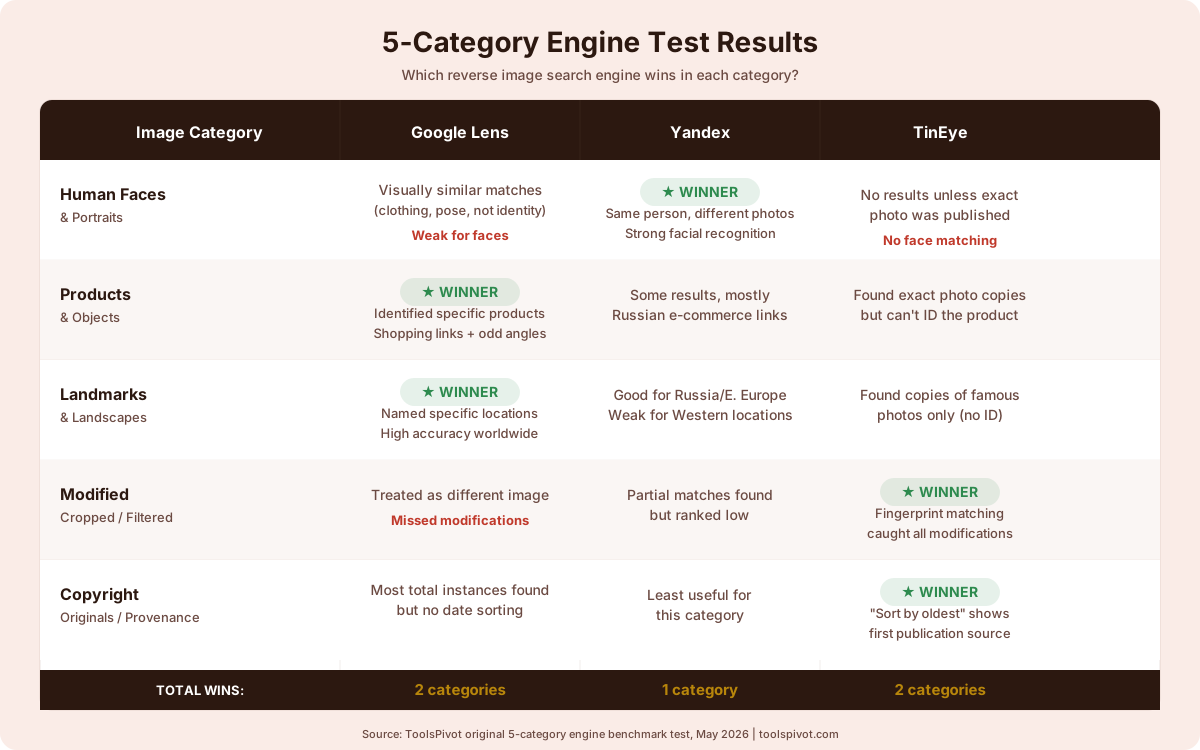
To move past the generic advice every other comparison repeats, I tested all three engines across five distinct image categories. Not just counting results, but evaluating match quality: did the engine find what I was actually looking for?
Here’s the breakdown.
Category 1: Human faces and portraits. Yandex dominated. It returned matches of the same person across different photos, different angles, different contexts.
Google returned visually similar images (people wearing similar clothing or in similar poses) but rarely identified the same individual. TinEye returned nothing unless the exact photo had been published elsewhere.
Category 2: Products and objects. Google won decisively. It identified specific products, surfaced shopping links, and matched items even when photographed from unusual angles.
Yandex returned some results but mostly linked to Russian-language e-commerce sites. TinEye found exact copies of product photos but couldn’t identify the product itself.
Category 3: Landmarks and landscapes. Google again. It recognized specific buildings, parks, and natural landmarks with high accuracy, often naming the location.
Yandex performed reasonably well for landmarks in Russia and Eastern Europe but struggled with locations in North America and Western Europe. TinEye found copies of famous landmark photos but couldn’t tell you what the landmark was.
Category 4: Modified images (cropped, filtered, watermarked). This one surprised me. TinEye caught modified versions that both Google and Yandex missed entirely.
When I tested a cropped and color-filtered version of the same photo, TinEye still matched it to the original. Google treated it as a different image. Yandex found partial matches but ranked them low.
Category 5: Copyright originals (photographer portfolio pieces). TinEye excelled here. Its “oldest first” sort immediately showed where an image first appeared online.
That’s exactly what you need for a copyright claim. Google found more total instances but couldn’t tell you which came first. Yandex was least useful for this task.
The pattern is clear. Google finds the most results. Yandex finds the right people.
TinEye finds the original source. No single engine covers all five categories well.
Where Google Lens Wins (and Where It Falls Short)
Google Lens processes nearly 20 billion visual searches every month, according to Google’s own announcement. That’s not a typo. Twenty billion.
Google Image Search indexes an estimated 136 billion images. So when you need sheer coverage, Google is the biggest library with the broadest catalog.
It recognizes products, reads text in photos, identifies plant species, matches furniture to shopping links, and names landmarks from vacation photos. For “what is this thing?” searches, nothing comes close.
But Google has a deliberate blind spot. It intentionally limits facial recognition in image search results. Google’s algorithms are designed to find visually similar images, not to identify specific people across different photos.
Upload a portrait, and Google will show you people wearing similar outfits or photographed in similar settings. It won’t reliably find other photos of the same person.
This design choice makes sense from a privacy standpoint. But it means Google is the wrong engine when you’re trying to verify whether a dating profile photo belongs to a real person. You’ll get results that look sort of similar without actually confirming anything.
The other gap: regional coverage. Google indexes Western websites heavily but has thinner coverage of Russian, Central Asian, and Eastern European platforms. If the image you’re tracking originated on VKontakte or a regional forum, Google probably won’t find it.
Use Google Lens when: You need to identify a product, landmark, plant, or object. You want the widest possible sweep of where an image appears. You’re looking for shopping matches or higher-resolution versions.
Skip Google Lens when: You’re trying to identify a specific person. You suspect the image originates from Eastern Europe or Central Asia. You need to prove which version of an image appeared first.
Where Yandex Beats Google (and Where It Doesn’t)
Yandex is Russia’s largest search engine, and its reverse image search has one standout strength that makes it irreplaceable for certain tasks: facial recognition.
Where Google deliberately avoids matching faces, Yandex leans into it. In our testing, Yandex returned face matches that Google missed entirely.
Upload a portrait, and Yandex will find other photos of the same person across social media profiles, news articles, and public databases. Different times, different angles, different lighting. Doesn’t matter.
For catfish detection, this changes everything. If someone sends you a profile photo and you want to verify they’re a real person, Yandex is your first stop.
Run the photo through ToolsPivot’s Reverse Image Search and check the Yandex tab first. If the face shows up on stock photo sites, other dating profiles, or belongs to someone with a completely different name, you have your answer.
Yandex also indexes content from Russia, Central Asia, and Eastern Europe far more thoroughly than Google or TinEye. If you’re investigating an image that might have originated in these regions, Yandex catches what Western engines miss.
But Yandex has real limitations. Product identification is weaker than Google’s. Most shopping results link to Russian-language marketplaces.
And there’s the privacy question, which I’ll address separately below.
For photographers trying to track stolen images, Yandex is helpful if your work circulates in Eastern European markets. But for tracking copies across Western websites, Google and TinEye are stronger.
If you’re building a copyright case, verify ownership metadata first. Check the EXIF data to confirm camera make, GPS coordinates, and timestamp before reaching out to infringing sites.
Use Yandex when: You’re trying to identify a person or verify a face. You suspect an image originates from Russia or Eastern Europe. You need face-matching capabilities Google doesn’t offer.
Skip Yandex when: You need product identification or shopping matches. You’re tracking copyright across primarily Western websites. Privacy is a top concern (see below).
Where TinEye Fits In (and Its Growing Limitations)
TinEye launched in 2008 as the first web-based reverse image search engine, and it still does one thing better than anyone else: finding exact copies and modifications of a specific image.
While Google and Yandex use visual similarity algorithms (finding images that look like yours), TinEye creates a unique digital fingerprint of your image and searches for that exact fingerprint across its index of over 77 billion images. This fingerprint-based approach means TinEye catches cropped, resized, and color-adjusted versions that Google and Yandex miss.
For copyright tracking, this precision is invaluable. TinEye’s “sort by oldest” feature shows you where an image first appeared online, which is the foundation of any copyright claim.
If a website is using your photo without permission, TinEye tells you exactly where it showed up, when it was first indexed, and whether it’s been modified. Capture a screenshot of each infringing page as evidence before filing a takedown notice.
But TinEye has limitations that have become more noticeable. I’ve seen photographers waste hours searching TinEye for copyright infringement when Google would have found more instances faster.
TinEye’s index, while large at 77 billion images, is smaller than Google’s 136 billion. If a website hasn’t been crawled by TinEye, your image won’t show up in results, even if it’s clearly visible on Google.
TinEye also can’t identify what’s in an image. It doesn’t recognize faces, products, or landmarks. It only finds copies of the same image.
Upload a photo of the Eiffel Tower, and TinEye will find other copies of that specific photo. It won’t find other photos of the Eiffel Tower.
User reports on Reddit have noted declining performance for general searches, with one thread titled “When did and why has TinEye become so bad?” highlighting that searches increasingly return fewer relevant results for uncommon images.
Use TinEye when: You need to find the oldest/original source of a specific image. You’re building a copyright case and need to prove first publication. You want to detect cropped, filtered, or watermarked modifications of your photo.
Skip TinEye when: You’re trying to identify a person, product, or place. You need the broadest possible coverage. You’re searching for recently uploaded images that may not be in TinEye’s index yet.
The Privacy Question: What Each Engine Keeps
This matters more than most comparison articles acknowledge. Here’s what happens to your image after you upload it to each engine.
Google logs your searches. If you’re signed into your Google account, your reverse image search history is tied to your profile and may be used for ad targeting. Convenience comes at a privacy cost.
Yandex operates under Russian jurisdiction. Its privacy policies differ from Western standards, and Russian data laws require certain data to be stored on servers within Russia.
For most casual searches, this is a non-issue. But if you’re uploading sensitive images (unreleased product photos, confidential documents, personal images), consider the jurisdiction question carefully.
TinEye is the most privacy-conscious option. The company explicitly states it doesn’t store uploaded images after the search completes and doesn’t track users across sessions.
For confidential investigations where you can’t risk the image being logged, TinEye is the safest choice.
If you’re concerned about EXIF metadata revealing your location or device information when uploading to any engine, strip the EXIF data before searching. Reverse image search works on pixel content, not file metadata. Removing EXIF data doesn’t affect search quality.
The Engine-First Decision Framework
Stop guessing. Start here.
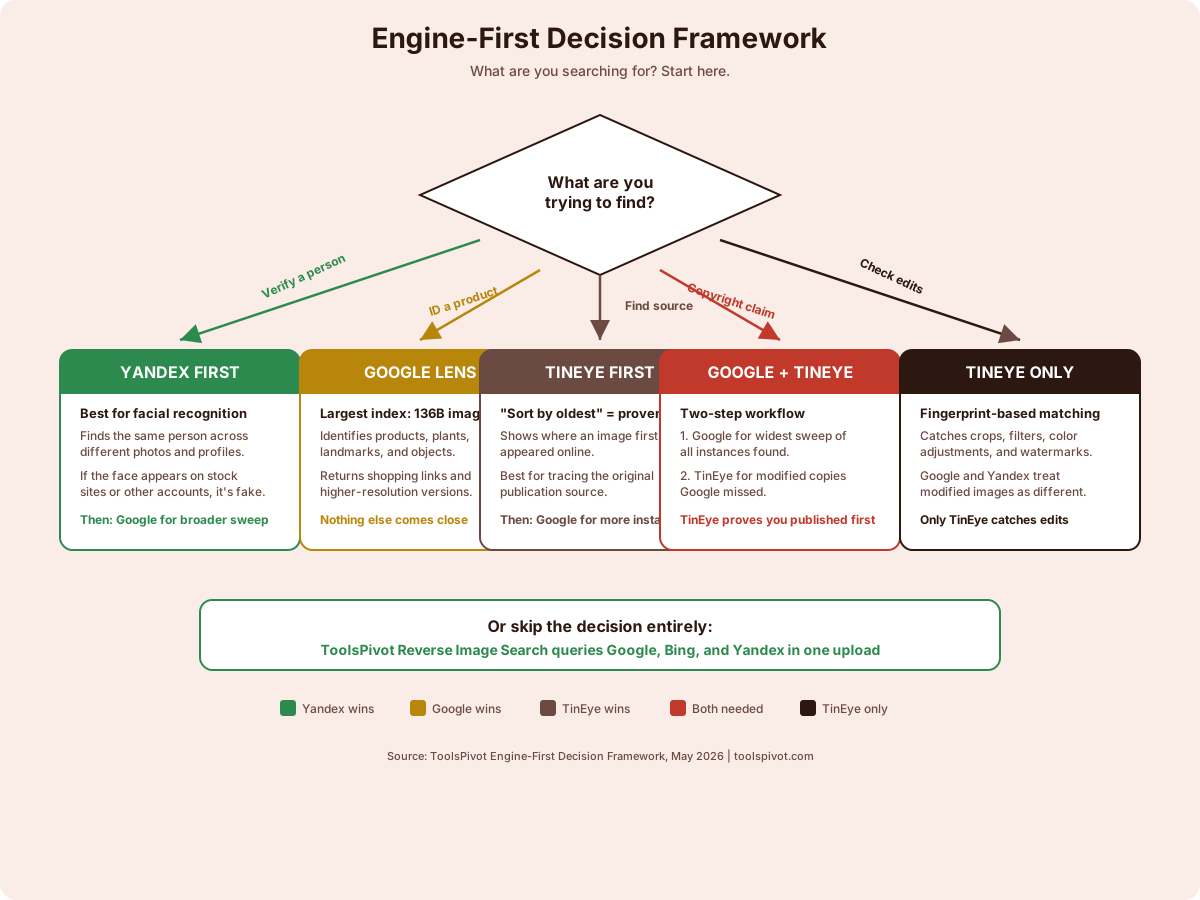
“I need to verify if this person is real.” → Open Yandex first. Its facial recognition will find other photos of the same face across different contexts.
If Yandex returns the face on stock photo sites or unrelated profiles, you’ve caught a fake. Run the accompanying text through a plagiarism checker too. Scammers copy bios as often as they steal photos.
“I need to find where my photo is being used without permission.” → Start with Google for the widest sweep, then run TinEye for modified copies Google missed. TinEye’s “sort by oldest” confirms you published first.
Check the domain of any site using your image. Sketchy domains are easier to get taken down.
“I need to identify a product, landmark, or object.” → Google Lens. Nothing else comes close for object recognition. It’ll name the product, find shopping links, and identify landmarks from vacation photos.
“I need to find the original source of an image.” → TinEye first, then Google. TinEye’s “sort by oldest” was built for exactly this. Google catches instances TinEye misses but can’t sort by publication date.
“I need to check if an image has been edited or manipulated.” → TinEye. Its fingerprint-based matching catches modifications (crops, filters, watermarks) that Google and Yandex treat as different images entirely.
Think of it this way. Choosing between these engines is like choosing between a metal detector, a bloodhound, and a satellite.
The metal detector (TinEye) finds the exact thing you buried. The bloodhound (Yandex) tracks a specific scent across any terrain. The satellite (Google) surveys everything from above.
Or save yourself the trouble. Upload your image to ToolsPivot’s Reverse Image Search and search all three major engines in one pass. One upload, three engines, zero guessing.
FAQs
Which reverse image search engine is the most accurate?
It depends on what you’re searching for. Google Lens is most accurate for products, landmarks, and objects because it has the largest index at 136 billion images. Yandex is most accurate for matching faces across different photos. TinEye is most accurate for finding exact copies and modified versions of a specific image. No single engine is “most accurate” across all use cases.
Is Yandex safe to use for reverse image search?
For casual searches, yes. Yandex’s reverse image search is free and doesn’t require an account. The privacy concern is jurisdictional: Yandex operates under Russian data laws, which differ from Western standards. For everyday catfish checks or curiosity searches, the risk is minimal. For sensitive corporate or legal investigations, consider stripping metadata from images before uploading and using TinEye instead.
Can reverse image search find a person from a photo?
Yes, but not all engines do this equally. Yandex uses aggressive facial recognition and can find other photos of the same person across social media and public websites. Google intentionally limits face matching and will mostly return visually similar images rather than identifying the same individual. TinEye only finds exact copies of the same photo, not different photos of the same person.
Is TinEye still worth using in 2026?
For its specialty, absolutely. TinEye remains the best tool for finding where an image first appeared online and detecting modified copies. Its “sort by oldest” feature is indispensable for copyright claims. For general image searching, however, Google and Yandex return broader results. TinEye works best as a complement to Google, not a replacement.
What’s the best free reverse image search tool?
All three engines covered here (Google Lens, Yandex, and TinEye) are free for individual searches. For the most thorough results, use a multi-engine tool like ToolsPivot’s Reverse Image Search, which queries Google, Bing, and Yandex simultaneously from a single upload. This catches results that any single engine misses.