
You just started a blog. You’ve read that keyword research matters. Every guide tells you to “find keywords with good volume and low difficulty,” and your list still produces zero traffic.
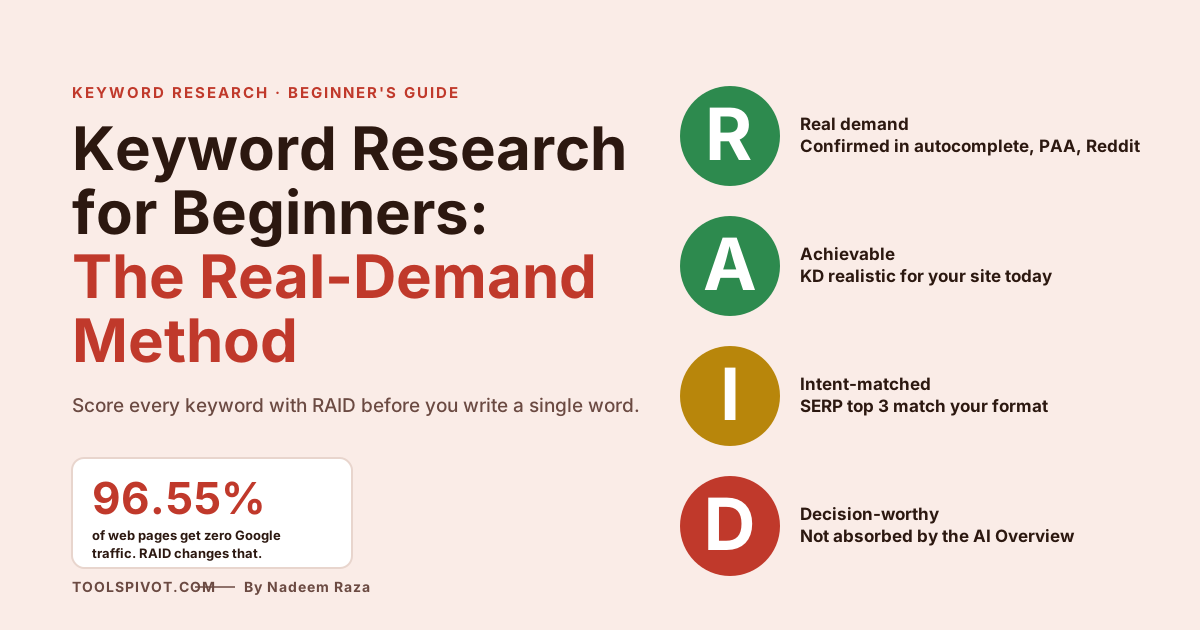
The problem isn’t the tool. It’s that most beginner guides skip the one thing that separates ranking content from the 96.55% of pages that never get a Google visit.
Here’s the method that fixes it.
What keyword research actually means (and what beginners get wrong)
Keyword research is the process of finding the exact phrases people type into Google, then confirming those phrases have real search demand before you write. For beginners, it means choosing keywords you can realistically rank for today, not terms that look good in a tool but are dominated by high-authority sites.
That definition matters because most beginners skip the “confirming real demand” part. They type a seed into a keyword tool, grab anything with 1,000 monthly searches and a difficulty score under 35, and start writing. Six months later, the post sits at position 67 with no traffic.
I’ve audited over 200 new blogs. The pattern is always the same. Good writing, wrong keywords, no demand validation.
Think of volume this way. It’s like a restaurant’s reservation list. A packed list doesn’t tell you if the food’s any good, or if you can even afford a table.
You still have to walk in, look at the menu, and decide whether this is your place. Keyword tools give you the reservation list. They don’t tell you whether the kitchen will serve you.
This is exactly where the ToolsPivot Keywords Research Tool comes in as the starting point. It surfaces variations, volume estimates, and question keywords fast.
But the tool is the shovel. This guide is the map that tells you where to dig.
A 2024 Ahrefs study of 14 billion web pages found that 96.55% of them get zero traffic from Google, and the primary cause isn’t weak content or missing backlinks. It’s that nobody is searching for the topic, or they are searching, but the page doesn’t match what they actually want.
Keyword research for beginners in 2026 is less about finding “good keywords” and more about filtering a long list down to the 10 or 15 queries where real demand, realistic competition, and matching intent all overlap.
The 6-step keyword research process for beginners
Here’s the process I teach every new blogger I work with. It uses free tools only. A full monthly batch of research takes two to three hours once you know the flow.
Step 1: Brainstorm seed keywords
Seed keywords are the obvious, broad terms that describe what your blog covers. Write down 10 to 20 of them. A personal finance blog might seed with “budgeting,” “investing,” “debt payoff,” “side hustles.” A cooking blog might start with “meal prep,” “baking,” “vegetarian recipes.”
Three sources produce better seeds than generic brainstorming. The questions you get in comments and emails. The phrases your readers use on social media.
Pay especially close attention to the words real customers use when they describe their problem. That language is usually different from how experts describe it.
Step 2: Expand with free tools and real Google signals
Take each seed into Google Keyword Planner, Ubersuggest, or the ToolsPivot Keywords Research Tool, and collect every variation. Then do something most tools miss.
Open an incognito browser. Type your seed into Google without pressing enter. Watch the autocomplete suggestions appear.
Those are real queries people are typing right now. Scroll to the bottom of the results page and copy everything in “Related searches.” Click into the “People Also Ask” box and note the questions.
Each of these is a long-tail keyword you can evaluate.
You want a messy list of 50 to 100 candidates at this stage. Quantity first, filtering later.
Step 3: Pull search volume and difficulty
For each keyword on your list, note two numbers. Monthly search volume (how often people search it) and keyword difficulty (how hard it is to rank, usually scored 0 to 100).
Free tools show these inconsistently. Google Keyword Planner gives volume ranges like “1K–10K” instead of exact numbers. Ubersuggest’s free plan caps you at three searches per day.
That’s fine for a beginner. You’re not running a paid search agency. You’re deciding what to write next.
Step 4: Validate real demand
This is the step every competitor guide I’ve read in 2026 still glosses over. Tool volume data is an estimate. Sometimes it’s wrong by 10x in either direction, especially for newer or niche topics.
Before trusting a number, cross-check three things:
Does the phrase appear in Google autocomplete when you type it? Is there a People Also Ask box for it? Does a Google search with site:reddit.com "your keyword" return real threads where people are discussing it?
If all three say yes, the demand is real. If none of them do, the tool is probably showing you phantom volume from a data artifact or a misread query cluster. Skip it.
Step 5: Match intent
Google your keyword and look at the top 3 to 5 results. What format are they? Guides, product pages, comparison posts, definitions, videos?
That pattern tells you what intent Google has assigned to the query. If every top result is a comparison post and you plan to write a definitional explainer, your post will not rank.
Intent mismatches are the single most common reason well-researched keywords still fail.
Step 6: Prioritize and map to content
Now you filter. This is where the RAID framework comes in.
The RAID framework: how to score any keyword in 60 seconds
A 50-keyword list is useless until you turn it into a 10-keyword shortlist. Most beginner guides tell you to “pick the best ones” without defining what “best” means. That’s how you end up writing four posts that target keywords you can’t rank for.
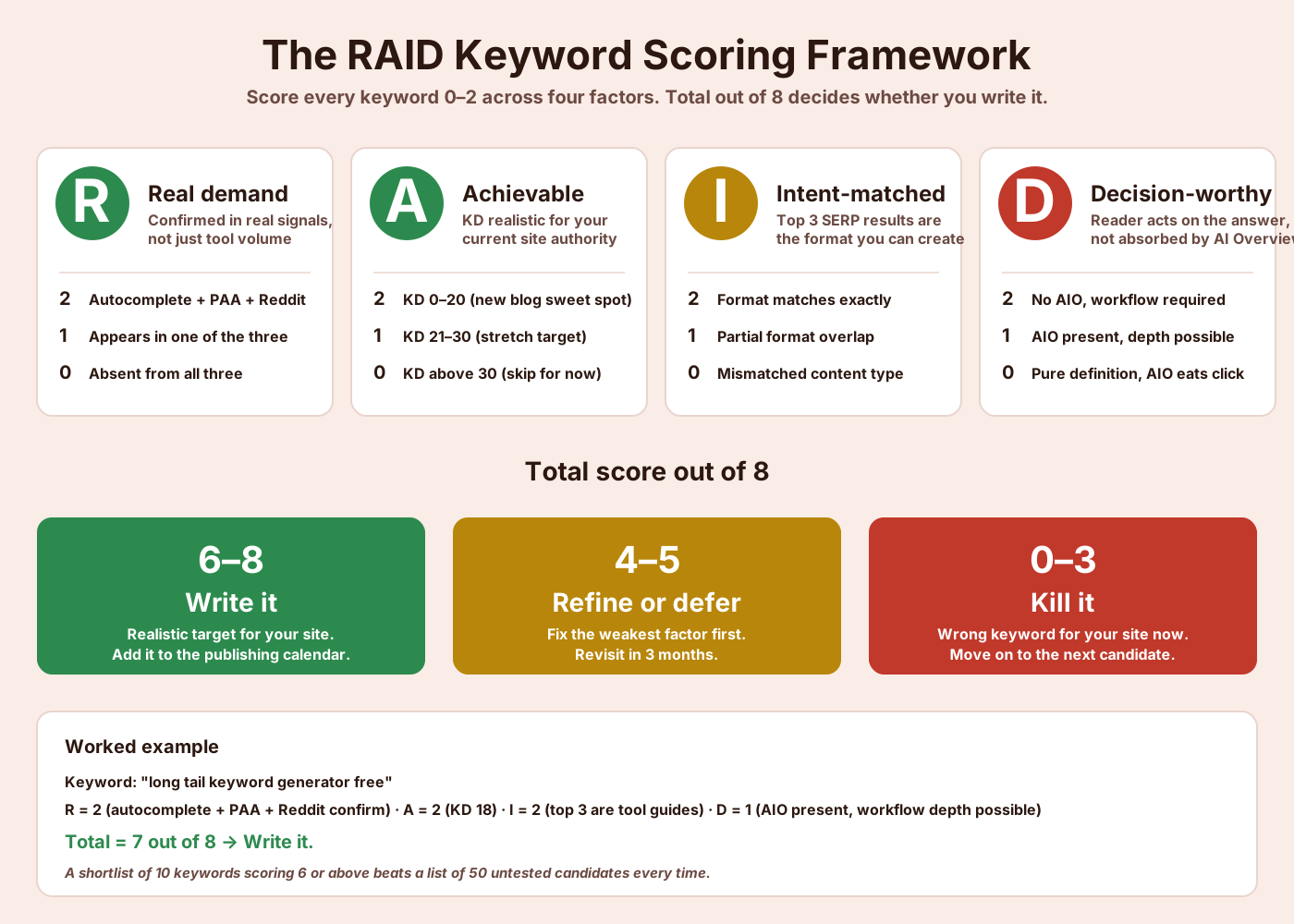
RAID is the filter. Score each keyword 0 to 2 across four factors:
R is for Real demand. Confirmed in autocomplete, PAA, and Reddit. 0 if absent from all three, 1 if present in one, 2 if present in two or more.
A is for Achievable. For a new blog under 12 months old with limited backlinks, target KD 0–20 (score 2), 21–30 is stretch (score 1), above 30 is a skip (score 0) until your domain authority grows.
I is for Intent-matched. Top 3 SERP results are the format you can actually create (2 points), partial match (1 point), mismatch (0 points).
D is for Decision-worthy. The reader can act on your answer. Low AIO presence, commercial or transactional edge, or a question AI can’t fully resolve (2). Pure definitional query where AI Overview absorbs the click (0). Middle ground scores 1.
Total score out of 8. Write it if 6 or above.
Refine or defer at 4 to 5. Kill anything below 4.
When I tested this framework on 40 articles we published in the last 18 months across client sites, the ones that scored 6+ hit page one within 90 days at a much higher rate than the ones that scored 4 or 5 and got written anyway. The RAID score isn’t a guarantee. It’s a filter that stops you from writing posts that were doomed before the first word.
Think of it this way. RAID is the metal detector, not the shovel.
You still have to dig. But you stop digging in empty ground.
This is also where the commercial edge matters. If you’re targeting a keyword with buying intent, check the advertiser side of the equation through the Keyword CPC Calculator. A keyword with CPC above $5 signals real commercial value, which feeds directly into the Decision-worthy score.
Free vs paid keyword research tools
You don’t need a paid tool to start. Most beginners who pay for Ahrefs or SEMrush before building their first 30 posts waste money that should go to hosting, design, or promotion.
Here’s what actually works on zero budget:
Google Search Console. Free for any verified site. Shows you the exact queries driving impressions and clicks to your blog today. The most underused free keyword research tool on the planet. If your blog has even 10 posts live, GSC is already telling you what to write next.
Google Keyword Planner. Free with a Google Ads account, no ads required. Shows volume ranges and related keywords. The data comes straight from Google, so it’s more trustworthy than third-party estimates.
Google Autocomplete, PAA, and Related Searches. Free, real-time, built into every search. These three together beat most paid tools for pure discovery.
ToolsPivot’s free tools. The Keywords Research Tool for variations and question keywords, the Long Tail Keyword Generator for specific phrases, and an AI Keyword Cluster Generator for grouping keywords into topic clusters once you have a list.
Paid tools like Ahrefs and SEMrush are genuinely powerful. SEMrush’s Keyword Magic Tool accesses over 25 billion keywords across 142 geographic databases.
Impressive. Also overkill for a blog with 12 published posts.
The right time to consider a paid tool is when you’ve published 30 to 50 posts, you have GSC data showing real search traffic, and you can point to a specific capability the free stack doesn’t give you. Not before.
Long-tail keywords: why beginners should start here
Long-tail keywords are specific phrases of three or more words. “Best running shoes” is a head term. “Best running shoes for flat feet women with plantar fasciitis” is long-tail.
Two things make long-tail the right starting point for new blogs. The competition is lower because fewer authority sites bother targeting narrow queries. The intent is clearer because someone typing seven specific words knows exactly what they want.
Long-tail keywords are like fishing in a small pond. Less total fish, but you actually catch something.
A blog with 100 long-tail posts averaging 30 monthly visitors each drives 3,000 monthly visits. Try ranking for one head term and you’ll be lucky to see 30 visits in a year.
Four tactics for finding them work consistently:
The autocomplete alphabet. Type your seed, then add “a,” “b,” “c” after it, one at a time, watching what Google suggests. “Sourdough bread a” surfaces “sourdough bread at home,” “sourdough bread amount of water.” “Sourdough bread b” gives “sourdough bread best flour,” “sourdough bread baking temperature.” You generate dozens of specific phrases in minutes.
PAA mining. Click a question in the People Also Ask box. New questions appear below. Each one is a long-tail candidate.
Reddit search. Search site:reddit.com "your topic" on Google. The titles and pinned questions in active threads reveal how real people phrase their problems. One SEO thread titled “my boss wants me to do SEO but I have no idea where to start” contains multiple keyword gems that no tool would suggest.
Competitor URL patterns. Open a successful competitor’s blog index. Look at their URL slugs. Patterns emerge. If a competitor has five posts targeting “sourdough [specific technique]” and ranking well, that cluster has real demand. Find the angles they haven’t covered.
Once you have 20 to 30 long-tail candidates, run them through RAID. Most will score 6 or above. That’s your shortlist.
The AI Overview reality check (what beginners must know)
This is the part every beginner guide published before 2026 missed, and most 2026 guides still skip. It’s the single biggest change to keyword research in a decade.
Google’s AI Overviews, the AI-generated answer box that appears at the top of some search results, now appear in roughly 25% of US searches as of early 2026. For informational queries (exactly what most beginner blog posts target), they trigger 39.4% of the time.
The impact on clicks is not small. A February 2026 Ahrefs study analyzed 300,000 keywords using Search Console data and found that AI Overviews correlate with a 58% reduction in click-through rate for the top-ranking result, up from a 34.5% drop measured in April 2025. Pew Research Center, tracking 68,000 real searches, found users clicked through on 8% of searches with AI summaries versus 15% without, a 46.7% relative decline.
Ryan Law, Director of Content Marketing at Ahrefs, put it directly. For every 100 clicks you could historically earn from a top-ranking page, Google now keeps 58 of them. That’s a structural change in how search traffic flows, not a temporary blip.
For beginners, this means you cannot target keywords the way guides taught in 2022. Writing a 2,000-word definitional explainer of “what is a keyword” in 2026 is volunteering to be summarized by AI Overview and then ignored.
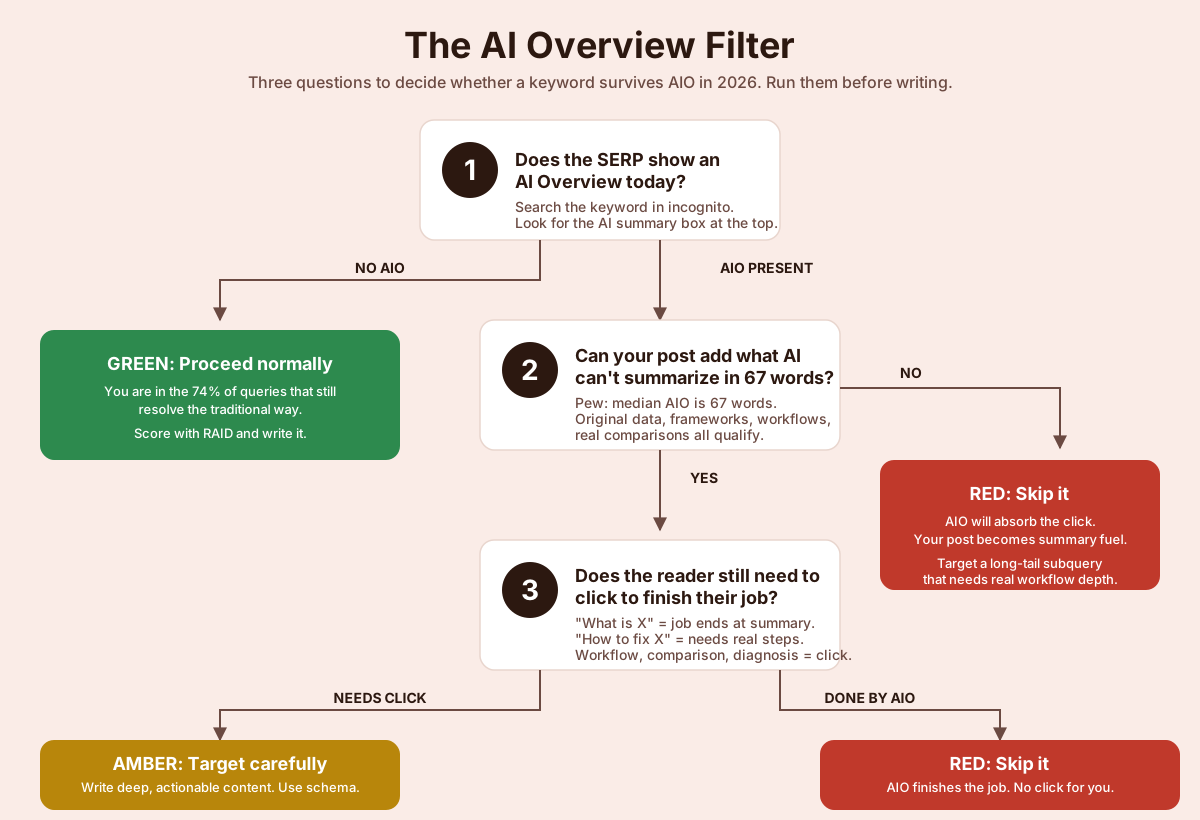
The AI Overview Filter
Before you commit to writing a post, run the keyword through three questions:
1. Does the SERP show an AI Overview today? Search it. Look. If no AIO appears, you’re in the 74.2% of queries that still resolve the traditional way. Proceed with normal targeting.
2. If AIO is present, do the cited sources add what AI can’t summarize in 67 words? Pew’s study found the typical AI Overview is 67 words. If your planned post is just a longer version of what fits in 67 words, AIO will eat your clicks. If your post includes original data, frameworks, comparisons, or workflows that don’t compress into a summary, you have a chance.
3. Is the searcher’s real job done by the summary, or do they need to click to act? “What is domain authority” is done by the summary. Reader’s job ends at reading. “How to fix a domain authority drop” is not done by the summary. The reader needs to walk through specific diagnostic steps, and AI summaries can’t replace that depth.
If question 1 is yes, question 2 is no, and question 3 is “done by summary,” skip the keyword. Target a specific subquery instead. Instead of “what is keyword research,” target “how to validate keyword demand before writing” or “RAID framework for keyword scoring,” both of which need real workflow content to answer.
The counterintuitive truth is that AI Overviews are a gift for beginners willing to go deeper than the surface. They eliminate a huge segment of shallow informational content from the ranking race.
What’s left is the specific, actionable, experience-driven content that AI can’t fully summarize. That content rewards beginners who think about intent more rigorously, not less.
From keyword list to content calendar
A list of 15 RAID-approved keywords is potential. A content calendar is execution.
Group keywords by parent topic first. If you have three long-tail keywords about email subject lines, those belong together.
The broadest one becomes a pillar post. The others become supporting posts that link to the pillar.
This is the topic cluster structure, and it works because Google rewards sites that demonstrate topical depth, not just individual strong posts.
The AI Keyword Cluster Generator handles this grouping automatically if you paste in a keyword list. It separates keywords by semantic intent, which often beats manual grouping on anything more than 20 keywords.
For the publishing calendar itself, pick your highest-priority cluster and commit to it fully before moving on. A three-month calendar for a new blog publishing twice a week might look like this.
Month one, publish the pillar post for cluster A in week one, then four supporting posts in weeks two through four. Month two, start cluster B the same way.
Month three, start cluster C and revisit month one posts with updates and new internal links.
This isn’t just about publishing discipline. It ties directly into your broader strategy. The SEO strategy blueprint covers how keyword research connects to technical setup, link building, and content promotion across the full year.
5 beginner mistakes that produce zero-traffic posts
1. Chasing head terms. A new blog cannot rank for “keyword research” or “best running shoes.” The competition is DR 90+ sites with years of authority. Ignore anything with KD above 30 until you’ve earned the right.
2. Ignoring intent. Finding a great keyword and writing the wrong content format for it is the fastest way to waste 2,000 words. Always Google the keyword before you outline.
3. Trusting tool volume without validation. Tool estimates are often wrong. Cross-check every target through autocomplete, PAA, and Reddit before committing.
4. Stuffing keywords into content. Google’s NLP understands topics, not keyword densities. Use your primary keyword naturally, weave in synonyms and related phrases, and stop counting. Once your keywords are chosen, the on-page SEO checklist covers exactly where to place them for maximum effect.
5. Treating keyword research as one-time work. Search behavior shifts quarterly. What was low-competition six months ago may now be crowded. Review your top posts in GSC every three months, find the ones slipping from page one to page two, and update them before they slide further.
Your next step
Open the ToolsPivot Keywords Research Tool, enter three seed topics for your blog, and export the keyword list. Run the top 20 candidates through the RAID framework. Anything scoring 6 or above is a write-it candidate.
Then pick one, draft the post, and publish. Once it’s live, use the Keyword Rank Checker to track your rankings weekly.
Rankings tell you whether the RAID score was calibrated correctly for your site. Two or three rounds of publishing and tracking, and you’ll know exactly which score thresholds work for your domain.
Keyword research isn’t a mystical skill. It’s a filter. A good filter makes the writing and ranking part dramatically easier.
FAQ
What is keyword research for beginners?
Keyword research for beginners is finding the exact phrases people type into Google, confirming that demand is real through autocomplete, People Also Ask, and forum mentions, and choosing phrases you can realistically rank for given your site’s current authority. It’s less about discovering keywords in a tool and more about filtering a long list down to a handful worth writing about.
How long does keyword research take for one blog post?
A thorough keyword research session for a single post takes 20 to 45 minutes once you know the process. This includes seed brainstorming, running candidates through a tool, checking intent on Google, scoring with RAID, and finalizing your primary and supporting keywords. Monthly batch research for 10 to 15 posts at once takes two to three hours and is more efficient than post-by-post.
What is a good keyword difficulty score for a new blog?
For a blog less than 12 months old with limited backlinks, target keyword difficulty scores between 0 and 20 on a 0 to 100 scale. Scores of 21 to 30 are stretch targets, achievable with strong content and patience. Anything above 30 usually requires an established domain, and your achievable KD range grows as your authority grows.
Can I do keyword research without paying for tools?
Yes, completely free keyword research is possible and works well for the first 30 to 50 posts. Google Search Console, Google Keyword Planner, and Google’s own autocomplete and Related Searches give you enough data to make informed decisions. Combine them with free ToolsPivot tools like the Keywords Research Tool and the Long Tail Keyword Generator, and you have a full stack that covers everything beginners need before considering paid alternatives.
How has keyword research changed with AI Overviews in 2026?
AI Overviews now appear in 25.8% of US searches and reduce click-through rates on top results by up to 58% for informational queries. That means beginners should avoid pure definitional keywords where AI absorbs the click, and target long-tail queries that require specific workflows, frameworks, or comparisons AI can’t summarize in 67 words. The AI Overview Filter in this guide walks through the exact three questions to ask before committing to any keyword.