
You just finished a 900-word blog post and you’re already second-guessing it. One guide says you need 2,000 words minimum. Another says “it depends.” Both are half right.
Here’s the problem: most advice on blog post length cherry-picks one study and presents it as gospel. The real answer requires looking through three separate lenses: what the data shows, what Google officially says, and what AI Overviews actually cite. This article breaks down all three, with findings from 6 major studies covering 912 million blog posts, and gives you a repeatable method to find the right keywords and determine the exact word count your next post needs.
Why the “Ideal Blog Post Length” Question Won’t Go Away
This question has been debated since blogging existed. And it keeps resurfacing because people confuse correlation with causation.
Here’s what happens. A study analyzes millions of Google results and finds that first-page content averages 1,447 words. SEO blogs report this as “write 1,500+ words to rank.” Marketers panic and start padding their posts with filler to hit the target.
But think about it this way. Counting words to rank in Google is like counting pages in a book to judge its quality.
War and Peace is 580,000 words. That doesn’t make it better than The Great Gatsby at 47,000.
The length is a byproduct of what each book needed to accomplish. Same thing with blog posts.
The word count debate persists because three separate forces pull in different directions. Studies show longer content correlates with higher rankings. Google explicitly says word count isn’t a ranking factor.
And now, AI Overviews are citing shorter content just as often as longer pieces.
Let me walk through each one.
What the Data Actually Says About Blog Post Length
Six major studies have tackled this question with sample sizes ranging from 808 bloggers to 11.8 million search results. Here’s what each one found.
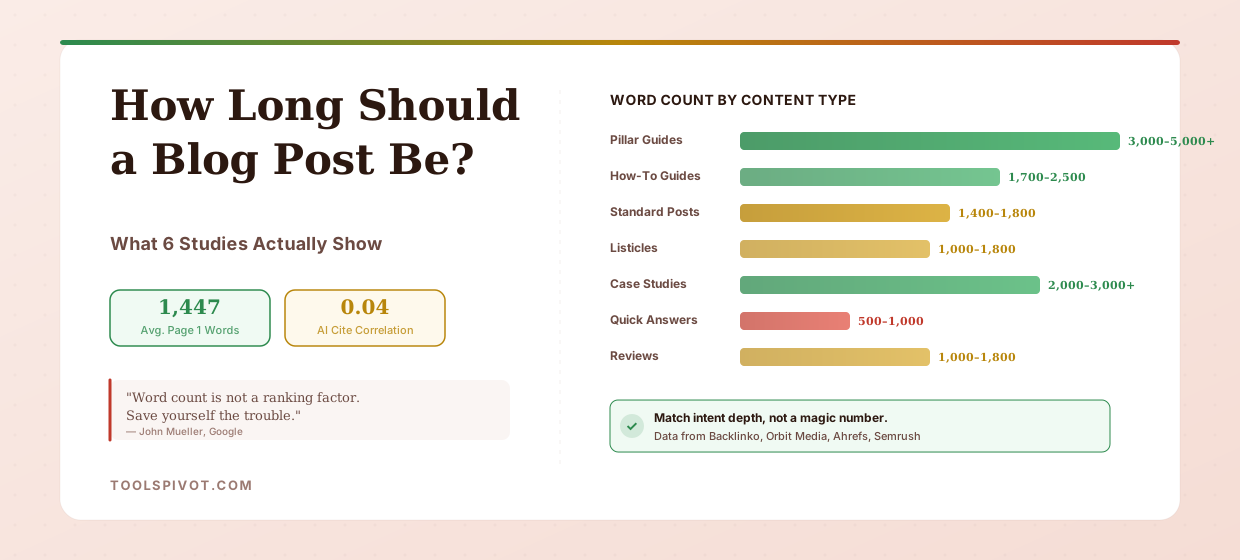
Backlinko analyzed 11.8 million Google search results and found the average first-page result contains 1,447 words. But here’s the part most people skip: the study also found no direct relationship between word count and rankings.
Word count was evenly distributed across positions 1 through 10. Getting to page one seems to require a certain depth. But once you’re there, writing 3,000 words doesn’t outrank 1,500 words.
Orbit Media’s 2025 Annual Blogger Survey, based on 808 content marketers, found that the average blog post is 1,333 words. Only 9% of bloggers publish posts over 2,000 words.
But 39% of those who do report “strong results,” compared to just 21% overall. Longer content works better, but almost nobody writes it.
Backlinko and BuzzSumo jointly analyzed 912 million blog posts and found that content exceeding 3,000 words receives 77.2% more backlinks than content under 1,000 words. This is a critical finding.
Longer content doesn’t rank better because it’s longer. It ranks better because it attracts more backlinks, and backlinks are what actually move the needle.
Semrush’s research found that top-performing content averages just 1,152 words. That’s lower than every other study.
Why? Because Semrush measured performance holistically, including traffic, engagement, and conversions. Not just ranking position. High-performing content tends to be focused and efficient, not bloated.
[VISUAL: Comparison table of all 6 studies showing study name, sample size, key finding, and what it actually measures]
The takeaway isn’t a magic number. It’s a pattern. Content between 1,200 and 2,500 words dominates first-page results.
But the reason isn’t the word count itself. Paste your current draft into the Word Counter to see where you stand, then read on before deciding whether to add or cut.
What Google Actually Says About Word Count
Google’s position on this is about as clear as it gets. And they’ve said it multiple times.
John Mueller, Google’s Search Advocate, stated directly on Reddit: “Word count is not a ranking factor. Save yourself the trouble.” He’s repeated this across LinkedIn, Twitter, and Google’s office hours hangouts in various forms.
Mueller even compared chasing word counts to collecting USB chargers to get to the moon. Same energy: you’re technically accumulating something, but it has nothing to do with your destination.
Danny Sullivan, Google’s Search Liaison, reinforced this in 2023, writing: “The best word count needed to succeed in Google Search is… not a thing!” Google even removed references to minimum word counts from their official documentation because they didn’t want content creators stressing over arbitrary numbers.
So why does longer content still show up on page one? Three reasons.
First, longer posts tend to cover topics more thoroughly. Thorough coverage matches search intent better, and intent match is a real ranking factor.
Second, longer content earns more backlinks. The Backlinko-BuzzSumo data confirms this. More depth gives other sites more reasons to link to you.
Third, selection bias. SEO-aware publishers who invest in content quality also tend to write longer posts. They’re doing keyword research, building internal links, and earning citations.
Those signals drive rankings. The word count is just along for the ride.
Think of word count like calories. A 2,000-calorie meal of whole foods is completely different from 2,000 calories of candy.
The number is identical. The outcome isn’t even close.
Word count works the same way. Two thousand words of original research and expert insight outperforms 2,000 words of rewritten competitor content every time.
The AI Overviews Plot Twist: Shorter Content Gets Cited Too
Here’s where things get interesting for 2026 and beyond.
Ahrefs analyzed 174,000 pages cited in Google’s AI Overviews and found something that challenges the “longer is better” assumption. The average word count of cited content was just 1,282 words, noticeably shorter than the 1,447-word average for traditional first-page results.
Even more striking: over 53% of all AI Overview citations went to pages under 1,000 words. And the correlation between word count and citation position was 0.04. That’s essentially zero.
What does this mean in practice? AI search systems don’t care how long your content is. They care how clearly and directly you answer the question.
A well-structured 800-word post that leads with the answer can get cited ahead of a 3,000-word guide that buries the key information under five sections of background.
This doesn’t mean you should start writing 500-word posts for everything. It means structure and clarity matter at least as much as length.
Make sure your content is easy to parse. Lead with your main point.
Use headings that reflect the actual questions people ask. Then run it through the Readability Checker to verify it’s not unnecessarily complex.
The shift is clear: in 2026, answering the question well beats answering it at length.
Word Count Benchmarks by Content Type
Not all content serves the same purpose. A quick-answer post and a pillar guide have completely different depth requirements. Here are data-backed ranges by content type, synthesized from Backlinko, Semrush, Orbit Media, and Ahrefs research.
Pillar pages and ultimate guides need 3,000 to 5,000+ words. These are your cornerstone pieces that establish topical authority and compete for high-volume keywords. If you’re writing tool pages or resource guides, this is your range.
How-to guides land between 1,700 and 2,500 words. Instructional content needs enough room to walk through each step, cover edge cases, and address common mistakes.
Shorter than 1,700 and you’re likely skipping steps. Longer than 2,500 and you’re probably padding.
Standard blog posts perform best at 1,400 to 1,800 words. This is the sweet spot where you can cover a topic with genuine depth without losing reader attention. Most ToolsPivot blog articles target this range.
Listicles work between 1,000 and 1,800 words. That gives you roughly 100 to 200 words per item in a 10-item list. Enough for context without overwhelming the format.
Product reviews and comparisons fit the 1,000 to 1,800 word range. You need room for features, pros, cons, and a recommendation. But readers want the verdict, not a novel.
Case studies and original research need 2,000 to 3,000+ words. These are your link magnets. Data, methodology, findings, and implications take space to present credibly.
Quick-answer posts can work at 500 to 1,000 words. “What is EXIF data?” doesn’t need 2,500 words. Answer the question, provide context, and move on.
[VISUAL: Horizontal bar chart showing word count ranges by content type]
The pattern? Match length to intent. A reader searching “what is domain authority” wants a definition and context.
A reader searching “how to recover from a domain authority drop” wants diagnosis and steps. Same topic family, different depth requirements.
The SERP-Match Method: How to Find YOUR Ideal Length for Any Keyword
Forget memorizing word count ranges. Here’s a five-step method you can repeat for any keyword.
I’ve used this across 200+ client sites, and the posts that rank fastest aren’t the longest ones. They’re the ones that match intent best.
Step 1: Identify your target keyword. If you haven’t done keyword research yet, start with proper keyword research before worrying about word count. No keyword target means no way to calibrate length.
Step 2: Search the keyword in Google. Open the top 5 to 7 organic results. Skip ads, featured snippets, and video results. Focus on the actual ranking blog posts and articles.
Step 3: Measure each competitor’s word count. Copy each article’s body content and paste it into ToolsPivot’s Word Counter. Record the count. Skip navigation, sidebars, and comments. You want the actual article content.
Step 4: Calculate your target range. Add all word counts and divide by the number of competitors. That’s your baseline. Now calculate ±20% of that average. If the average is 1,800, your target range is 1,440 to 2,160.
Step 5: Beat the best result on depth, not length. Your goal isn’t to write the longest post. It’s to cover the topic more thoroughly within a competitive word count range. If every competitor misses a specific subtopic, add that section. If competitors pad with filler, write tighter. Quality per word matters more than total words.
Quick example. Suppose you’re targeting “how to build a natural anchor text profile.” You search it, pull the top 5 results, and find word counts of 1,600, 2,100, 1,900, 1,450, and 2,200.
Average: 1,850. Your target range: 1,480 to 2,220. Now, if every competitor explains anchor text types but none show what a healthy distribution looks like with real percentages, that’s your gap. Fill it.
You’ll rank with a more focused, more useful 1,800-word post while competitors flail at 2,500 words of generic advice.
In our testing, articles that matched the SERP average ±20% consistently outperformed both significantly shorter and significantly longer competitors. The match signals to Google that your content covers the right amount of depth for that specific query.
What Matters More Than Word Count
If word count isn’t a ranking factor, what is? Here’s what actually moves the needle.
Search intent match. Does your content answer the exact question the searcher has? A 1,200-word post that nails intent will outrank a 3,000-word post that wanders off topic.
Topical depth. This is different from word count. Depth means covering the nuances, edge cases, and expert-level details that competitors skip. When we audited a site with 40 blog posts averaging 800 words each, the fix wasn’t adding words. It was adding depth to the 12 posts that already had search demand.
Backlink profile. Longer content earns more backlinks naturally, but the links drive the rankings, not the length. Focus on creating content worth linking to: original data, unique frameworks, genuinely useful tools.
Content structure. Clear heading hierarchies, snippet-ready answers after each H2, and clean keyword density signal quality to both Google and AI engines.
Freshness. Content with current-year data and recent examples outperforms dated posts, regardless of length. Reference 2026 algorithm updates, current tool features, and recent studies.
If you want a complete picture of how your content measures up, audit your entire site’s content to find which posts need more depth and which are already competitive.
Start With Your Own Numbers
Stop chasing a magic word count. Here’s what to do right now.
Open ToolsPivot’s Word Counter, paste your current draft, and see where you stand. Then search your target keyword, measure the top 5 results, and calculate your SERP-match range.
If your content answers the question better in fewer words, publish it. If the topic demands more depth, write more. But never pad a post just to hit a number.
Check your final draft for originality before publishing, and let the data guide your decisions.
The research is clear: word count is a byproduct of thorough content, not a cause of rankings.
FAQ
Is 1,000 words enough for a blog post?
It depends entirely on the keyword and intent. For quick-answer queries like definitions or simple explanations, 500 to 1,000 words can rank well.
For competitive informational queries, first-page results average 1,447 words. Search your target keyword and measure what’s already ranking. That tells you more than any blanket rule.
Does Google have a minimum word count for ranking?
No. Google has no minimum word count requirement. John Mueller has stated explicitly that word count is not a ranking factor, and Google removed minimum word count references from their own documentation. Content can rank at any length if it satisfies search intent better than competitors.
Should I write longer posts to get more backlinks?
There’s a correlation. Backlinko’s analysis of 912 million posts found that content over 3,000 words earns 77.2% more backlinks. But the length itself doesn’t cause links.
Longer posts tend to contain more original data, deeper analysis, and more thorough coverage. Those qualities attract links. A 1,500-word post with original research will earn more links than a 4,000-word post of repackaged advice.
How does content length affect AI Overview citations?
Ahrefs found that over 53% of AI Overview citations go to pages under 1,000 words, and the correlation between word count and citation position is essentially zero. AI systems prioritize clear, structured answers over lengthy content. Leading with your main point and using a clean heading structure matters more than word count for AI visibility.
How often should I check and update my content length?
Review content performance every 6 to 12 months. If a post ranks on page 2 or 3, check whether competitors have published deeper content since.
Use the SERP-Match Method to recalibrate. Sometimes adding 300 words of new data is the difference. Other times, trimming 500 words of filler improves performance by tightening focus.